Tax point date adjustment for Polish e-Invoice compliance
Use the Tax Point Date Adjustment process to identify Payables invoices with a received date different from the KSeF number assignment date.
KSeF (Krajowy System e-Faktur) is Poland’s National e-Invoice System. It is a centralized electronic invoicing platform managed by the Ministry of Finance, through which businesses issue, validate, receive, and archive structured XML invoices for B2B and B2G transactions.
Each government-assigned KSeF invoice number includes the KSeF number assignment date. This date represents when the customer receives the invoice, regardless of when the invoice is imported into or entered manually in Payables.
Use Payables Invoice Received Date and Receivables Invoice Date to keep KSeF number assignment date tracking consistent with the government-assigned KSeF number received from the Interim Service Provider.
Initiate Tax Point Date Adjustment process to identify Payables invoices where the Invoice Received Date doesn't match the KSeF clearance date derived from the KSeF number stored at invoice header level.
This helps users to identify and correct inconsistencies before final JPK_V7M monthly tax reporting and reduces the effort for subsequent tax declaration rectifications.
After the Tax Point Date Adjustment output is generated, a supplemental section titled “Payables Invoices with Mismatching Invoice Received Date and KSeF Date” is printed, showing invoice number, supplier, site, amount, dates, and KSeF number. Duplicate invoice lines are consolidated so each invoice appears only once in the mismatch section. The supplemental section is appended after the standard Tax Point Date Adjustment output and does not change the core processing flow.
If the feature is not enabled, the supplemental mismatch section is not generated. Invoices are excluded from the mismatch report when required dates are missing or invalid, or when the KSeF reference cannot be parsed. Existing Tax Point Date Adjustment logic, calculations, and totals remain unchanged.
These are the business benefits:
- Provides consistent, compliant VAT reporting and recovery because tax point dates are aligned with official KSeF clearance.
- Lowers the risk of error and subsequent tax declaration rectifications.
- Strengthens audit trails.
Steps to enable and configure
Use the following steps to enable the feature:
- Navigate to Setup and Maintenance.
- Search and navigate to the setup task: Manage Standard Lookups.
- Search the Lookup Type: JE_FEATURE_OPTIN.
- Define the following Lookup Code under the above Lookup Type.
- Lookup Code: JE_PL_LIST_KSEF_MISMATCH_DATES
- Enabled: Checked
- Meaning: Enable optional Payables KSeF mismatch listing.
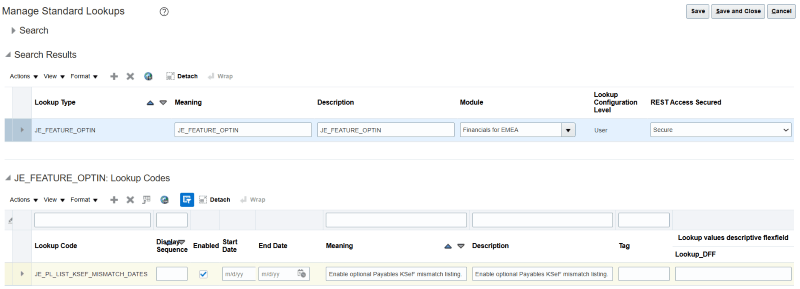
Lookup Code to enable the feature.
- Save the changes.
Tips and considerations
- If the opt-in lookup is disabled, the mismatch section is omitted from Tax Selection output. Enabling the lookup adds a diagnostic list only; it doesn't change any invoice or tax dates.
- When the lookup is disabled, users will not see mismatches, however the standard Tax Point Adjustment date-alignment logic still runs.
- Update the Invoice Received Date on all applicable Payables invoices using either import, manual entry, or Interim Service Provider to align with the KSeF Number Date before the Tax Point Date Adjustment process runs
- Only users with the privilege to manage lookup codes can change the opt-in setting. No additional role changes are required.
- The optional listing is informational only. It does not automatically correct Invoice Received Dates or Tax Point Dates. Customers are responsible for correcting these dates and, if necessary, re-running the Final Tax Selection before Tax Point Date adjustment.
- The existing Tax Point Date Adjustment process is unchanged. Extensions that depend on the original logic continue to function.
Access requirements
No new access requirements.