Data Extraction Migration Assistant
Data Extraction Using Read-Only Replicated Data offers a high-performance, reliable data extraction model that minimizes impact on Fusion Applications performance and supports near real-time data requirements. The Data Extraction Migration Assistant helps migration leads transition BICC outbound extracts and schedules to this RODS-based model through a guided experience.
Use the assistant to guide your migration through four stages:
- Discover the BICC extracts and schedules that you want to migrate.
- Assess mappings, configuration, and readiness before starting the migration.
- Control the proposed migration scope by reviewing and approving the selected jobs.
- Monitor migrated jobs, schedules, progress, and exceptions.
Discover current extract configuration
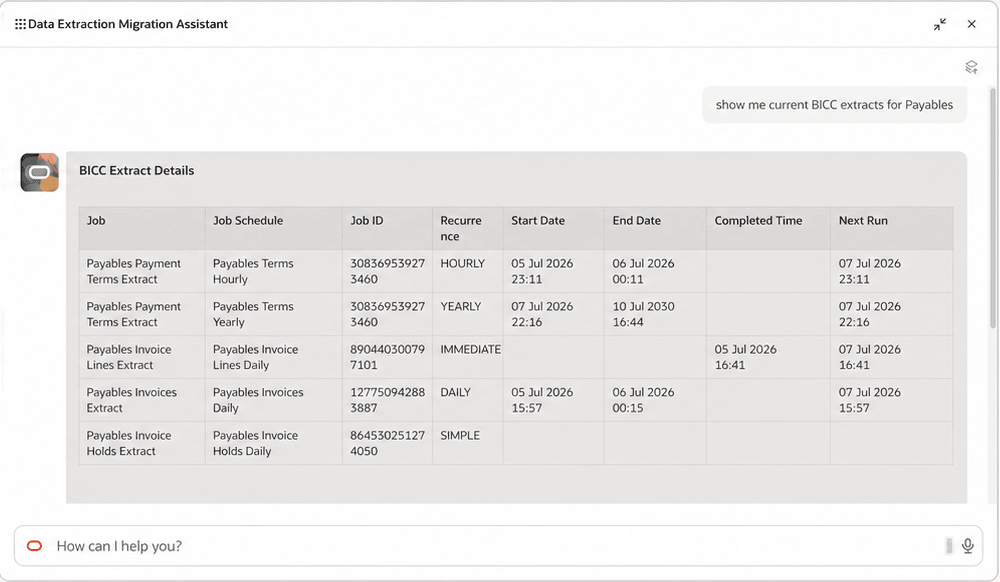
Start by understanding the extract landscape for the business area that you plan to migrate. The assistant summarizes the current BICC configuration, including job and schedule names, schedule frequency, completed time, next run, and associated PVO (Public View Object) details.
Example flow
A migration lead wants to review the current BICC extract configuration for Payables before assessing migration readiness.
Discover current BICC extracts using sample prompt "Show current BICC extracts for Payables".
Assess mappings and migration readiness
Before migrating, use the assistant to confirm that the selected extracts are suitable candidates. It helps you review how BICC extract data maps to the target Business Object and extract view, including the associated PVO, mapping coverage, and unmapped attributes.
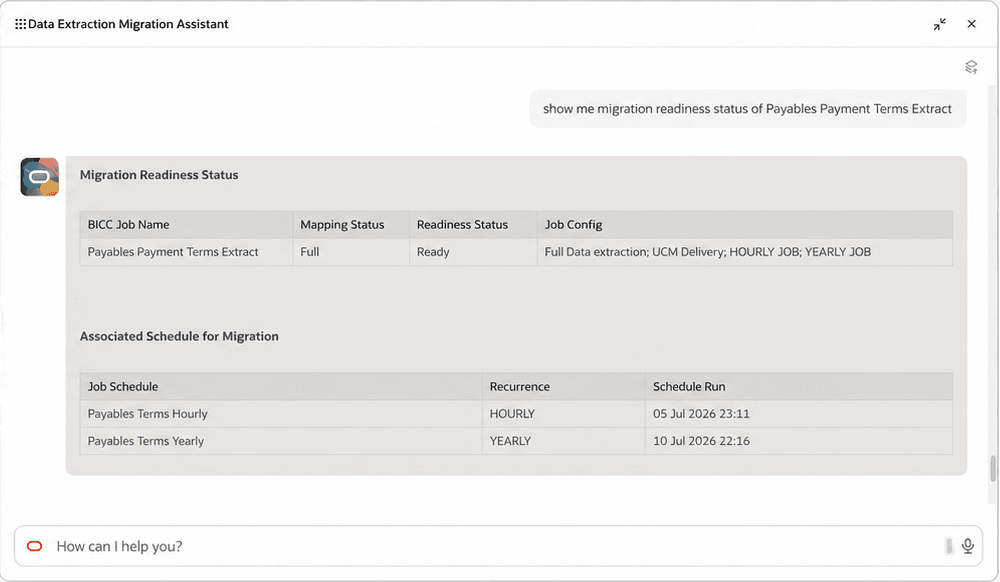
For each BICC job, the assistant displays mapping status, readiness, configuration, and associated schedules. Use this information to identify gaps and confirm that a job is ready before you add it to the migration scope.
Assess mappings and readiness using sample prompt "Show Business Object mappings for Payables".
To review a specific job’s readiness, a sample prompt could be "Show migration readiness status of [BICC job name]".
To identify migration candidates in a business area, a sample prompt could be "Show jobs that are ready for migration in Payables".
Control migration execution
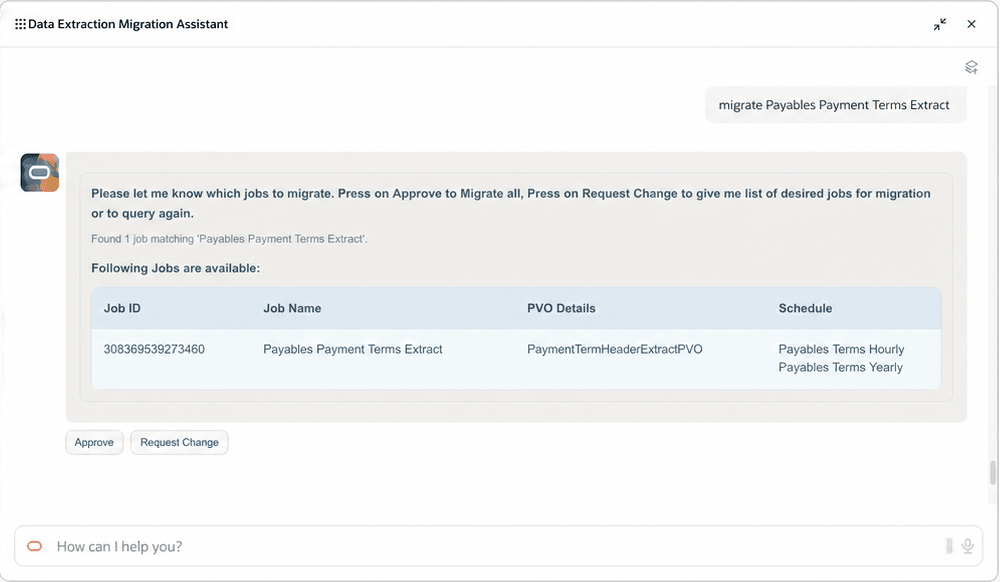
When you are ready to proceed, start the migration for a specific BICC job or selected job set. The assistant presents the proposed scope for review, so you can approve the selected jobs or change the scope before execution. After approval, it creates the new RODS-based extract and related job details, including the associated PVO, migrated schedule names, and tracking details for follow-up.
Migrate a selected BICC job using a sample prompt like "Migrate [BICC job name]".
Validate and monitor operations
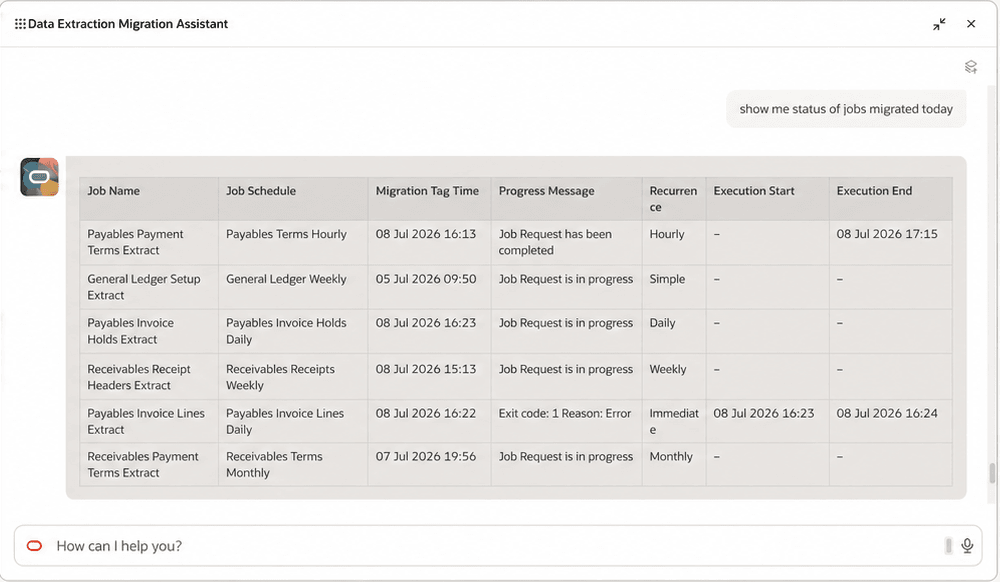
After migration, use the assistant to monitor the outcome and follow up on exceptions. Ask for the status of migrated jobs to view job schedules, migration time, progress messages, schedule frequency, execution times, completion status, and error reasons.
To review a migration after it has been initiated, you can use one of these sample prompts:
- "Show migration details for [BICC job name]".
- "Show me the status of jobs migrated today".
To investigate exceptions, enter a sample prompt such as "Show errors for jobs migrated today".
These are the business benefits
- Simplifies the transition to RODS-based data extraction with a guided migration experience.
- Reduces manual effort by bringing discovery, readiness, approval, and monitoring into one flow.
- Provides clear visibility into migration progress and exceptions.
Steps to enable and configure
- Role that includes the Data Extraction Migration related duties (noted in Access Requirements) must be assigned within the AI Agent Studio to the Data Extraction Migration Assistant.
- Refer to the Access Requirements section to set up the required security roles and privileges.
- After the required security roles and privileges are set up, users can access the Data Extraction Migration Assistant from the Explore area on the AI Agents page.
Tips and considerations
- Extensible attributes, for example, descriptive flexfields, aren't currently included in the predefined business views.
- Start requests with a clear action word, such as Show or Migrate.
- Submit only one request per message.
- Submit requests in English, as the assistant currently supports English only.
Key resources
- Data Extraction Using Read-Only Replicated Data
- Data Extraction Playbook
- How do I use AI Agent Studio?
- Explore AI Agents for Oracle Fusion Cloud Applications
Access requirements
Users can access this feature after their roles include the required access described below.
Roles and Privileges
- BIA Administrator Duty
- ESS Administrator Role
- Content Intelligence Users
Roles and Permission Groups
- FAI GenAI Agent Runtime Duty
- Data Extraction Services Viewer
- Data Extraction Tasks Management
- Data Extraction Services Integration Access