Cash Processing Agent for cash positioning and improved liquidity
Cash Processing Agent for cash positioning and improved liquidity helps cash managers review daily liquidity and manage bank transfers through an insights-driven conversational experience. It provides real-time visibility into cash positions, short-term projections, bank balances, balance movements, cash shortfalls, and anomalies. Users can review insights, ask natural language questions, drill into account and balance details, receive recommendations to cover funding gaps, and take follow-up actions.
In this release, the Cash Processing Agent extends cash operations support into bank account transfer recommendations, bank transfer generation, and transfer status monitoring. Cash managers can review cash shortfalls and receive recommended bank account transfers to cover funding gaps. After reviewing and accepting a recommendation, the agent automatically generates and submits the bank account transfer. The agent uses previous transfers from the same bank account to default the payment method, payment process profile, and business unit. If no previous transfer exists for the bank account, users provide the required payment attributes before the transfer is submitted. Users can also monitor the latest status of bank account transfers, review settlement progress, identify exceptions, and receive contextual guidance to resolve issues such as settlement failures or mismatches.
You can open the Cash Processing Agent from Navigator > ERP Agents > Cash Processing Agent. Within the Cash Processing Agent, users can access the assistant experiences available to them based on their assigned access, including the Cash Position.
Following are the key enhancements introduced in this release:
Bank account transfer recommendations
- Identify funding gaps and cash shortfalls that require movement of funds.
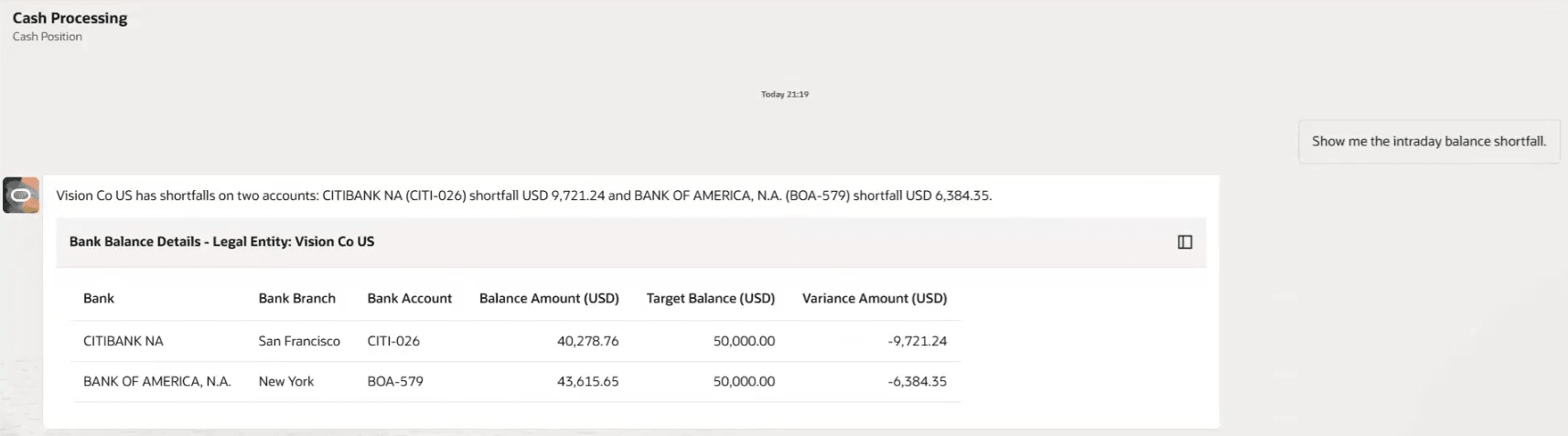
Shortfall accounts
- Recommend bank account transfers to cover the shortfall, including the relevant transfer context for user review.
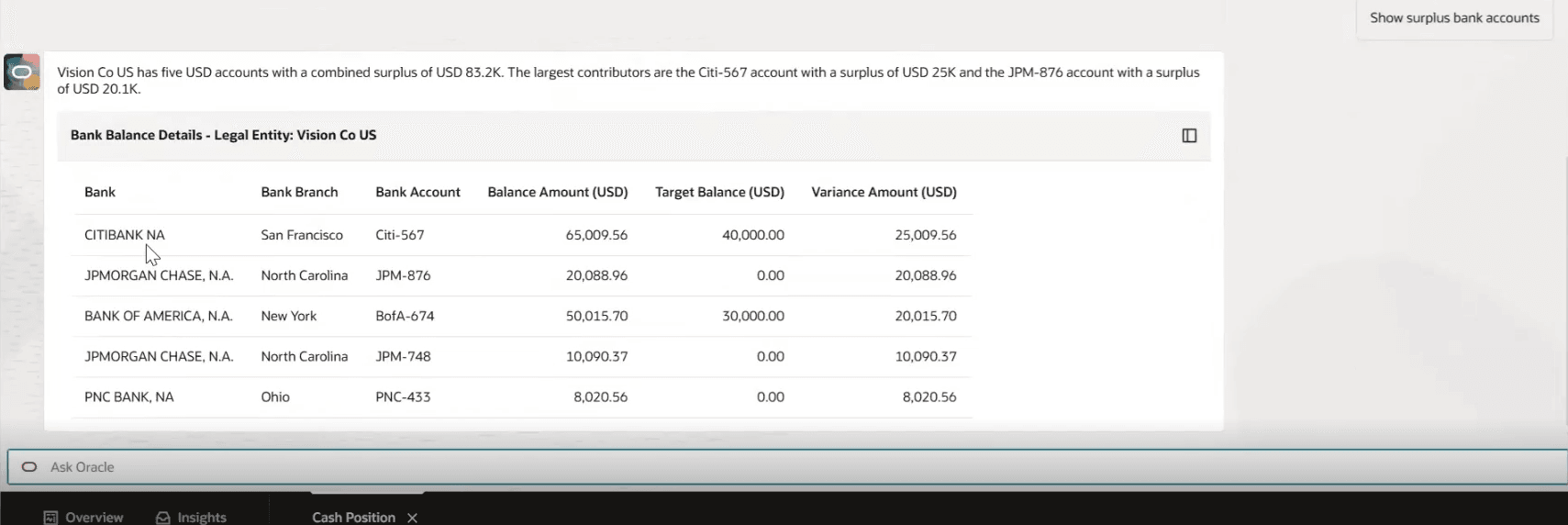
Surplus accounts
Allow users to review and accept the recommendation before any transfer is generated.
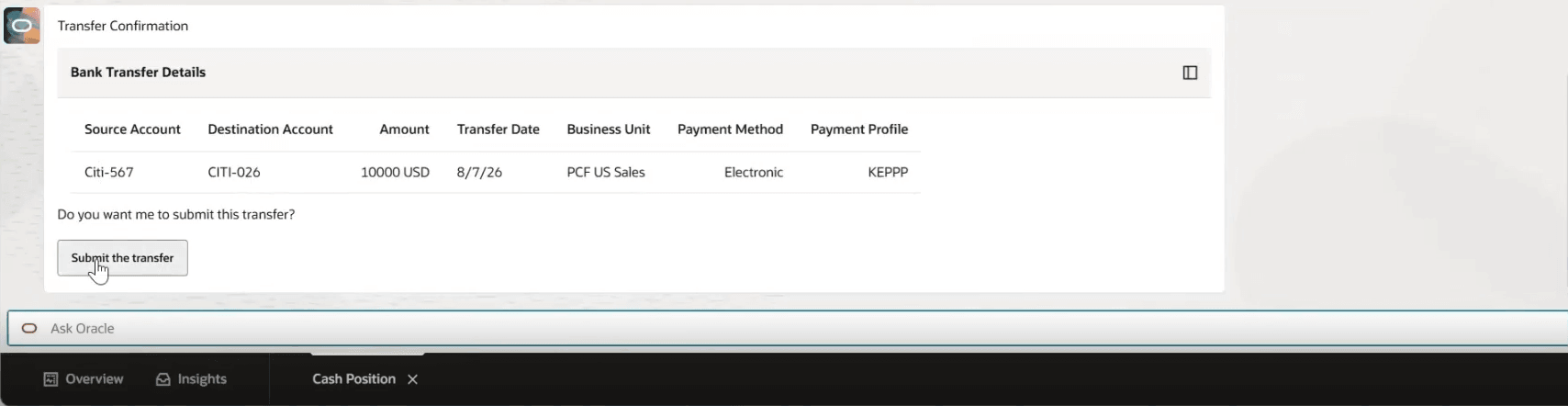
User confirmation of bank transfer
Bank transfer generation
- Automatically generate and submit the bank account transfer after the user accepts the recommendation.
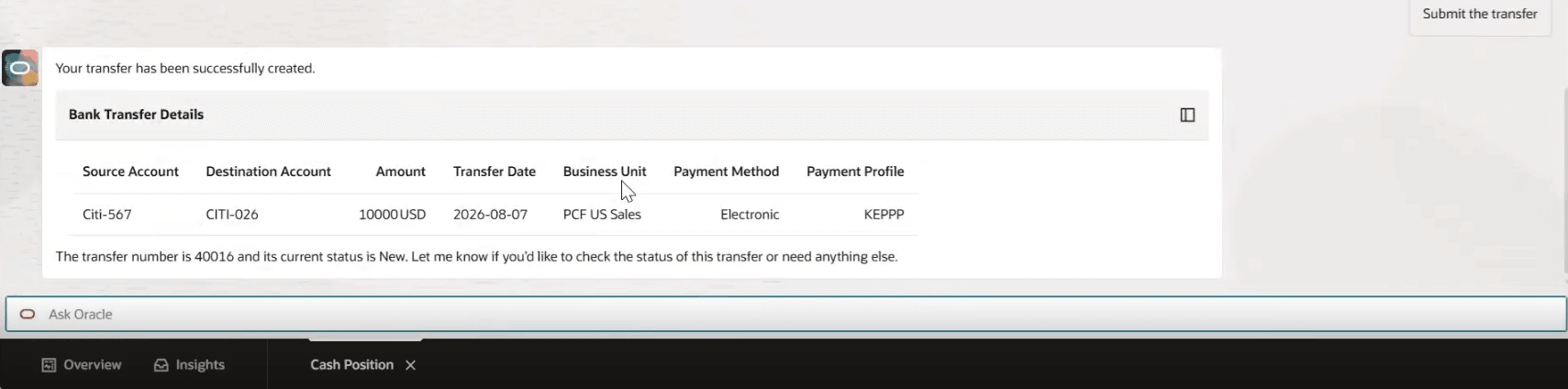
Bank transfer generation
- Default payment attributes from previous transfers for the same bank account, including payment method, payment process profile, and business unit.
- Prompt users to provide the required payment attributes when the bank account hasn’t been used for prior transfers.
Bank account transfer status monitoring
- Provide the latest status of submitted bank account transfers.
- Monitor settlement progress and highlight transfer exceptions.
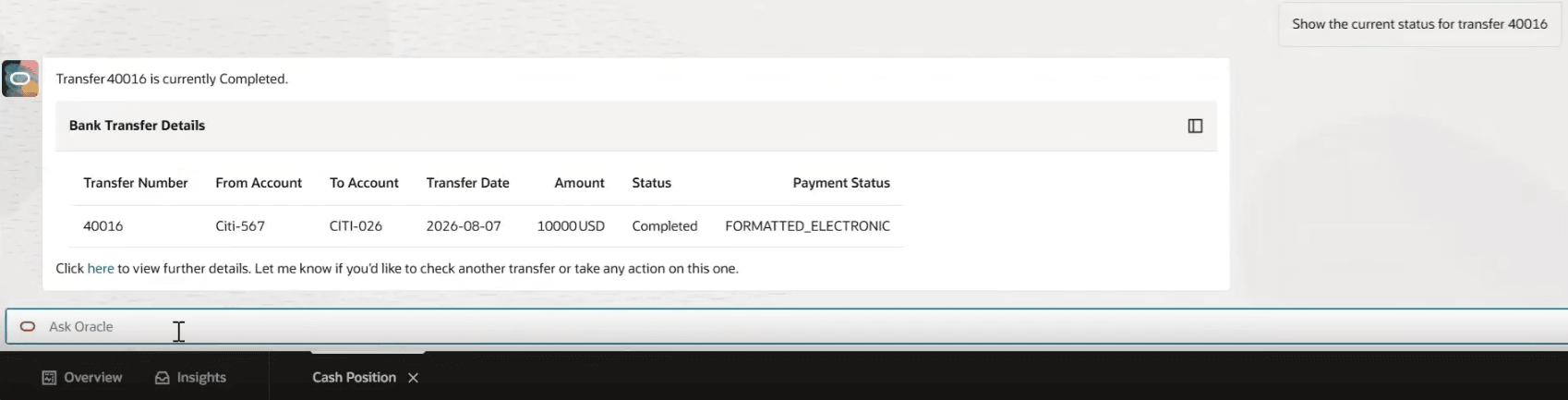
Bank transfer status
Business benefits include:
- Improves liquidity response by identifying cash shortfalls and recommending bank account transfers to cover funding gaps.
- Speeds up transfer processing by defaulting payment attributes from prior transfers for the same bank account.
- Strengthens operational control by requiring user review before transfer submission and by monitoring transfer status through settlement.
- Speeds up transfer exceptions resolution with clear status visibility and contextual guidance for settlement failures or mismatches.
Steps to enable and configure
Refer to the Cash Processing Agent What’s New for 26C for the applicable setup and configuration steps.
Tips and considerations
- For bank accounts with previous transfers, the agent defaults the payment attributes - business unit, payment method, payment process profile from the most recent applicable transfer.
- For a new bank account transfer, users provide the required payment attributes to process the transfer.
Key resources
- Oracle Help Center: Using Cash Management
- Oracle Help Center: Implementing Cash Management
- Oracle Help Center: AI Agent Studio: Setup and Access Guide
- Oracle Help Center: Security Reference for Financials: Cash Management roles, duties, and privileges
- Oracle Help Center: REST API documentation for Cash Management
- Oracle Help Center: Cash Processing Agent for Cash Positioning and Improved Liquidity
Access requirements
Refer to the Cash Processing Agent What’s New for 26C for the access requirements.