Collector Workspace Agentic Application for enhanced collections actions
The Collector Workspace Agentic Application provides an AI-powered, guided collections experience that helps collectors identify accounts requiring attention, understand the reasons behind recommended actions, and act from a unified workspace. It brings together customer account information and incoming customer communications, giving collectors the context needed to investigate collection issues and engage customers effectively.
For details about the foundational capabilities, see the Collector Workspace Agent for Prioritized Work Queue and Guided Resolution.
In this release, Collector Workspace adds policy-aware next-best-action recommendations for more collection scenarios, broader incoming email intelligence, and enhanced conversational inquiry capabilities. These improvements help collectors handle more complex collection scenarios, take consistent follow-up actions, and resolve customer accounts more efficiently.
Collector Workspace also introduces Fusion Claw in 26D, the governed agentic runtime execution layer, extending collections from guided recommendations to outcome-driven execution. This enables adaptive, policy-driven collection paths that respond to changing customer and account conditions instead of relying solely on predefined collection sequences. Eligible actions can be executed automatically in accordance with organizational policies and controls, helping collections teams respond more quickly to changes in payment risk, maintain consistent follow-up, reduce manual handoffs, and resolve customer accounts with greater automation, visibility, and control.
Collectors can also access Collector Workspace directly from the ERP Agents menu on the Oracle Fusion Cloud Applications home page, providing a simpler entry point to the experience.
Key capabilities
Fusion Claw powers following agentic capabilities introduced in 26D:
- Outcome-driven payment risk assessment and prioritization - Assesses assigned accounts using receivables exposure, payment behavior, promise adherence, disputes, customer responses, and other relevant signals. Produces an evidence-backed risk assessment and prioritization that can drive follow-up work.
- Adaptive collections orchestration - Manages collections across the customer lifecycle through guided, policy-driven actions and follow-up. The application continuously evaluates payment activity, disputes, broken promises, customer responses, and other collection signals to adapt each customer’s collection path as payment behavior and risk change.
- Policy-driven action execution - Recommends and automatically executes the appropriate next-best collection action based on customer context, supporting evidence, and organizational policies. Configured controls, approvals, and automation thresholds govern execution across scenarios such as customer outreach, credit reviews, and account escalations, while providing collectors with visibility into the rationale and evidence behind recommended or executed actions.
Note Fusion Claw capabilities will be available for customer uptake starting 13th Nov CWB.
Other capabilities introduced in 26D include:
- Expanded next-best actions – Extends policy-aware next-best-action recommendations to additional collections scenarios, including credit reviews and customer account escalations to managers.
- Promise to Pay intent detection from call notes – Automatically identifies Promise to Pay intent in collection call notes and records the commitment when applicable.
- Expanded incoming email intelligence – Extends incoming customer email triage to identify and support additional customer intents, including disputes, invoice copy requests, purchase order updates, and contact updates. Collectors can more quickly understand the reason for an incoming email and determine the appropriate follow-up action.
- Enhanced account context summary – Provides a more comprehensive customer account summary that includes unapplied receipts, payments, credit information, and dispute details. Outstanding and past-due balances appear as links in the Account Snapshot section in the Customer Drill Down page, collectors to quickly access and review relevant balance details while assessing the customer account.
- Ask Oracle starter prompts – Provides predefined prompts in the workspace to help collectors initiate common account and collections queries without composing questions from scratch.
- Expanded invoice inquiry – Enables collectors to inquire about invoice details across additional transaction sources, including projects, subscriptions, and order management. This provides collectors with broader invoice context while investigating customer questions and collection issues.
- Actionable customer list – Shows only customers with recommended actions, enabling collectors to focus on accounts that require attention. After the action is completed, the customer is temporarily removed from the list. If the account condition remains unchanged and further action is still required, the customer resurfaces after seven days.
- Enhanced contact retrieval – The workspace retrieves and displays the appropriate contact details maintained for the customer account. Email-based actions, such as Request Promise to Pay, show the applicable dunning email address, while Call Customer shows the applicable phone number.
- Enhanced contact retrieval - Displays the appropriate customer email address or phone number for the action being performed.
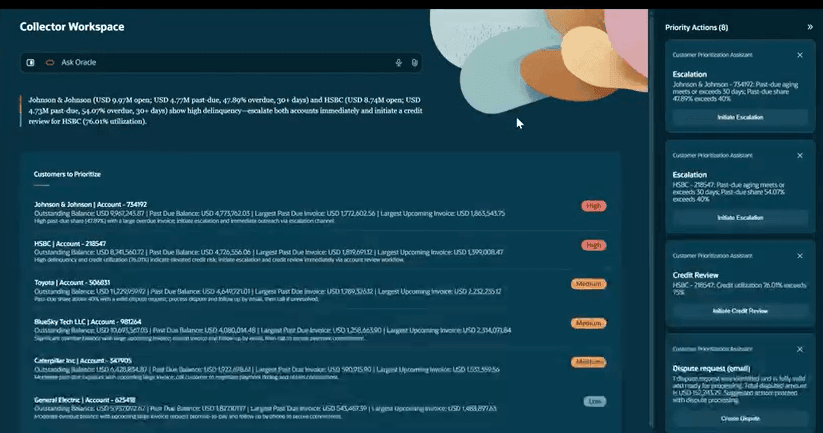
Landing Page
Business benefits
The expanded Collector Workspace capabilities help collections organizations improve financial performance, collector effectiveness, and customer engagement through these outcomes:
- Faster end-to-end resolution - Moves from risk assessment and evidence gathering to eligible follow-up within one delegated flow, reducing manual handoffs and keeping work aligned to the intended result.
- More responsive prioritization and customer treatment – Adapts collection priorities, next actions, and customer engagement as payment risk, account conditions, disputes, promises, and customer responses change, rather than relying solely on predefined collection sequences.
- More consistent collector actions – Provides policy-aware guidance across collection scenarios, helping collectors apply consistent approaches to customer outreach, credit reviews, account escalations, and other follow-up activities.
- More consistent and controlled execution – Applies organizational policies, approvals, controls, security requirements, and automation boundaries across collection activities, enabling greater autonomous execution while maintaining appropriate governance, escalation, rationale, and supporting evidence.
- Improved commitment tracking and fewer follow-up gaps – Captures Promise to Pay intent from call notes and responds to changes in payments, promises, disputes, communications, and account conditions with timely next steps and automated follow-up where permitted.
- Faster handling of customer requests – Identifies customer intents from incoming emails, including disputes, invoice copy requests, purchase order updates, and contact updates, reducing the effort required to understand requests and determine appropriate follow-up.
- Better account investigation and broader invoice visibility – Combines richer account context, recommended actions, and invoice information across projects, subscriptions, and order management, helping collectors investigate issues and access relevant information more efficiently.
- Greater collector productivity – Reduces manual account research, communication review, action determination, navigation, and repetitive follow-up, enabling collectors to focus on complex exceptions and higher-value customer interactions.
Steps to enable and configure
Upload and approve collections policy
- Use the Oracle-provided Policy document as a template. Before uploading, fill in your organization’s details and customize the content to reflect your organization’s specific policies. The Policy document template is available here.
- After finalizing the policy, upload it using the Policy Node in the AI Agent Studio. For this Administrator access to AI Agent Studio is required. For information about granting administrator access, see Provide Access to Configure AI Agents in Oracle Fusion Cloud Financials. The policy document should be uploaded in DOCX or PDF format.
- To upload and approve the policy:
- In AI Agent Studio, navigate to Policy Node > Policies.
- Search for the Collections Policy and open it.
- Click Customize.
- Click Choose File and upload the policy document containing all configured policy rules.
- Click Generate.
- Review the generated rule conditions in the Functions section.
- Click Publish.
Note: The Collections Policy Execution Assistant is no longer available starting with 26D. If you configured and published the Collections policy earlier using this assistant, your existing policy configuration is carried forward. If no policy changes are required, you don't need to configure or upload the policy again. Use Policy Node only if you need to update your existing policy.
Set up incoming email intelligence
- Register an email account with AI Agent Studio from which the incoming emails will be read. For instructions, see Add Email Accounts
- Associate the registered email account with the Collections Email Response Assistant:
- The Collections Email Response Assistant is a template agent. To associate a registered email account, create a copy of this template and associate the email account with the copied agent. Administrator access to AI Agent Studio is required to access and copy template agents. For information about granting administrator access, see Provide Access to Configure AI Agents in Oracle Fusion Cloud Financials.
- The mailbox is accessed using the user context of the administrator who configures the email account. The administrator who registers the email account must have access to the relevant business units and be assigned the Collections Email Response Assistant Role.
To create and configure a copy of the template:
- Go to AI Agent Studio.
- From the AI Agents subtab, search for the Collections Email Response Assistant template, and then select Copy Template.
- Enter a suffix for the new agent team, and then select Continue.
- In the newly created copy, select Agent Team Settings, update the agent team details as required, and then select Update.
- Go to Settings > Triggers and select the email account registered with AI Agent Studio. This associates the email account with the agent team.
- Select Publish to activate the agent
Enable access to Collector Workspace
- Collections Workspace Assistant Duty role is needed to access the Collector Workspace. If you use Oracle-provided predefined job roles, you can access the Collector Workspace without any additional role assignments. If you use custom job roles, refer to the Access Requirements section for details.
- After access is enabled, on the Oracle Fusion Cloud Applications home page, navigate to ERP Agents > Collector Workspace to launch the workspace.
Tips and considerations
- The workspace uses existing Receivables validations, dispute controls, approval rules, write-off controls, and customer account security requirements. It doesn’t override these controls.
- For credit review actions, the credit analyst’s email address is derived from the credit analyst assigned to the Customer Account Profile. Ensure that the appropriate credit analyst is assigned and that their email address is maintained correctly.
- For customer account escalations, the manager’s email address is derived from the manager assigned to the corresponding collector in the employee hierarchy. Ensure that the collector-manager hierarchy and the manager’s email address are maintained correctly.
- For customer outreach, the customer’s email address and phone number are derived from the contact information maintained at the Customer Account Contact level. Ensure that the relevant contact details are maintained accurately.
- Incoming Email Intelligence analyzes incoming customer emails received through the email account configured for the Collections Email Response Assistant. Ensure that the appropriate email account is configured so that incoming customer communications can be read and surfaced in the workspace.
- Ask Oracle supports read-only inquiries about available collections information, including customers, accounts, invoices, promises-to-pay, disputes, aging buckets, and credit exposure. It doesn’t support creating, updating, deleting, or uploading transaction data, and isn’t intended for open-ended analysis, root-cause diagnosis, or recommendations beyond the retrieved information. Use the appropriate application processes to perform transaction actions and the relevant support channels to troubleshoot application, configuration, or processing issues. Refer to the following best practices to frame clear, focused questions when using Ask Oracle:
- Make each question complete and specific by including relevant identifiers and the information required. For example, ask “Show the outstanding balance for invoice 27007 for customer account 17001” instead of “Invoice details.”
- Include precise time, aging, and status criteria where applicable, such as over 30 days past due, due this week, open invoices, active promises, or disputed invoices. For example, ask “List open invoices over 60 days past due for customer account 17001” instead of “Show old invoices.”
- Break broader inquiries into focused follow-up questions. For an inquiry such as “List customers with broken promises-to-pay whose associated invoices have open disputes,” first ask which customers have broken promises-to-pay, then request the associated invoices for a selected customer, and finally ask which of those invoices have open disputes.
- Use consistent business terms, such as outstanding balance, days past due (DPD), promise-to-pay, amount in dispute, and credit limit. For example, ask “Show the amount in dispute for invoice 27007” instead of “Show the problem amount for invoice 27007.”
- Specify the customer or account identifier when context is ambiguous, and restate it when switching customers or accounts. For example, ask “Show open disputes for customer account 17002” instead of “Show their disputes.” For customer account inquiries, use the available drill-down option to open the Customer Details page.
- Results include information about customers assigned to the signed-in collector. Users must have the appropriate collector responsibility and data access. You don’t need to repeat collector details. For example, ask “Show aging balances for my portfolio.”
- Filter broad requests by customer, status, date, or amount. Initial results are generally limited to 10 records; ask “Next page” or “Show the next 10” to view additional results.
- Inquiries about collections policy content and descriptive flexfields (DFFs) aren’t currently supported in Ask Oracle. Keep questions focused on supported collections information.
Key resources
- Collector Workspace Agent for Prioritized Work Queue and Guided Resolution
- How do I use AI Agent Studio?
- Explore AI Agents for Oracle Fusion Cloud Applications
- Promise to Pay Overview
- Overview of Dunning
Access requirements
User role and permission group configuration
Use the following steps to provide access to the Collector Workspace for users who are not assigned Oracle-provided Collections Agent job role.
- Navigate to the Security Console.
- Search for the custom job role you want to use.
- Click Edit Role.
- Select Enable Permission Groups.
- Save your changes.
- Navigate to Role Hierarchy > Roles and Privileges.
- Add the Collections Workspace Assistant Duty role.
- Navigate to Role Hierarchy > Roles and Permission Groups.
- Add the same Collections Workspace Assistant Duty role you added in the previous step.
- Save your changes
Synchronize user and role security data
Changes to user role assignments in Oracle Fusion Cloud Applications may take some time to synchronize and become effective. To synchronize the role changes, run the following scheduled processes:
- Import User and Role Application Security Data
- Retrieve Latest LDAP Changes
To run the processes:
- Go to Tools> Scheduled Processes.
- Click Schedule New Process.
- Search for the corresponding process name.
- Select it and click OK.
- Click Submit.
Data access requirements
- Users must also have the appropriate data access for the business units, customer accounts, customers, and Receivables data they are expected to review. The Collector Workspace displays customer balances, transactions, promises, disputes, and activities only for the data the user is authorized to access. Use the Manage Data Access for Users task in the Users and Security functional area to assign users the appropriate data access based on their job roles.
- Users will only see customer accounts for which they are assigned as collectors. Collector assignments are managed at the customer account profile level.