New Redwood Process to Request Assignment Change For Workers
The Request My Assignment Change feature allows employees to request changes to their own assignment information using a streamlined Redwood process. Employees can now initiate updates such as changing their work location or modifying working hours directly from the self-service interface without requiring any HR intervention. The actions for the following action types are supported for this process:
- Change Location
- Change Working Hours
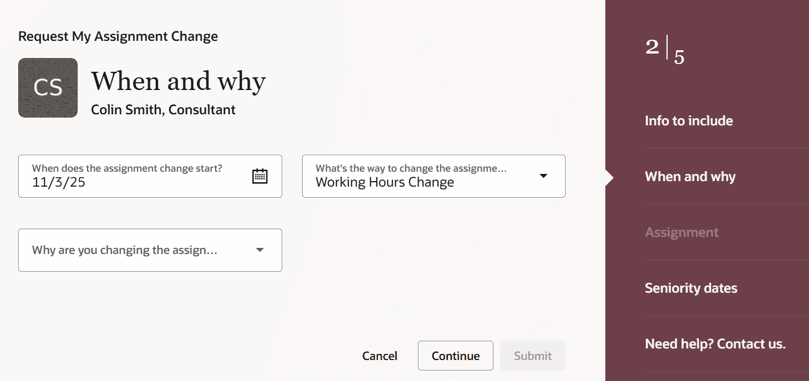
Request My Assignment Change process
Allowing employees to request their own location change and working hours change reduces dependency on managers and HR specialists, leading to faster processing and improved data accuracy. The self-service flow cuts administrative effort, ensures consistent approvals, and provides better transparency for employees tracking their requests. This enhancement improves employee autonomy while ensuring governance through existing approval rules and workflows.
Key Features
- Self-Service Enablement - Employees can raise assignment change requests for themselves.
- Common Use Cases - Some of the common use cases are when employees
- Request change in work location.
- Request change in working hours.
- Out-of-the-Box Availability:
- Delivered by default for the predefined employee role.
- No configuration required for customers using standard roles
- For Custom Roles
- If your organization uses a custom employee role, you need to include the following aggregate privilege:
Privilege Name Code Request Assignment Change By Worker
ORA_PER_REQUEST_ASSIGNMENT_CHANGE_BY_WORKER
- If your organization uses a custom employee role, you need to include the following aggregate privilege:
Approval Rules Configuration
The Request My Assignment Change process leverages the existing Change Assignment approval framework. If you want to define or modify approval behavior specific to this request type, you need to configure approval rules using the following reference condition: sensorDataReferenceCode = "RequestMyAssignmentChange"
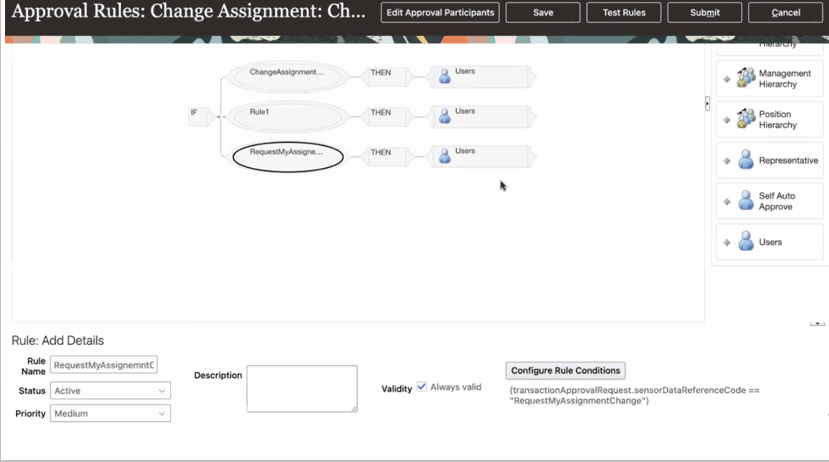
Approval configurration for Request My Assignment Change process
This ensures that employee-initiated assignment change requests follow the appropriate approval routing as defined in your BPM configuration.
This feature:
- Empowers employees to manage assignment-related changes independently.
- Reduces manual HR workload and turnaround time.
- Maintains compliance and approval control using existing assignment workflows.
- Delivers a cohesive, modern Redwood user experience.
Steps to enable and configure
You can access the new page by navigating to Me > Request My Assignment Change
For predefined roles: No setup required.
For custom roles:
- Navigate to Tools > Security Console > Roles.
- Edit the relevant custom employee role.
- Add the aggregate privilege Request Assignment Change By Worker (ORA_PER_REQUEST_ASSIGNMENT_CHANGE_BY_WORKER).
- Save and publish the role.