Ability to Expand Payroll Region by Default in Employment Processes
The ability to expand the payroll region by default (without having to select the Add button) has been extended to the following processes:
- Change Assignment
- Change Location
- Change Working Hours
- Promote
- Transfer
- Promote and Change Position
- Edit Pending Worker
- Local and Global Transfer
You can also control whether to display the Delete icon within the payroll region or not. In VB Studio, select Configure Page Properties, and under Payroll details set the following properties:
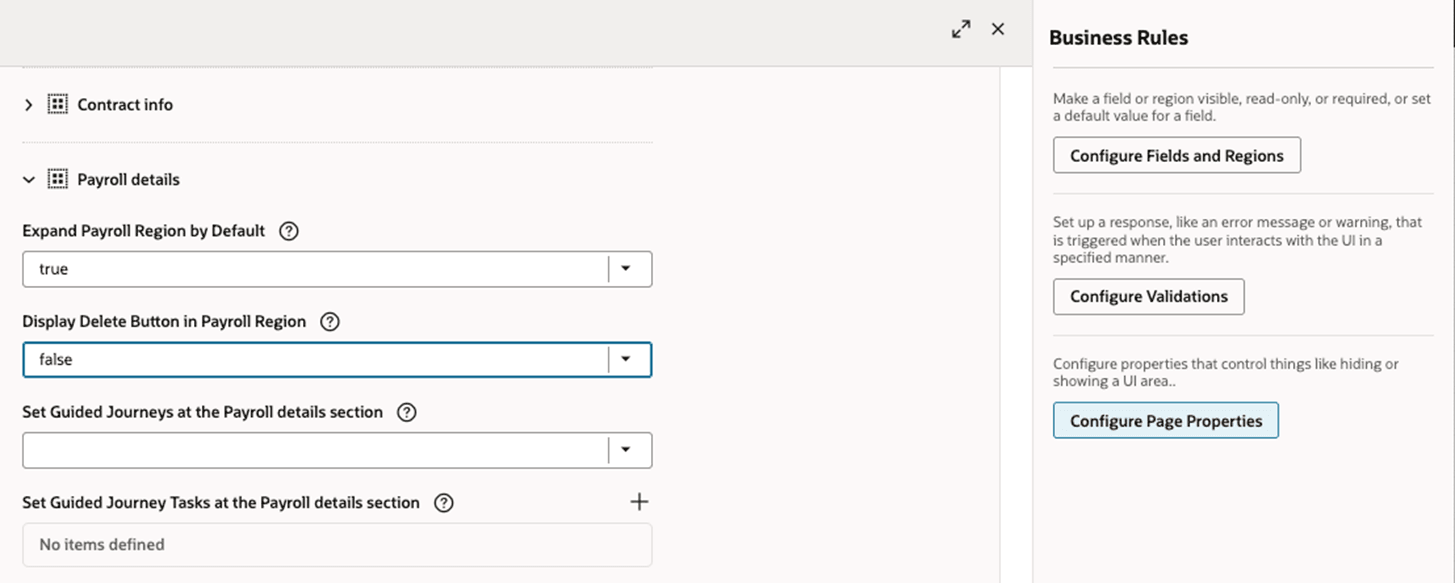
Payroll Step in Employment Processes
The combination of these 2 page properties allows you to control whether it's mandatory to create a payroll record if one doesn’t exists while updating an employee’s employment record. This is only applicable if the selected employee isn’t already on a payroll; otherwise the payroll region is automatically expanded.
Enhanced support for customizing application user interfaces within the payroll region in employment processes.
Steps to enable and configure
You don't need to do anything to enable this feature.
Key resources
For more information, refer to these resources on the Oracle Help Center.
- Express Mode in VBS for detailed instructions on using specific Express Mode features.
- Extending Redwood Applications for HCM and SCM Using VB Studio for details on what’s supported by HCM.
- You can refer to the VB Studio documentation "Configure an Oracle Cloud Application" to check the steps to access VB Studio from a Redwood page.
- Extending HCM Redwood Applications Using Visual Builder Studio
- Refer to the Customer Connect forum Visual Builder Studio for HCM