Redwood: View Enhanced Skill Suggestions in Skills Center Using Generative AI
Provides enhanced skill suggestions using recommendation profiles, which are powered by Generative AI and recommender algorithm through a new profile option ORA_HRT_SKILLS_CENTER_SUGGESTIONS.
The below skills suggestion categories are created by recommender algorithm:
• Skills popular in current role
• Skills popular in careers of interest
• Skills popular with managers and peers
• Skills based on current role gaps
The below skills suggestion categories are from generative AI:
• Skills based on nonskill attributes on your talent profile
• Skills similar to your skills on talent profile
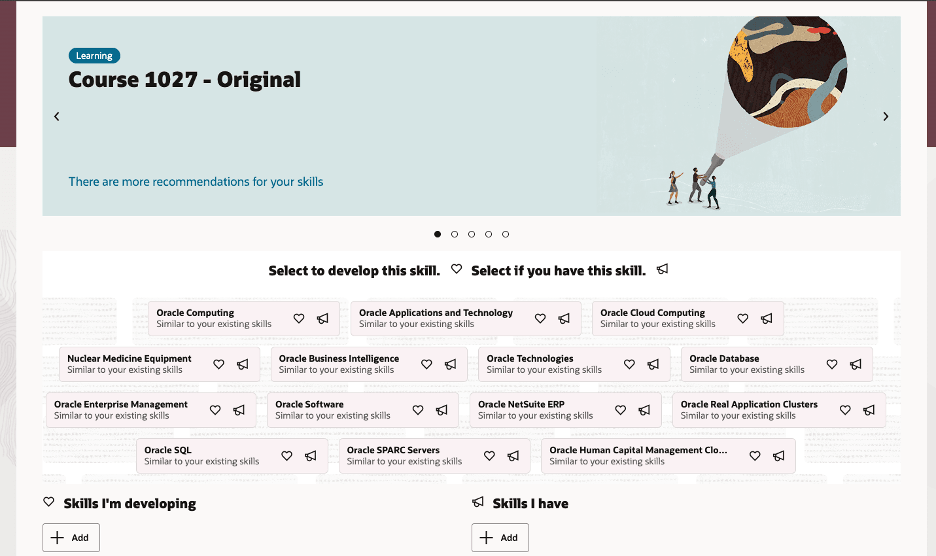
Skills suggestion in worker’s Skills Center
Before this upgrade, skill suggestions were provided based on predictive AI. Skill suggestions based on GenAI are more relevant and contextual to the job title, capability guide, or gig compared to predictive AI. Gen-AI provides relevant skill recommendations for job titles that include non-standard prefixes or suffixes—a scenario where predictive AI may encounter difficulties.
You can now move to Gen-AI based skill suggestions through the profile option ORA_HRT_SKILLS_CENTER_SUGGESTIONS.
By default, this profile option is set to the value of Legacy, which provides skill suggestions using predictive AI. To leverage GenAI-based suggestions, you can change it to:
- Next Generation – Uses generative AI.
- Next Generation with Workflow Agents – Uses AI Agents based on Agent Studio, which enables you to customize the AI prompts to get skill suggestions based on your needs.
Business benefit: This feature gives you the flexibility to choose between different AI technologies when generating skill suggestions.
You can set up recurring recommendation profiles to suggest skills. This gives you control and flexibility to send skill recommendations based on your needs.
Steps to enable and configure
If you plan to use skills suggestions categories created by recommender algorithm for skills suggestions, follow the sequence to minimize disruption:
- Run the Prepare Application for Skills Enrichment ESS job.
- Enable Enhanced Dynamic Skills using profile option ORA_HRT_SKILLS_ENRICHMENT_ENABLED. For more details, see Upgrade to Enhanced Dynamic Skills.
- Set the ORA_WLF_AI_COMPANY_INFO profile option to Site level. The profile value must be a description of the organization in about 1000 characters or less including the organization name.
- Stop the ESS job Synchronize Talent Data for AI Recommendations.
- Schedule the ESS job Create Summaries Using Generative AI on a recurring basis.
- Create recommendation profiles for the 4 categories of skills suggestions categories based on recommender algorithm. For more details, see How do I enable enhanced skill suggestions using recommendation framework?
- Select the desired option (Next Generation or Next Generation with Workflow Agents) for the profile option ORA_HRT_SKILLS_CENTER_SUGGESTIONS.
If you plan to use skills suggestions categories created by generative AI for skills suggestion, follow the sequence to minimize disruption:
- Run the Prepare Application for Skills Enrichment ESS job.
- Enable Enhanced Dynamic Skills using profile option ORA_HRT_SKILLS_ENRICHMENT_ENABLED. For more details, see Upgrade to Enhanced Dynamic Skills.
- Set the ORA_WLF_AI_COMPANY_INFO profile option to Site level. The profile value must be a description of the organization in about 1000 characters or less including the organization name.
- Stop the ESS job Synchronize Talent Data for AI Recommendations.
- Schedule the ESS job Create Summaries Using Generative AI on a recurring basis.
- Create recommendation profiles for the skill suggestions categories from generative AI. For more details, see How do I enable enhanced skill suggestions using recommendation framework?
- Select the desired option (Next Generation or Next Generation with Workflow Agents) for the profile option ORA_HRT_SKILLS_CENTER_SUGGESTIONS.
You can also enable both the skill suggestions categories based on recommender algorithm and generative AI in a single recommendation profile.
Select one of these values for the ORA_HRT_SKILLS_CENTER_SUGGESTIONS profile option:
- Legacy: If you’re currently seeing skill suggestions, the profile option is set to this default value. If you don’t change the value, you’ll continue to get skill suggestions based on predictive AI.
- Next Generation: Select this to move to GenAI-based suggestions. For details, see How do I enable enhanced skill suggestions using generative AI?
- Next Generation with Workflow Agents : Select this to move to GenAI based suggestions using AI Agents. To use this option, you need to perform additional configuration tasks using AI Agent Studio. For details, see How do I enable enhanced skill suggestions using AI Agents?
The prerequisites for using AI Agent Studio are:
- Your environment must have the appropriate services for Oracle Applications Platform deployed. For more information, see FAQ2521 on My Oracle Cloud Support.
- Set the Enable Security Console External Application Integration (ORA_ASE_SAS_INTEGRATION_ENABLED) profile option to Yes and enable permission groups for the appropriate roles. See Access Requirements for AI Agent Studio.
For skill suggestions of desired type of categories, set up recommendation profile. For details, see How do I enable enhanced skill suggestions using recommender framework?
Key resources
- Explore AI Agents for Oracle Fusion Cloud Applications
- How do I use AI Agent Studio?
- Create AI Agents Using Preconfigured Agent Team Templates
- Upgrade to Enhanced Dynamic Skills
- How do I enable enhanced skill suggestions using recommendation framework?
Access requirements
The agents you can view depend on the roles and privileges assigned to you. To access the Skill Recommendation Agent, your role must be explicitly granted access to it by an AI Studio Administrator. See How can I give users access to AI agents and Access Requirements for AI Agent Studio.