Redwood Experience: New Sections and Field in the Create and Edit Job Offer Flows
When you create or edit a job offer in Redwood, these 3 sections are now available:
- Additional assignment info
- Work relationship info
- Weekly working hours
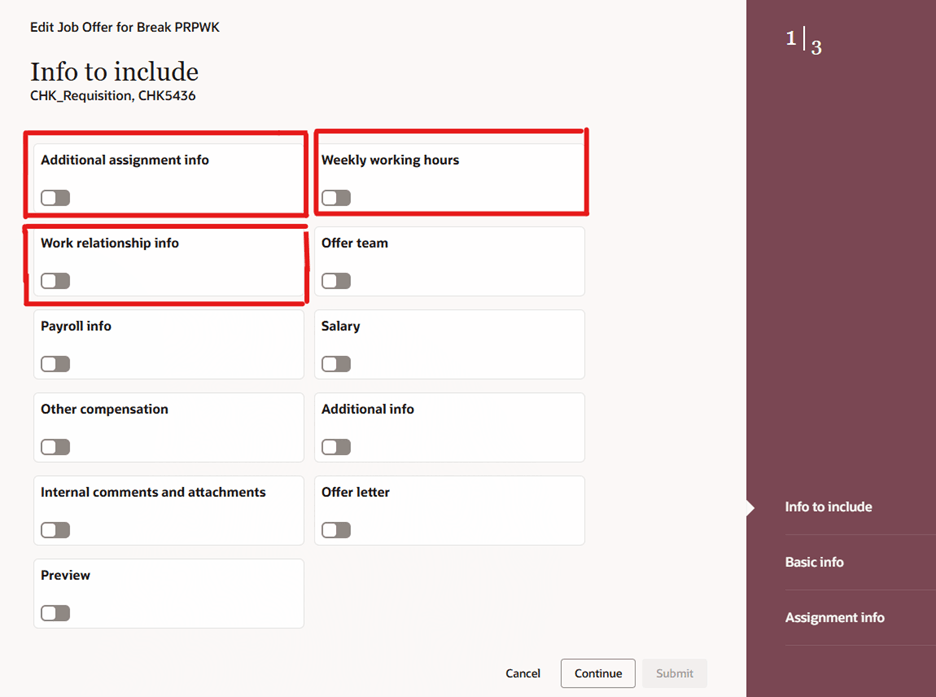
New Sections in the Edit Offer Flow
This new field is also available in the Basic info section:
- Proposed Reason
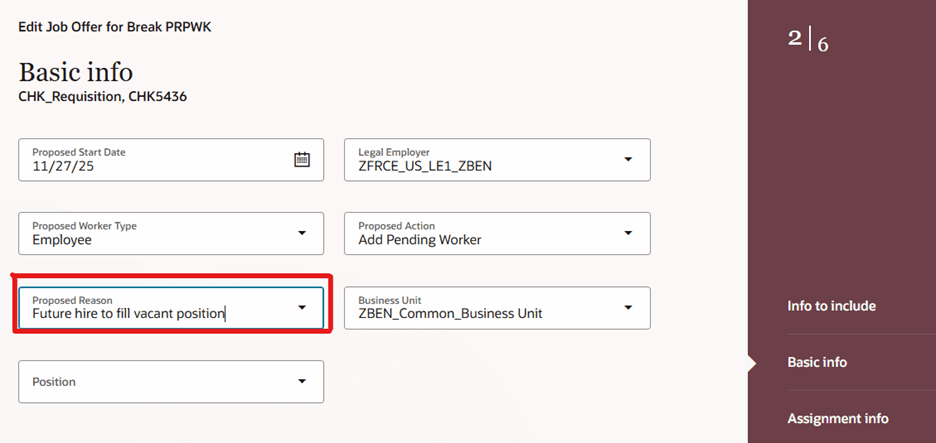
New Field in the Offer Basic Info Section
The new sections and field are also available when you view the content of the Offer tab in job applications as well as in the Activity Center.
By default, the new sections and field are hidden when you create, edit, and view a job offer. Rules in Visual Builder Studio can be created to display them.
Data entered in these new sections while creating a job offer are added seamlessly in the employee assignment and person record once the job application is moved to HR. Data is added with the below flows:
- Job offer to pending worker record.
- Pending worker to employee or contingent worker: Both automatic and manual conversion.
- Duplicate merge after job offer: For example a potential duplicate candidate is found when the job application is moved to the HR phase and the external candidate record is merged with the ex-employee record. Note: In this release, you need to visit these new sections during the Recreate Job Offer flow so that the data from the job offer is copied to the pending worker record. If you don’t visit the sections, data from the job offer in these new sections won’t be copied.
- Internal movement such as Transfer, Global Transfer, Promotion: Both automatic and manual conversion.
Business benefits:
- You can capture the information in the assignment extensible flexfields while creating a job offer. The same information is copied to the employee assignment without having to configure duplicate flexfields, which helps avoid data integrity issues.
- You can use the Weekly working hours section and present the information to the candidate as part of the job offer. You don’t have to configure custom fields.
- You can take a head start on Form I-9 by populating work relationship information for the new hire while creating the job offer, which speeds up the hiring process.
Steps to enable and configure
To access the new sections and field from the Redwood Activity Center page, you need to enable this profile option:
- ORA_IRC_RECRUITING_REDWOOD_ENABLED
To access the new sections and field from the Redwood job application details page, you need to enable these profile options:
- ORA_IRC_RECRUITING_REDWOOD_ENABLED
- ORA_IRC_JOB_APPLICATION_REDWOOD_ENABLED
To access the new sections and field from the Redwood job offer create and edit pages, you need to enable these profile options:
- ORA_IRC_RECRUITING_REDWOOD_ENABLED
- ORA_IRC_JOB_APPLICATION_REDWOOD_ENABLED
- ORA_IRC_CREATE_ OFFER_REDWOOD_ENABLED
For details, see How do I enable a profile option?
For details on creating rules in Visual Builder Studio to display the new sections and field, see How do I write defaulting and validation rules for the create and edit offer flows in Redwood?
For details on enabling and customizing Redwood for HCM, see How do I adopt Redwood for HCM? and Extending Redwood Applications for HCM and SCM Using Visual Builder Studio.
Tips and considerations
The Work relationship info section isn't visible in scenarios where a job offer is created or edited for internal movements within the same legal employer (for example, Transfer, Promotion, Manager Change, Job Change).
Scenario identification takes place when the user selects a value in the Proposed Action field, in the Basic info section. Therefore, even if the Work relationship info section is enabled using Visual Builder Studio rules, it will remain hidden until a value is selected in the Proposed Action field. Once a value is selected, the section will be displayed for all scenarios except those involving internal movements within the same legal employer.