 Redwood Experience: Job Application List Move Application Action Extensibility
Using Visual Builder Studio, you can configure the fields in the Move Application action when the action is performed on the job application list. These fields can be configured to be hidden and required:
- Comment
- Phase
- Reason (the field is only visible based on the candidate selection process configuration)
- State
Note: As a best practice, the Phase and State fields shouldn't be hidden from users. Also, the Phase and State conditions are only applicable when a single job application is selected.
Business benefit: You can ensure that the Move Application action behaves consistently when performed from the job application list and the job application details page. The action also aligns with your business processes to require or hide fields from users.
Steps to enable and configure
To configure fields in the Move Application action, you need to create business rules in Visual Builder Studio. The Move Application action is available on the Job Application List page, in the Hiring sub-menu.
For details, see How do I hide or show a field in Visual Builder Studio?
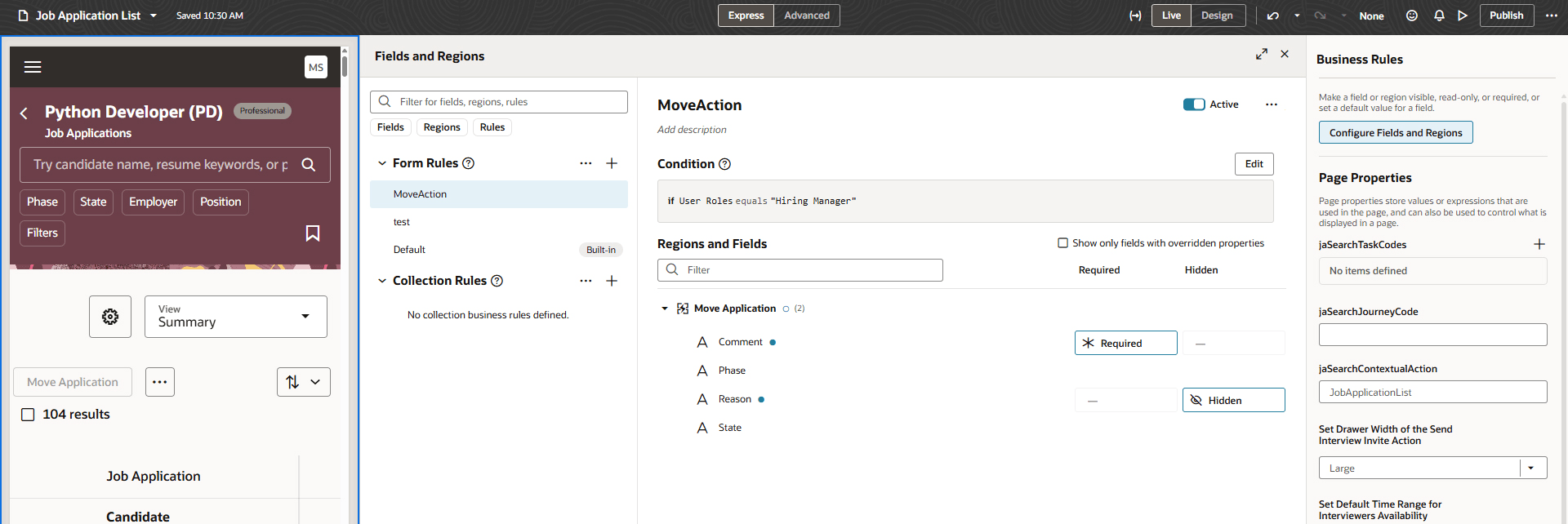
Move Application Action Configuration in Visual Builder Studio
To use Redwood experience, you need to enable these profile options:
- ORA_IRC_RECRUITING_REDWOOD_ENABLED
- ORA_IRC_JOB_APPLICATION_REDWOOD_ENABLED
- ORA_IRC_CANDIDATE_REDWOOD_ENABLED
- ORA_IRC_REQUISITION_REDWOOD_ENABLED
For details, see How do I enable a profile option?
For details on enabling and customizing Redwood for HCM, see How do I adopt Redwood for HCM? and Extending Redwood Applications for HCM and SCM Using Visual Builder Studio