Redwood: Dynamic Skills In Performance Documents
You can now enhance worker evaluations by including dynamic skills from Skills Center in performance documents.
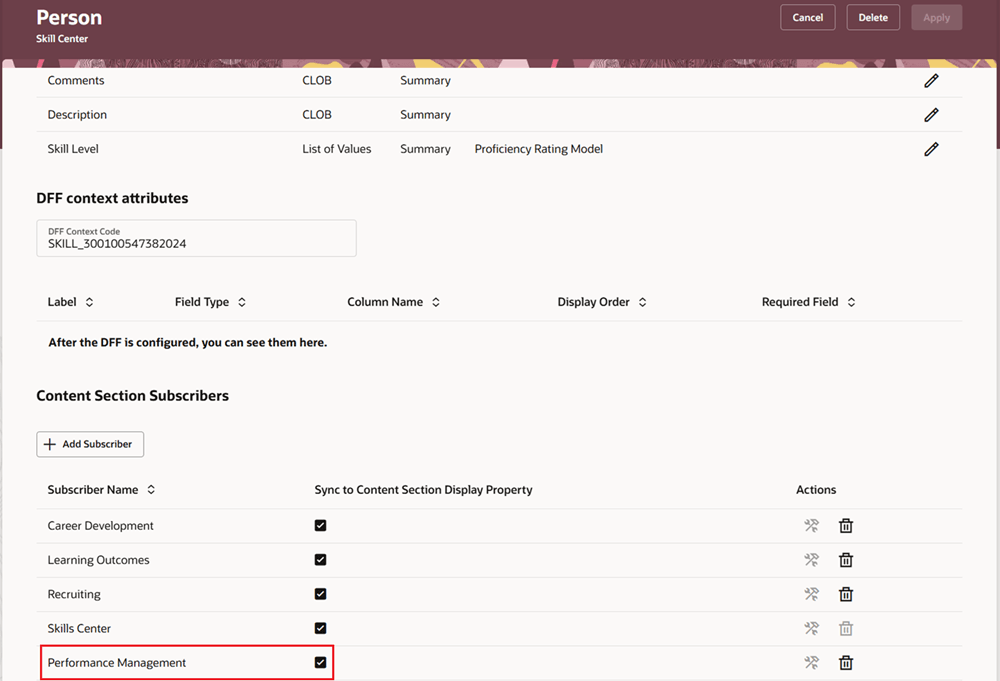
Add Performance Management as Content Section Subscriber
HR users can create a performance template section and configure the Dynamic Skills section (available only if Performance Management is added as a subscriber to the content section).
When you create a performance document from this template, it automatically populates dynamic skills from the employee’s Talent Profile.
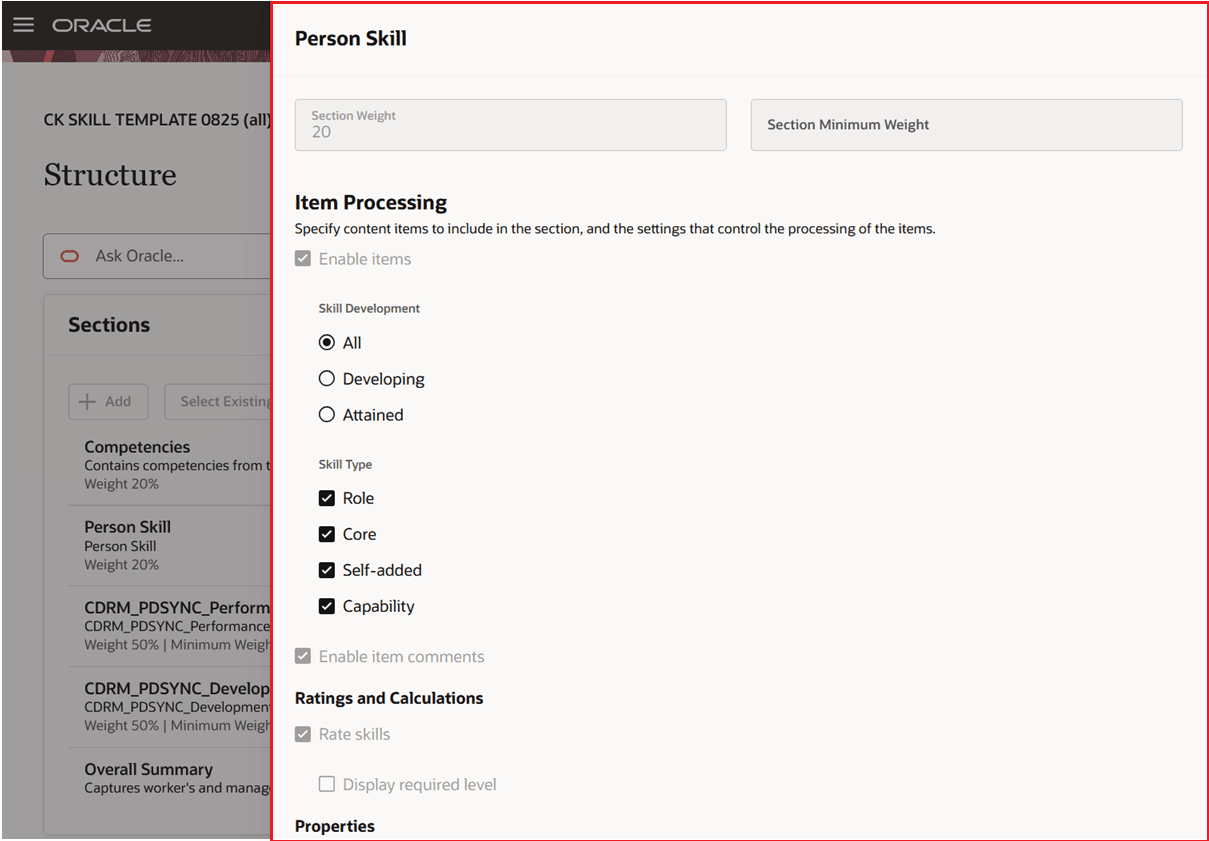
Configure Performance Template Section Settings for Dynamic Skills
After you add or remove a dynamic skill from an employee’s Talent Profile, running the Synchronize Person Profile Content in Performance Documents scheduled process will automatically update any of the employee’s active performance documents (where evaluation tasks aren’t completed) that include a Dynamic Skills section, ensuring the latest information displays for evaluation.
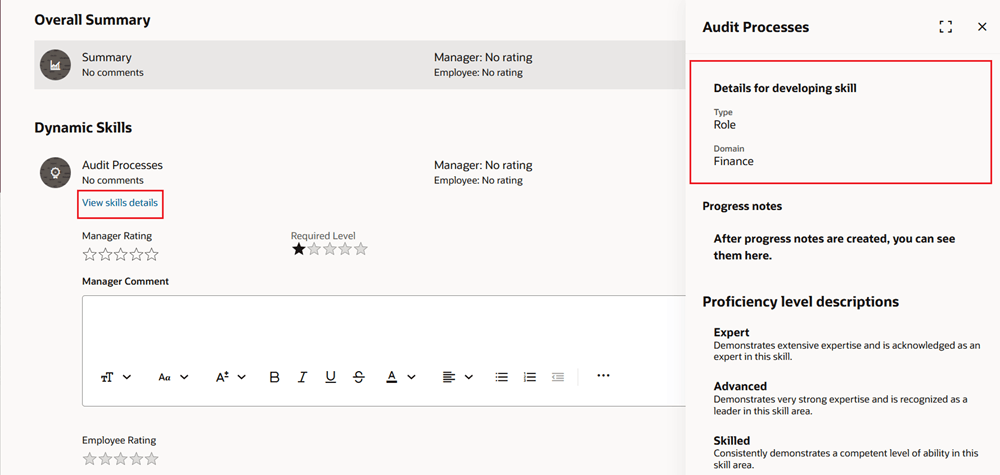
View Skill Details in Performance Document
Managers and workers can rate and comment on dynamic skills in the performance document. Participants can’t rate but can provide evaluation comments.
Managers, employees, and participants can all use Generative AI to help generate enhanced evaluation comments for the individual dynamic skills and the evaluation topic summary comments based on sources such as information about the skills, initial evaluation comments, selected ratings and check-in comments. You can enable this feature by role using the following page properties:
- Manager - Show AI Assist Button for Dynamic Skills Comments
- Worker - Show AI Assist For Worker
- Participants - Show AI Assist For Participants
Business Benefit: This feature enables more comprehensive worker evaluations by automatically reflecting employees' current skills.
Steps to enable and configure
For more details, see How do I configure a Dynamic Skills performance template section?
You need to configure the profile options for Redwood performance documents as indicated in the following table.
| Profile Option Code | Description | Value |
|---|---|---|
| ORA_HCM_VBCS_PWA_ ENABLED |
Enable VBCS Progressive Web Application User Interface | Y |
| ORA_HRA_PERFORMANCE_DOCUMENTS_AND_GOALS_REDWOOD_ENABLED | Enable performance documents and employee performance and development goals to display in Redwood. | Yes |
|
ORA_HRA_SETUP_REDWOOD_ |
Enable Redwood setup pages for Performance Management. |
Yes |
Configure the following page property to show the AI Assist button for Dynamic Skills:
| Page Property Name | Label | Description |
|---|---|---|
| SHOW_DYNAMIC_SKILLS_AI_ ASSIST |
Show AI Assist Button for Dynamic Skills Comments |
This property controls the display of the AI Assist button to provide manager dynamic skills evaluation comments. Set it to true or false to show or hide the action button respectively. |
| SHOW_AI_ASSIST_WORKER | Show AI Assist For Worker | This property controls the display of the AI Assist buttons for worker evaluations. Set it to true or false to show or hide the action buttons respectively. |
| SHOW_AI_ASSIST_PARTICIPANT | Show AI Assist For Participants | This property controls the display of the AI Assist buttons for participant evaluations. Set it to true or false to show or hide the action buttons respectively. |
Tips and considerations
- The Dynamic Skills section can only be included in performance documents if Performance Management is subscribed to Skills Center.
- Updates to an employees dynamic skills aren't synchronized real time. You need to run the Synchronize Person Profile Content in Performance Documents scheduled process to update any of the employee’s active performance documents that include a Dynamic Skills section. This includes changes such as:
- A skill has been added or removed from the employee's Talent profile.
- Skill type has changed, for example, from Core to Role or the progression of a skill has changed, for example, from Developing to Attained.
- A skill removed from the employee's Talent Profile isn't removed from the employee's performance document because it was evaluated. The evaluation ratings or comments are then removed in the performance document. The dynamic skills are removed when the process is run.
- Errors where the performance document data isn't synchronized. It's recommended to run the scheduled process daily or if changes to dynamic skills are expected more frequently during the evaluation period.
- If a dynamic skill is removed from an employee's Talent Profiles it's automatically removed from a performance document only if they haven't been evaluated by a contributor. If any ratings and comments for the skill are deleted from the performance document, the skill will be deleted from the document the next time the process is run.
- You can configure employee and manager skill ratings to be passed back to the employee's Talent Profile. You can also configure a section rating and comment. The section rating from the manager can also be passed back to the employee's Talent Profile. But section Skill performance ratings won't be included in Skills Center.
Key resources
- For a listing of all profile options for the recreated pages across applications, see the following document in My Oracle Support:
- For details, see How do I enable a profile option?
- For details, see Implementing Dynamic Skills