Redwood: Competency Check-In Notes As Contextual Feedback
Employees, managers, and HR specialists can now view check-in notes for competencies directly within a performance document.
When competencies are evaluated and have related check-in notes from the same review period, these notes appear contextually in the performance document, making it easier to access feedback without needing to open the individual check-in PDFs.
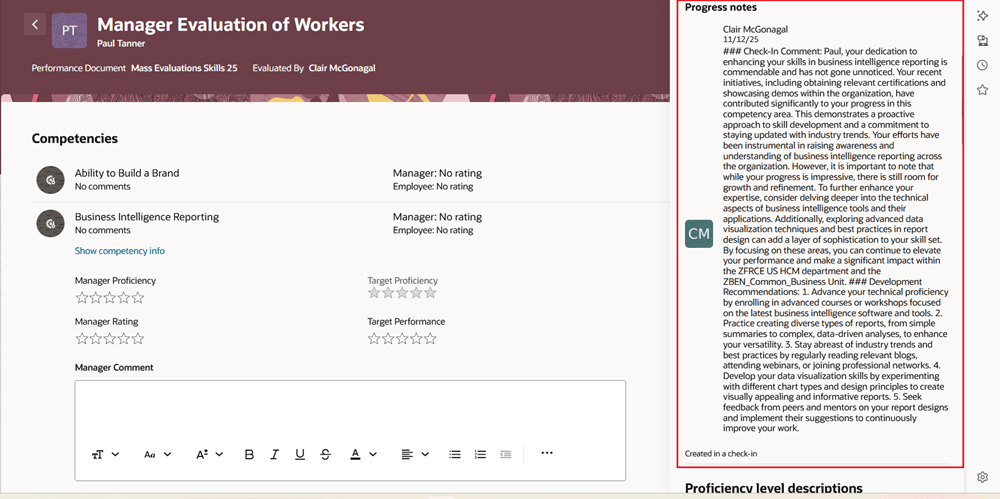
Contextual Competency Check-in Notes in a Performance Document
Business Benefit: This feature provides quick and convenient access to relevant competency feedback within the performance document.
Steps to enable and configure
For more details, see How do I configure and access check-in notes for a competency in an employee’s performance document?
You need to configure the profile options for Redwood performance documents as indicated in the following table.
| Profile Option Code | Description | Value |
|---|---|---|
| ORA_HCM_VBCS_PWA_ ENABLED |
Enable VBCS Progressive Web Application User Interface | Y |
| ORA_HRA_PERFORMANCE_DOCUMENTS_AND_GOALS_REDWOOD_ENABLED | Enable performance documents and employee performance and development goals to display in Redwood. | Yes |
|
ORA_HRA_SETUP_REDWOOD_ |
Enable Redwood setup pages for Performance Management. |
Yes |
Tips and considerations
- The contextual notes display only if the performance template is configured on the Process tab to Display Check-In and the check-in template is configured to Include in performance document.
Key resources
- For a listing of all profile options for the recreated pages across HCM, see the following document in My Oracle Support: