Redwood: View Additional Alignment Information
From this release, when you click on the goal card of an aligned shared or organization goal you can see these details about the goal in a panel:
- Goal name
- Description
- Name of the person who shared or published the goal
- Date on which the goal was shared or published
- Start date
- Target completion date
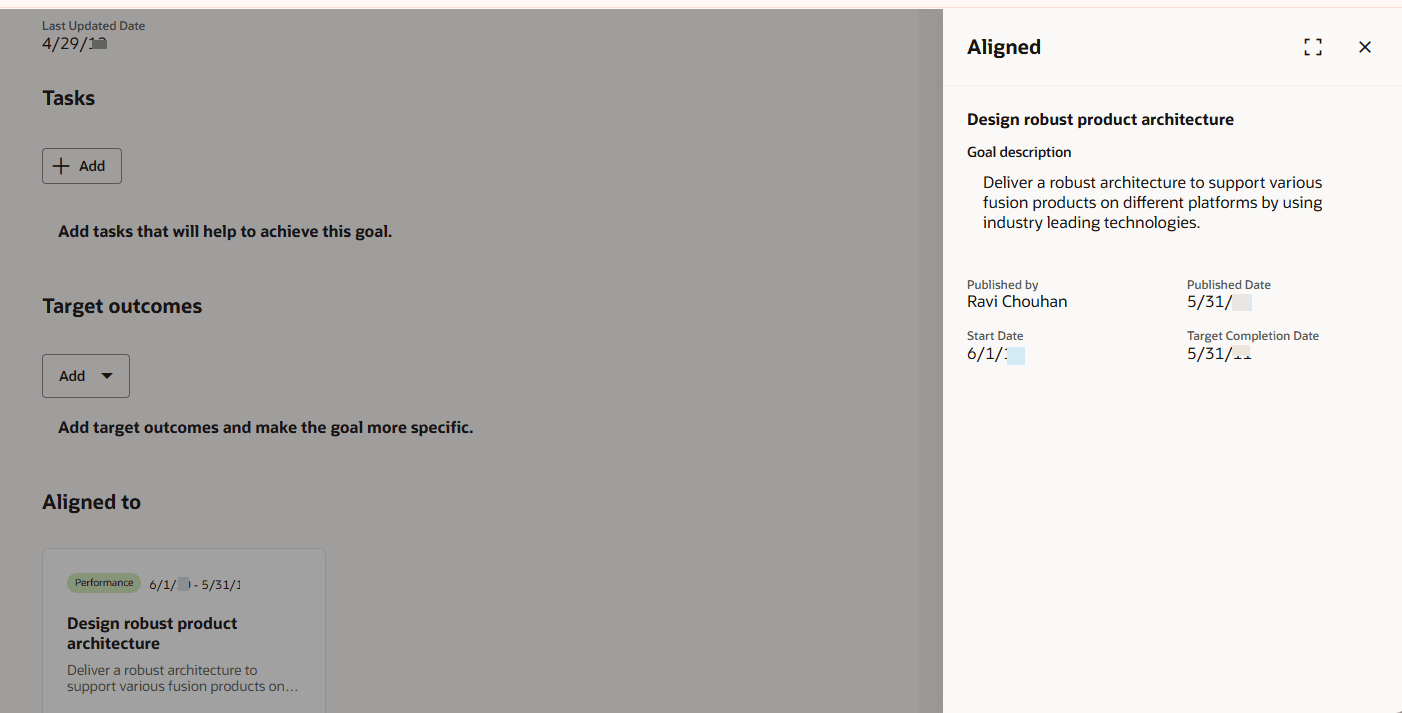
Aligned Goal Details
Business Benefit
View additional information about the aligned goal and plan to achieve your goal.
Steps to enable and configure
To enable Redwood Goals Center, you need to enable the profile options indicated in the table.
|
Profile Option Code |
Profile Option Display Name |
Value |
|---|---|---|
|
ORA_HCM_VBCS_PWA_ENABLED |
Enable VBCS Progressive Web Application User Interface |
Y |
|
ORA_HRA_PERFORMANCE_DOCUMENTS_AND_GOALS_REDWOOD_ENABLED |
Enable Redwood Performance Documents and Goals Center |
Yes |
NOTE: The Performance Document, Check-in, and Goals Center features are closely connected. So, the Redwood version of these pages can all be enabled or disabled only using the common ORA_HRA_PERFORMANCE_DOCUMENTS_AND_GOALS_REDWOOD_ENABLED profile option. These features can't be enabled individually.
For more information, see How do I enable a profile option?.