Redwood Experience for HCM Extracts: Submit Extracts
Enhance your experience with the redesigned Submit Extracts page, developed using the Redwood toolset. Built with Visual Builder Studio (VBS), the page delivers a modern, intuitive interface aligned with Oracle Applications design standards.
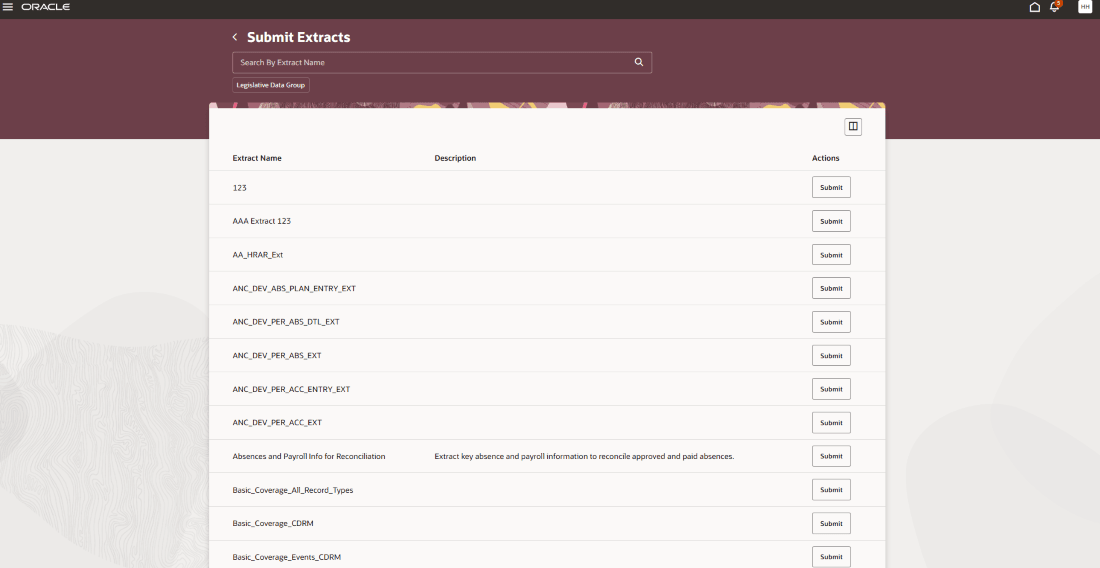
The Submit Extracts page displays a list of available extract definitions. You can search for a specific extract by name or filter the list using Legislative Data Group.
To submit an extract, select it and provide the required and optional parameters on the Create Extract Instance page.
To access the page, navigate to My Client Groups > Data Exchange > Submit Extracts.
Create Extract Instance:
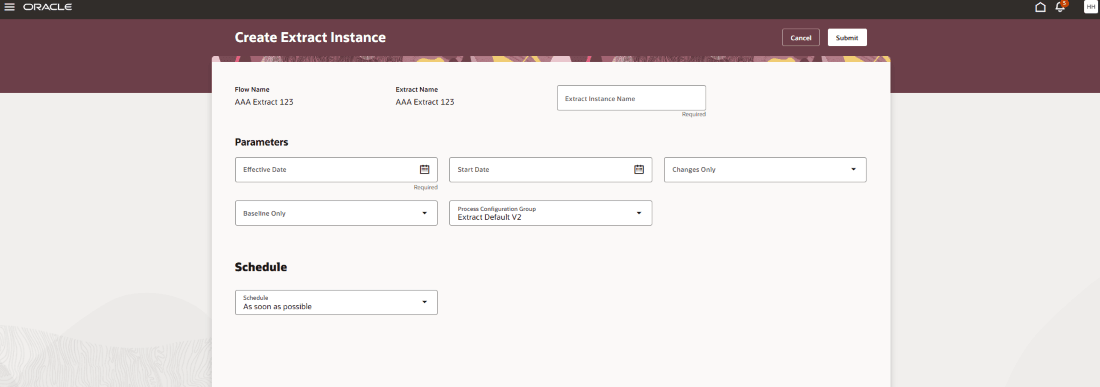
The Create Extract Instance page opens when you select Submit for a specific extract on the Submit Extracts page. On this page, you need to enter an Extract Instance Name and specify parameters such as Effective Date, Start Date, Changes Only, Baseline Only, and Process Configuration Group.
You can choose to submit the extract immediately or schedule it to run at a later date and time. After submission, the application automatically navigates to the View Extract Results page, where you can monitor the extract instance.
Business Benefit:
The redesigned Submit Extracts page delivers a streamlined Redwood experience with high-fidelity interactions. It reduces navigation steps, improves performance, and provides a more cohesive and intuitive user interface.
Steps to enable and configure
This feature is enabled by default in Redwood; no further action is required.
Access requirements
The role needed for Submit Extracts is PER_RUN_HCM_EXTRACT_PRIV.