Manage Document Records for Managers and HR Specialists with AI Assistance
In continuation of the Document Records Management Assistant (Supervisor Agent) introduced in Release 26A, we have now delivered an enhanced workflow agent Document Records Management Assistant. This workflow agent includes all the capabilities of the existing Release 26A Document Records Management Assistant supervisor agent and extends functionality to support Line Managers and HR Specialists, enabling them to manage document records more efficiently across their teams and workforce. It leverages advanced large language models (LLMs) to understand your natural-language requests and provide contextual, accurate assistance when creating, organizing, and finding records.
NOTE: The existing Supervisor Agent template will no longer be supported. Instead, you can use the workflow agent Document Records Management Assistant template.
Here are a few points to note:
-
If you are currently using a copy of the Release 26A agent, you can continue using it without disruption. However, it will continue to support self-service functionality only.
-
Document Records Management Assistant is a new, separate workflow agent that extends document management capabilities beyond employees to include line managers and HR users, enabling broader and more efficient handling of document records across the organization.
-
This enhancement gives greater flexibility by allowing you to either continue with the existing self-service model or adopt the enhanced workflow agent for expanded role-based document management.
-
The Document Records Management Assistant agent is designed to operate at the individual employee level. Team-wide aggregation, consolidated reporting, and cross-employee analysis are not supported.
These are the improvements of the Workflow Agent over the Supervisor Agent:
-
Returns only relevant data in a cleaner and more consumable format - The Workflow agent retrieves and presents only the information required for the user’s request, improving response clarity and reducing unnecessary details. This results in a more streamlined and user-friendly experience.
-
Creates records with minimal required input - When no mandatory fields are required for document record creation, the Workflow agent proceeds with the bare minimum information instead of prompting the user for additional unnecessary details. This reduces user effort and accelerates task completion.
-
Prompts only for mandatory information - The Workflow agent intelligently requests only the fields that are required to complete the transaction, minimizing back-and-forth interactions and improving efficiency.
-
Provides detailed validation for irrelevant or incorrect input - If users provide unsupported or irrelevant information, the Workflow agent returns clear and detailed validation messages, helping users quickly understand and correct the issue. This improves usability and reduces transaction failures.
Here's some benefits of using this workflow agent instead of the UI:
-
Provides access to relevant resources through a Document (RAG) tool.
-
Streamlines workflows into a single conversational query, providing quick answers with direct links.
-
Removes the learning curve for new or infrequent users, minimizing training, and manual filtering.
-
Automatically identifies user intent (for example, latest passport) and retrieves the correct record.
-
Guides users in creating document records by suggesting categories, document types, required fields, and metadata values.
-
Enhances overall document management with natural language interaction and clear, actionable responses aligned with your organization’s policies.
With the Document Records Management Assistant, you can facilitate rapid retrieval and creation of records using natural-language and contextual prompts. For example, users can use these prompts to ask the assistant and receive details about it.
-
Find the passport for Ravi Chauhan
-
Show me the driving license for Ross Taylor
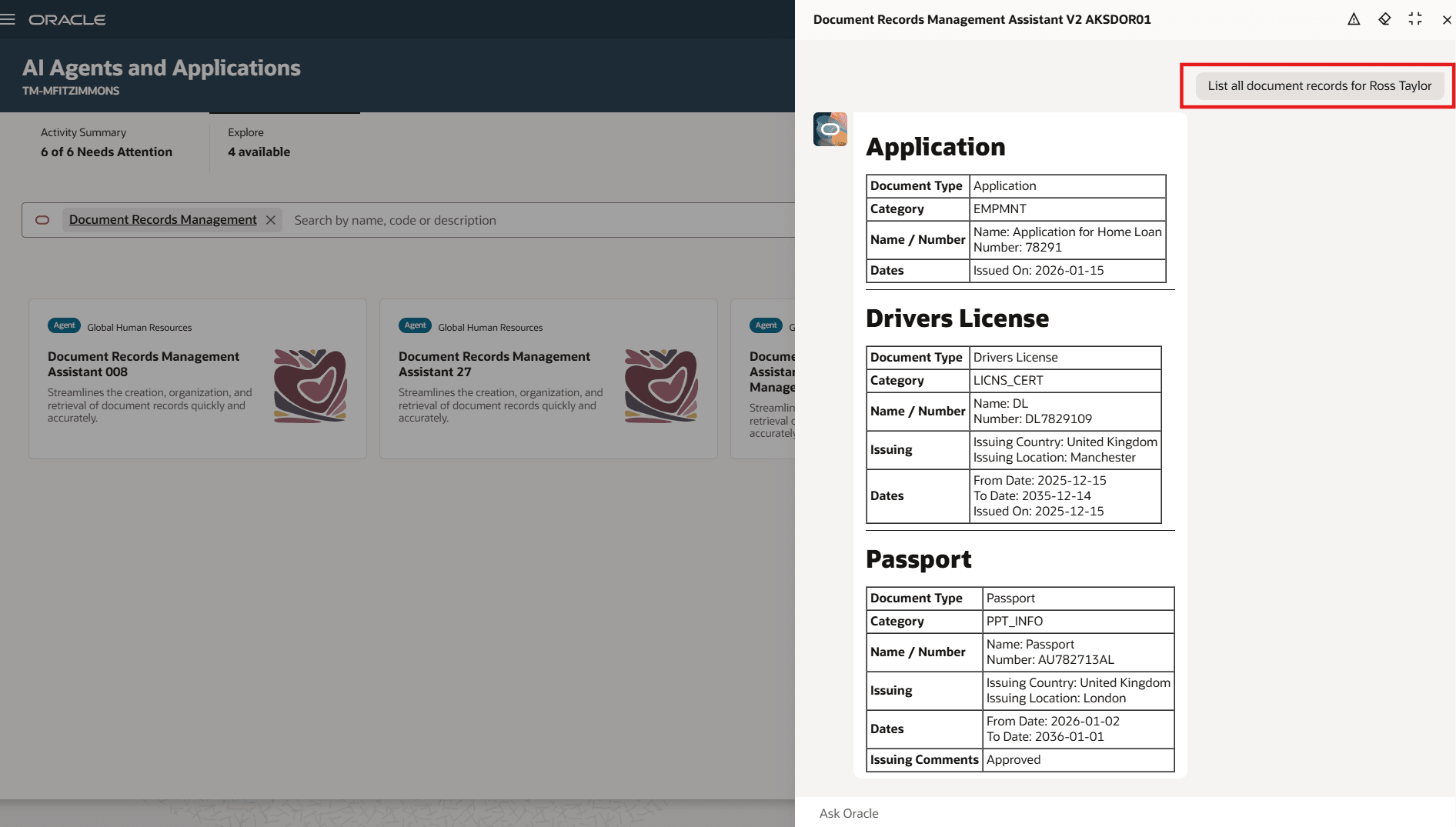
Document Records Management Assistant for Managers and HR Specialists
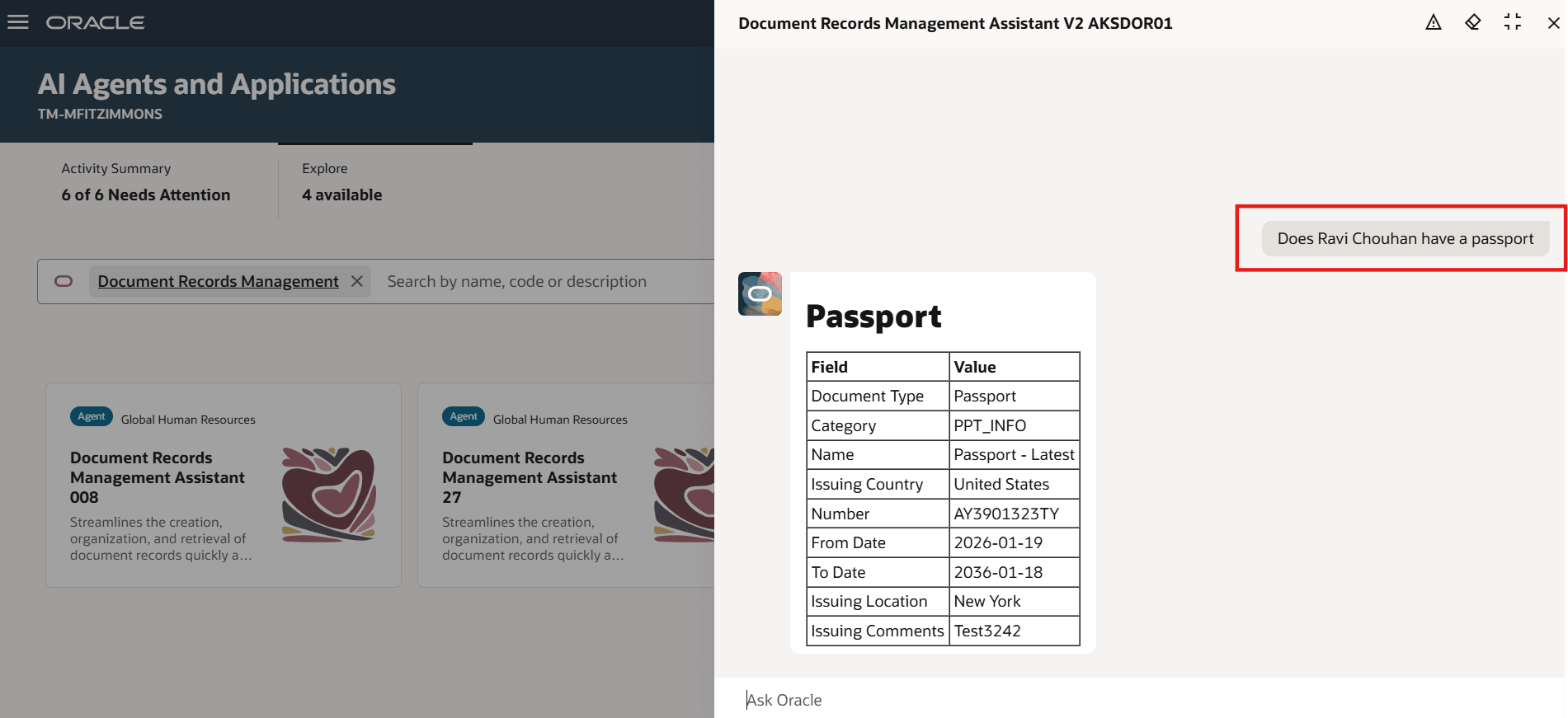
AI Assistant Retrieving Specific Document Record for a Specific Person
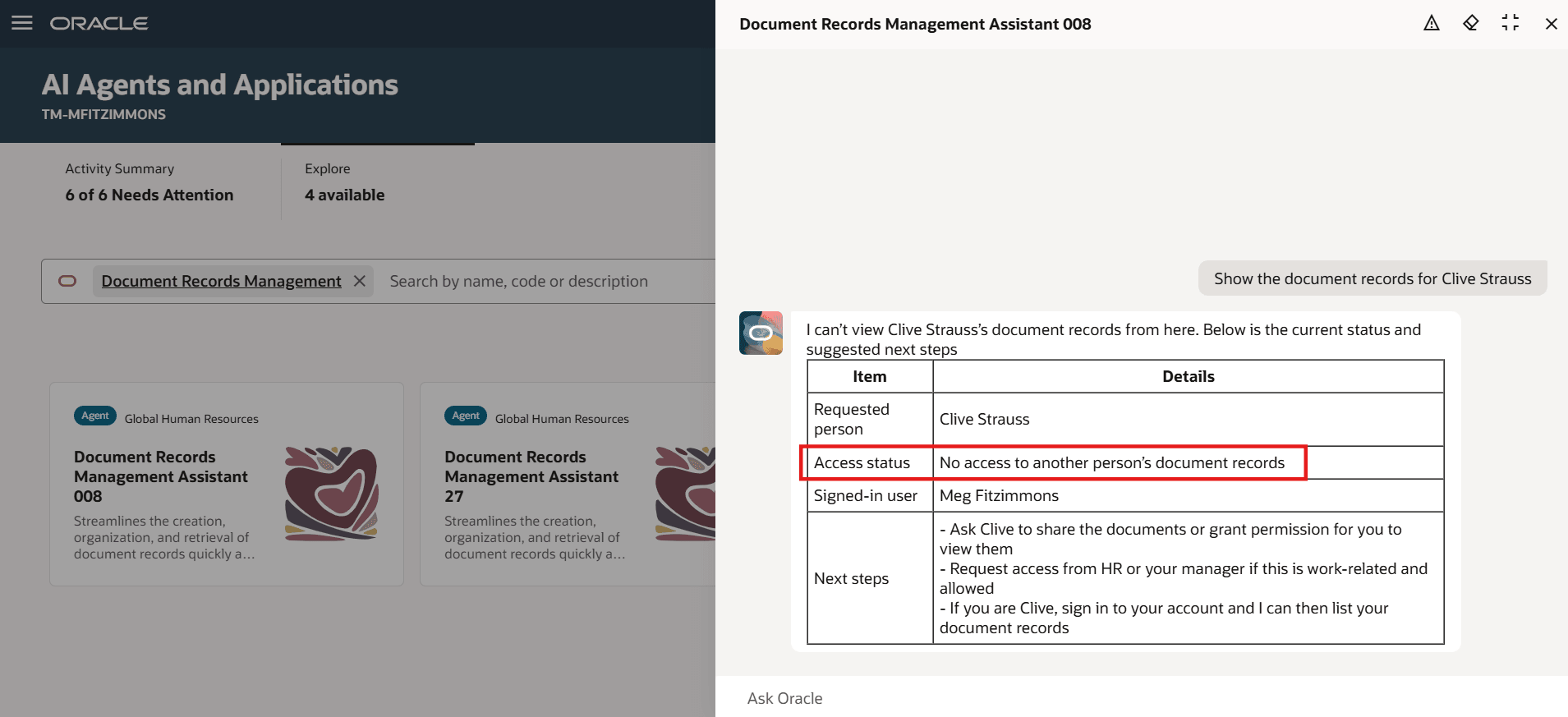
AI Assistant Only Retrieves Data Based on Logged-in User's Access
Business benefit: Enhance the existing Document Records framework by providing proactive support, personalized guidance, and efficient access to information.
Steps to enable and configure
-
Your environment must have certain necessary configurations. Ask your help desk to contact Oracle Support, who can verify what your environment has and address any gaps. For more information, see FAQ2521 on My Oracle Cloud Support.
-
Set the Enable Security Console External Application Integration (ORA_ASE_SAS_INTEGRATION_ENABLED) profile option to Yes and enable permission groups for the appropriate roles. See Access Requirements for AI Agent Studio.
-
The Document Records Management Assistant is a preconfigured template. You need to create your own agent using the preconfigured template.
-
To learn how to set up AI agents, see Create AI Agents Using Preconfigured Agent Team Templates.
-
Tips and considerations
-
The agent enables users to retrieve, create, and update document records. However, deletion of document records is not supported.
-
Approval rules remain the same whether you perform create or update operations using the agent or transactions using the user interface.
-
The agent also fetches document records that are pending approval.
-
You can view and manage document records using the agent only for people for whom you have access via your security profile.
-
You can view and manage document records using the agent only for document types for which you have access via your security profile.
-
Create, update, and display operations for descriptive flexfields (DFF) and legislative flexfields (DDF) are not supported by the agent.
-
Business rules and validations configured in Visual Builder Studio are not evaluated by the agent.
Key resources
-
Manage Own Document Records with AI Assistance, What's New 26A
Access requirements
The agents you can view depend on the roles and privileges assigned to you. To access this agent, your role must be explicitly granted access to it by an AI Studio Administrator. See How can I give users access to AI agents and Access Requirements for AI Agent Studio.