Enhanced Promotion Advisor Agent Insights and Salary Support
The Promotion Adviser Agent is enhanced to provide richer insights and in-transaction support during promotion actions, helping managers make more informed and confident decisions. This release introduces two key capabilities: the ability to update salary directly within the agent-assisted promotion flow, and enriched assignment notes that now include a summary of worker feedback alongside performance and seniority data.
1. Salary Update During Promotion
The Promotion Adviser Agent now supports salary updates as part of the promotion flow. Managers can update the worker's salary directly through the agent by specifying either a new salary amount or a percentage increase. This provides flexibility to handle straightforward salary adjustments inline with the promotion action.
For more detailed or complex salary configurations, managers can continue to use the Promotion process, which offers the full range of salary update options.
2. Enriched Assignment Notes with Feedback Summary
Assignment Notes generated by the agent have been enhanced with worker feedback summarization. In the previous release, the agent generated Manager Notes by analyzing assignment attributes, performance data, and seniority information. Starting with this release, the agent also summarizes all feedback entered for the worker and incorporates it into the notes.
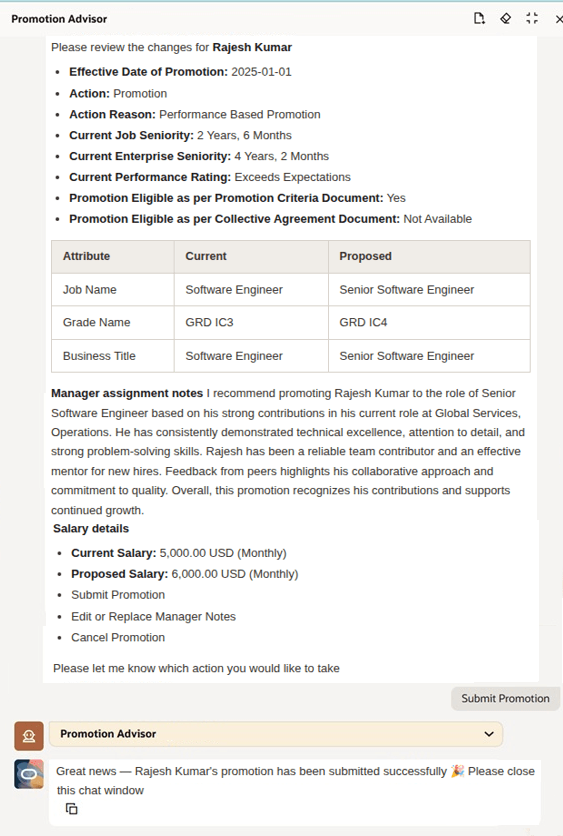
Promotion advisor's insights and salary update
With the ability to update salary along with the promotion and feedback-enriched assignment notes, the Promotion Advisor Agent now enables managers to handle a more complete promotion workflow in a single conversational flow. The inclusion of worker feedback summaries alongside performance and seniority data gives managers richer context, leading to well informed and more defensible promotion decisions with less manual effort.
Steps to enable and configure
- Your environment must have certain necessary configurations. Ask your help desk to contact Oracle Support, who can verify what your environment has and address any gaps. For more information, see FAQ2521 on My Oracle Cloud Support.
- Set the Enable Security Console External Application Integration (ORA_ASE_SAS_INTEGRATION_ENABLED) profile option to Yes, and enable permission groups for the appropriate roles. See Access Requirements for AI Agent Studio.
-
To learn how to set up AI agents, see Create AI Agents Using Preconfigured Agent Team Templates.
You need to configure security to use this feature. See the Access Requirements section.
Key resources
For more information, refer to this What's New announcement in release 25D
Access requirements
The agents you can view depend on the roles and privileges assigned to you. To access this agent, your role must be explicitly granted access to it by an AI Studio Administrator. See How can I give users access to AI agents and Access Requirements for AI Agent Studio.