Questionnaire Task Type Hidden in Guided Journey Configuration
The Questionnaire task type in Guided Journeys is now hidden by default to simplify the configuration experience and reduce complexity for customers who don’t commonly use this task type.
If required, you can re-enable the Questionnaire task type by setting the profile option ORA_PER_JRN_HIDE_QUEST_TASK_GJ to N.
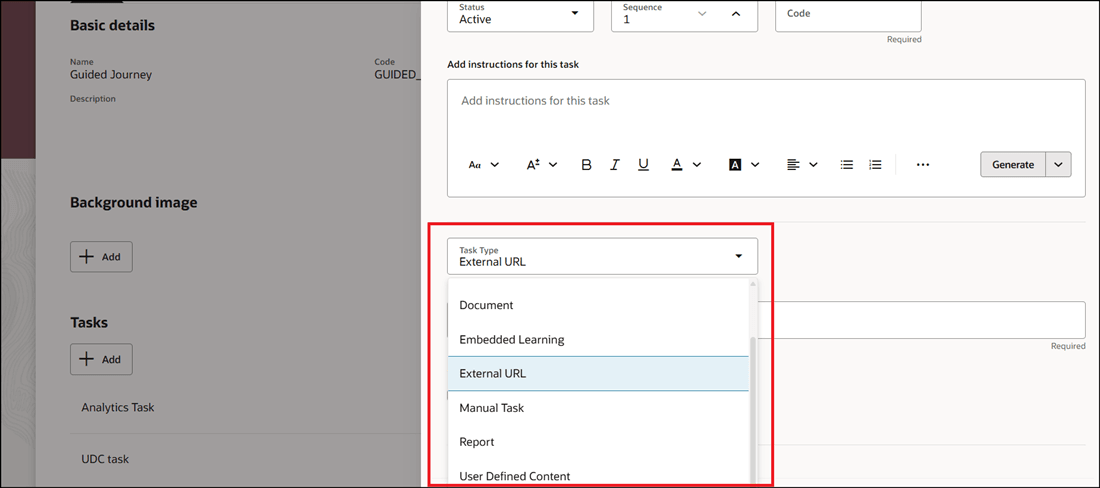
Questionnaire Task Hidden by Default
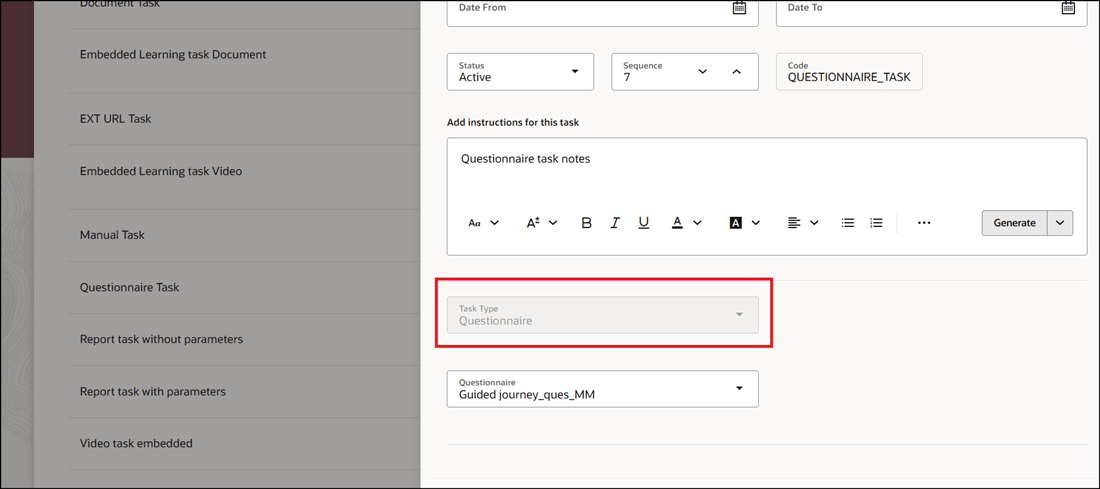
Existing Questionnaire Task Disabled
Streamlines guided journey configuration to make it clearer and easier to manage, as the Questionnaire task type is not commonly used in Guided Journeys.
Steps to enable and configure
You can set the ORA_PER_JRN_HIDE_QUEST_TASK_GJ profile option (set the profile value to N at the user profile level) to show the Questionnaire task type in a guided journey task. Once enabled, the task type is available for selection from the Task Type list. For more information, see this topic: How do I enable a profile option?
Tips and considerations
-
By default, the Questionnaire task type is not enabled when configuring Guided Journeys. You can disable the profile option to display the task type when configuring a guided journey.
-
Existing configurations of the Questionnaire task type will continue to work; however, you can’t create new configurations.
Key resources
For more information about journeys, refer to the Implementing and Using Journeys guide on Oracle Help Center.
Access requirements
You must be granted the Manage Journey (ORA_PER_MANAGE_JOURNEY_TEMPLATE) aggregate privilege to work on journey templates.