 Business Rules Support for Key FlexFields on Redwood Employment Processes
Business Rules now support key flexfields, including Default Expense Account and People Group, across Redwood Employment processes. This enables defaulting and validation logic for key flexfield segments within employment update, add employment, add assignment, and local and global transfer processes.
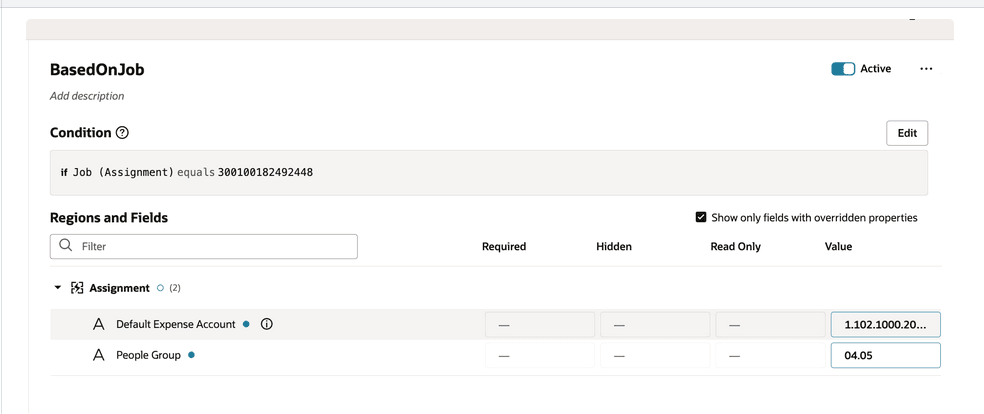
Default Expense Account and People Group key flexfields added to Business Rules
You can enable the properties Hidden, Read Only, and Value for these key fkexfields. You can also use these fields for creating defaulting and validation rules.
Business Rules support for key flexfields reduces manual errors, enforces consistent HR policies across all employment transactions, and eliminates the need for custom workarounds — resulting in faster processing and improved data quality.
Steps to enable and configure
For more information, refer to this topic on the Oracle Help Center:- How do I hide or show a field in Visual Builder Studio?
Tips and considerations
- Support for the Required property will be implemented in a future release.
- Using business rules if an invalid value is defaulted in the KFF segments, then even though it will be visible on the UI, it won't be saved in the application when the employment transaction is submitted.
Key resources
For more information, refer to these topics on the Oracle Help Center:
- People Group in the Implementing Global Human Resources guide
-
How You Configure the Default Expense Account in the Implementing Global Human Resources guide
-
Employment Processes in the Using Global Human Resources guide
Here are the topics we recommend on getting started with Express Mode.
- Refer to the following documentation in this order:
- Express Mode in VBS for detailed instructions on using specific Express Mode features.
- Extending Redwood Applications for HCM and SCM Using VB Studio for details on what’s supported by HCM.
- You can refer to the VB Studio documentation "Configure an Oracle Cloud Application" to check the steps to access VB Studio from a Redwood page.
- Extending HCM Redwood Applications Using Visual Builder Studio
- Refer to the Customer Connect forum Visual Builder Studio for HCM