Team Learning and Development Workspace for Managers
Managers and learning managers benefit from the intelligent Team Learning and Development Workspace for Managers agentic app with a consolidated view that prioritizes team learning needs. The app helps with faster identification of compliance gaps, where to focus team attention, and assignment of recommended learning to directs. This agentic app focuses manager attention on overdue and near-due requirements, skills development trends, and high-value recommendations to support timely remediation and development planning. Here's the information provided by available sections:
Learning (Assigned Learning Monitor agent)
- Displays learning with overdue or due-soon assignments and prioritizes the learning by affected learners so managers can identify high-risk learning.
- Select a learning to see directs with overdue or due soon assignments.
Learners (Team Learners Monitor agent)
- Shows only direct reports and prioritizes them by count of overdue assignments so managers can quickly identify which workers to follow-up with
- Expanded view shows assignments due in the next 30 days.
- Select a learner to see their current learning assignments that are overdue or due soon so that managers can follow up as appropriate.
Skill Development by Skill (Skills Development Monitor by Skill agent)
- Lists the skills with the largest number of team members currently developing them, helping managers understand team-level trends.
- Expanded view lists team members developing a skill.
Skill Development by Direct (Skills Development Monitor by Direct agent)
- Lists directs prioritized by the number of skills they currently have in development so managers can identify highly-engaged learners or workload on skill growth
- Expanded view shows core vs role skills by direct.
Recommended Learning (Team Learning Recommendations Advisor agent)
- Surfaces prioritized learning recommendations for the team and lets managers assign recommended learning to their directs or the entire reporting group
- Expanded view shows the team members recommended for each skill.
Most Recommended Skills (Team Skills Recommendation Monitor agent)
- Lists the top recommended skills for the team based on the skill recommender so managers can focus on recommendations tied to objectives.
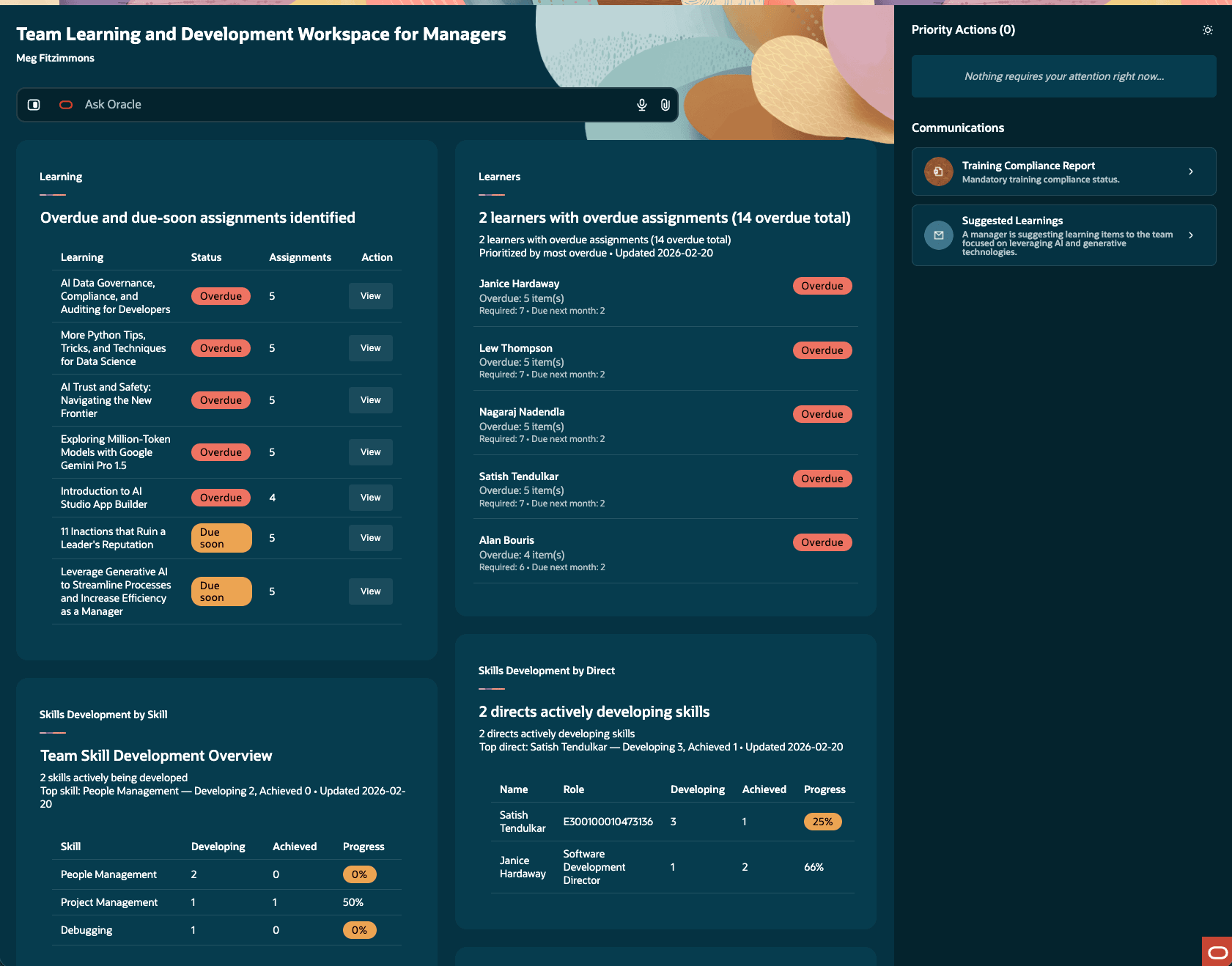
Team Learning and Development Workspace for Managers Home Page
Business benefit: An AI-driven workspace that surfaces the most important learning and development items for the manager's team.
Steps to enable and configure
You need to add access. See the Access Requirements section for details.
Tips and considerations
- The due soon window is 30 days (can be modified in the prompt)
- Managers can generate overdue and due soon emails, based on available templates, to remind learners.
- Ask Oracle queries will return information from only the Assigned Learning Monitor (Learning panel agent) and Team Learners Monitor agents (Learners panel agent)
- Known issues
- Occasionally the agentic app panels may not render correctly. Reloading the page panel should correct this.
- You might notice the counts of overdue or due soon items change between the summary and the details. We are working to refine the agent to fix this.
- Other agentic apps
- Due to packaging constraints, you'll also see these apps. Ignore them because they're children used in the Team Learning and Development Workspace.
- Learner with Incomplete Assignments Workspace for Manager
- Learning with Incomplete Assignments Workspace for Manager
- Due to packaging constraints, you'll also see these apps. Ignore them because they're children used in the Team Learning and Development Workspace.
What's Coming Soon
In the next release, we're replacing the Skills Development by Skill and Skills Development by Direct panels with these panels:
- Directs’ progress on development objectives
- Managers can see which direct reports are and aren't making progress on assigned development skills over a 90-day window.
- The panel prioritizes who to show, limits the default list to top rows, supports Show all, and gives delivered email actions to:
- Nudge people with no progress
- Recognize people making progress
- Directs’ learning alignment with development objectives
- Managers can see whether completed noncompliance learning by directs is and isn't aligned with their development objectives over the same 90-day window.
- The panel includes learning context (such as name, date, outcomes, or inferred outcomes), supports expanded views, and provides delivered email actions to:
- Ask about misaligned learning
- Recognize aligned learning
Key resources
Access requirements
Managers with appropriate learning manager permissions, and AI Agent Studio access will see this agentic app in AI Agent Studio. They can also access the agent directly using the My Team > Learning > Team Learning and Development Workspace quick action.
This duty role and privilege are delivered in the Line Manager abstract role. You need to add them to your corresponding custom roles.
| Role Name | Role Code | Role Description |
|---|---|---|
| Learning and Development Agents Duty | ORA_DR_WLF_LEARN_DEV_AGENTS_DUTY | Grants access to the learning and development agents, such as description and summary. |
| Privilege Name | Privilege Code | Privilege Description |
|---|---|---|
| Access Team Learning and Development Workspace | WLF_ACCESS_TEAM_LEARNING_DEVELOPMENT_WORKSPACE | Enables the quick action in My Team to access this agentic app. It's also delivered with the Line Manager abstract role. |
Also, edit the appropriate roles and add the oraCommonFusionAISecurityAuthorization_read_DocumentGenConversion permission group.