Enhancements to WhatsApp Configuration and Template Library
You can now view the following template metrics using the WhatsApp Notification Template Library task in Setup and Maintenance:
- Number of active templates
- Number of approved templates
- Number of rejected templates
- Number of suspended templates
- Number of draft templates
- Number of templates in pending approval status
- Number of templates used in the content library
- Number of recently updated templates (those updated in the last 7 days)
These metrics include translated templates as well. So, if an active template exists in 2 translations, the total count is taken as 2 for that template. Deactivated templates aren’t included in template metrics.
These metrics are displayed in the header area of the WhatsApp Message Templates page.
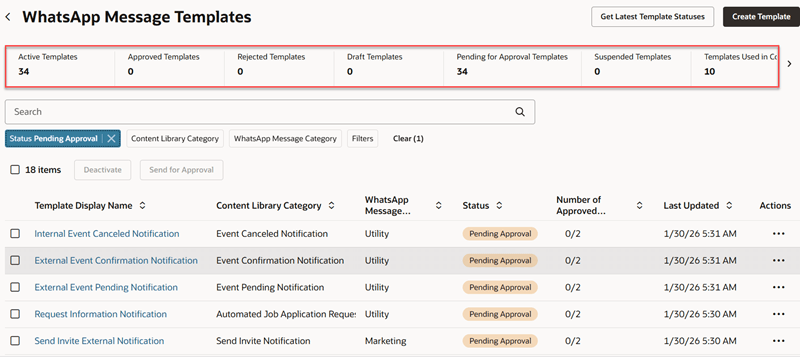
Template Metrics
When you filter templates based on the status, content library category, or WhatsApp message category, the count of templates is automatically updated in all metrics.
Import and Export of WhatsApp Configuration
You can now export the following WhatsApp configuration details from one application environment and import them into another:
- Name and description of WhatsApp messaging providers
- Allowed list of countries for WhatsApp
- Daily limits for WhatsApp messages, which includes the system hard limit, candidate message limit, and the system soft limit.
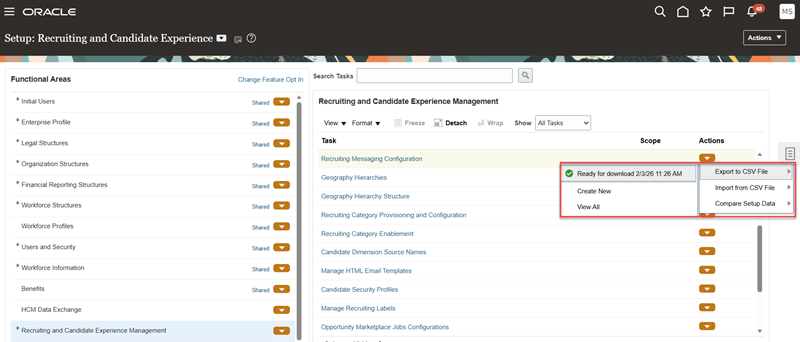
Export WhatsApp Configuration
These details are exported as a CSV file. When you import the details, the following changes occur in the destination environment:
- WhatsApp messaging providers that are in the CSV file are added to the existing list of WhatsApp providers.
- The allowed list of countries and daily limits for WhatsApp messages are replaced with the corresponding data from the CSV file.
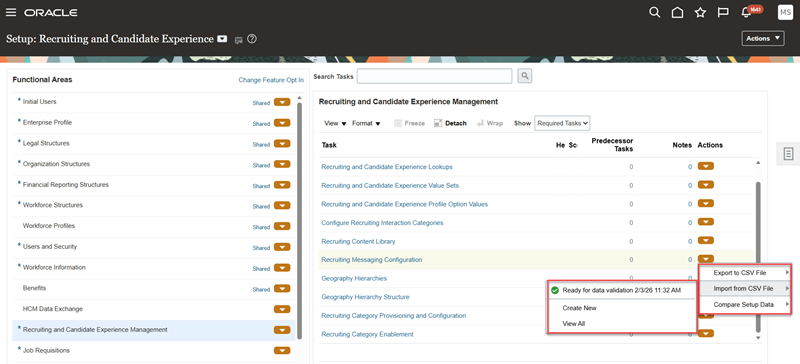
Import from CSV File
Business Benefit: Leverage these features to:
- Gain visibility into template counts across various statuses for better quality monitoring and compliance.
- Enable faster migration of messaging providers, message limits, and geo-permissions across environments.
Steps to enable and configure
There’s no setup or configuration required for the WhatsApp template metrics feature.
To export WhatsApp configuration data from an environment and import them into another, refer to Export and Import WhatsApp Configuration Data.
Tips and considerations
Note that the existing functionality for exporting and importing of SMS configuration details remain the same. So, when you perform the export and import tasks, the SMS configurations in the destination environment are also updated as follows:
- SMS providers from the imported data are added to the existing list of providers
- Daily limits for SMS are replaced by the imported data
- Allowed list of countries for SMS are also updated with the imported data
Key resources
For more information, refer to these topics in Oracle Help Center:
- Set Up WhatsApp Templates
- Associate WhatsApp Templates with Content Library Items
- Set Limits for Outbound Messages and Enable WhatsApp Communications