Redwood Experience: Saved Search in Rule-Based Pools
Saved Search is available as an attribute you can select when creating rule-based pools.
You can apply saved searches to rule-based pools so that all the filter parameters used in the saved search are automatically applied to the pool when you create it. The saved search attribute can be combined with the existing location and tags attributes.
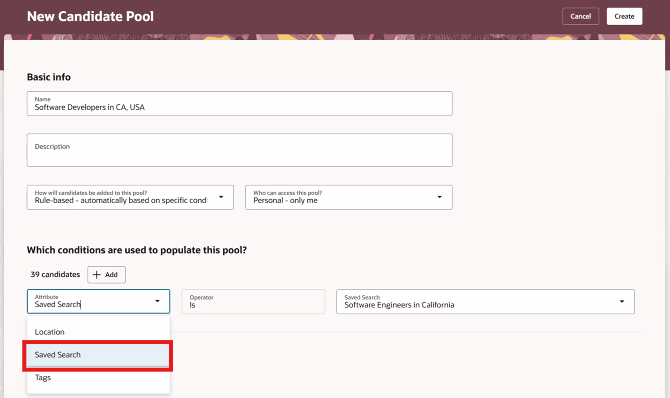
Saved Search in Rule-Based Pools
Business benefit: You can quickly create pools which are automatically populated with candidates with a high level of specificity of attributes, leveraging all the search criteria and resulting in a targeted grouping of candidates.
Steps to enable and configure
To use Redwood experience, you need to enable this profile option:
- ORA_IRC_RECRUITING_REDWOOD_ENABLED
For details, see How do I enable a profile option?
For details on enabling and customizing Redwood for HCM, see How do I adopt Redwood for HCM? and Extending Redwood Applications for HCM and SCM Using Visual Builder Studio
For privileges, see the Access Requirements section.
Tips and considerations
Only saved searches created in Redwood are available here.
Access requirements
Users need one or more of these privileges or aggregate privileges:
- Manage Candidate Pool (ORA_IRC_MANAGE_CANDIDATE_POOL)
- Manage Candidate Pool Data (IRC_MANAGE_CANDIDATE_POOL_DATA)
- Choose Candidate Pool Data (IRC_CHOOSE_CANDIDATE_POOL_DATA)
- Report Candidate Pool Data (IRC_REPORT_CANDIDATE_POOL_DATA)