Redwood Experience: Schedule Interview for Multiple Candidates
Take advantage of the Schedule Interview action that has been enhanced to allow scheduling an interview for multiple candidates at once.
On the Job Applications list page, when you select multiple job applications and use the Send Interview Invite action in the More Actions menu, the schedule interview creation flow opens. You can schedule the interview and request feedback for the interview being scheduled. When you select 11 or more job applications, the action is processed asynchronously (bulk process).
The Send Interview Invite action is only used to schedule candidate managed interviews. Hiring team managed interviews can't be scheduled using this action.
Note: When scheduling an interview for multiple candidates, requesting feedback and defining interview resources aren't available.
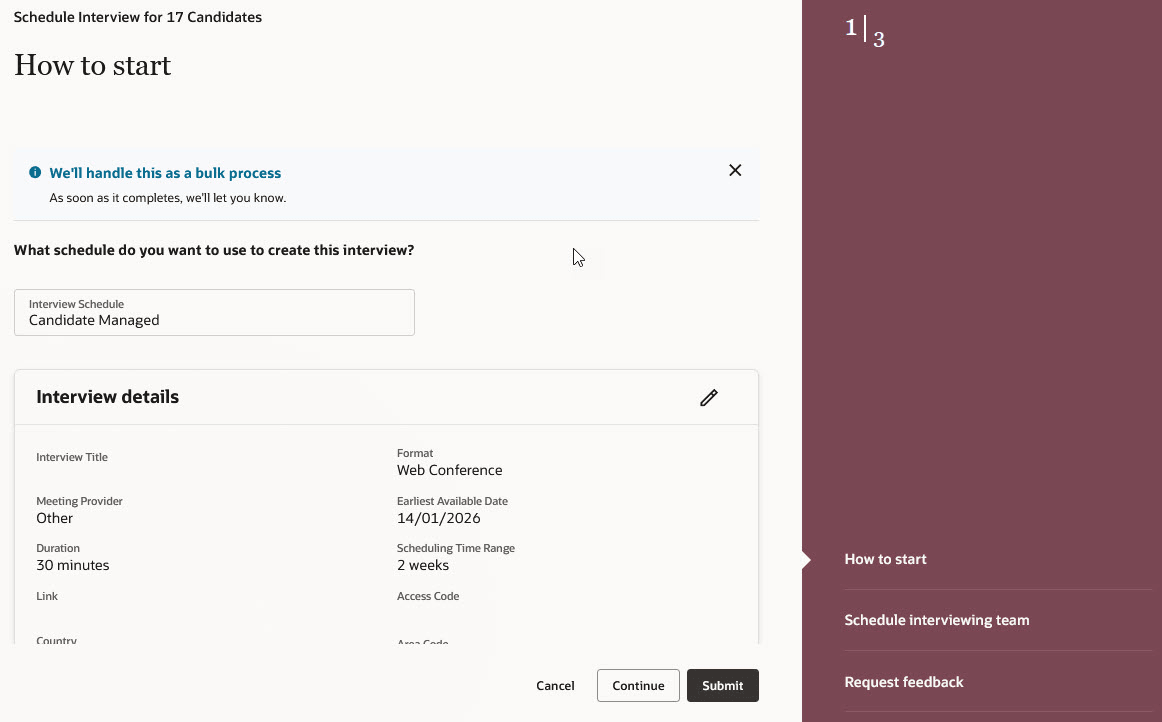
Scheduling an Interview for Multiple Candidates
Business benefit: This feature will allow you to save time when scheduling interviews for candidates.
Steps to enable and configure
To use the Redwood experience for the Send Interview Invite action, you need to enable these profile options:
- ORA_IRC_RECRUITING_REDWOOD_ENABLED
- ORA_IRC_JOB_APPLICATION_REDWOOD_ENABLED
For details, see How do I enable a profile option?
For details on enabling and customizing Redwood for HCM, see How do I adopt Redwood for HCM? and Extending Redwood Applications for HCM and SCM Using Visual Builder Studio.