Redwood Experience: Find Candidates and Create and Populate a Candidate Pool Using AI Agent
Use an AI Agent to find candidates who are a fit for a job requisition and to create and populate a candidate pool with those matching candidates. This helps to identify and organize candidates earlier in the hiring process and to create an initial candidate pool with relevant candidates as soon as a requisition is submitted for approval.
Here’s how it works:
A new agent template is available in AI Agent Studio: Recruiting Sourcing Candidate Pool Agent Template.
The Recruiting Sourcing Candidate Pool Agent reads requisition details to find eligible requisitions and converts those details into a natural language search. This invokes the Recruiting Candidate Matching Agent which then takes the search criteria created by the agent and finds candidates that match specific job requisitions.
Once the matching candidates are identified, the Recruiting Candidate Pool Agent runs and creates and populates a candidate pool with the relevant candidates. Pool owners are notified by email when a pool gets created and are automatically notified when potential candidates are available.
The agent continues to proactively monitor your requisition activity and initiates candidate sourcing efforts based on the schedule you set up.
Business benefit: Provides recruiters with an automatically created candidate pool at the earliest stage of the requisition lifecycle. Instead of manually building searches and pools, recruiters can save time by relying on the agent to do this.
Steps to enable and configure
You determine the trigger for the Recruiting Sourcing Candidate Pool Agent by configuring the schedule. The other two agents are triggered automatically by workflow events.
(Navigator > Tools > AI Agent Studio > [open your agent] > Agent Team Settings > Triggers > [Schedule] > Add)
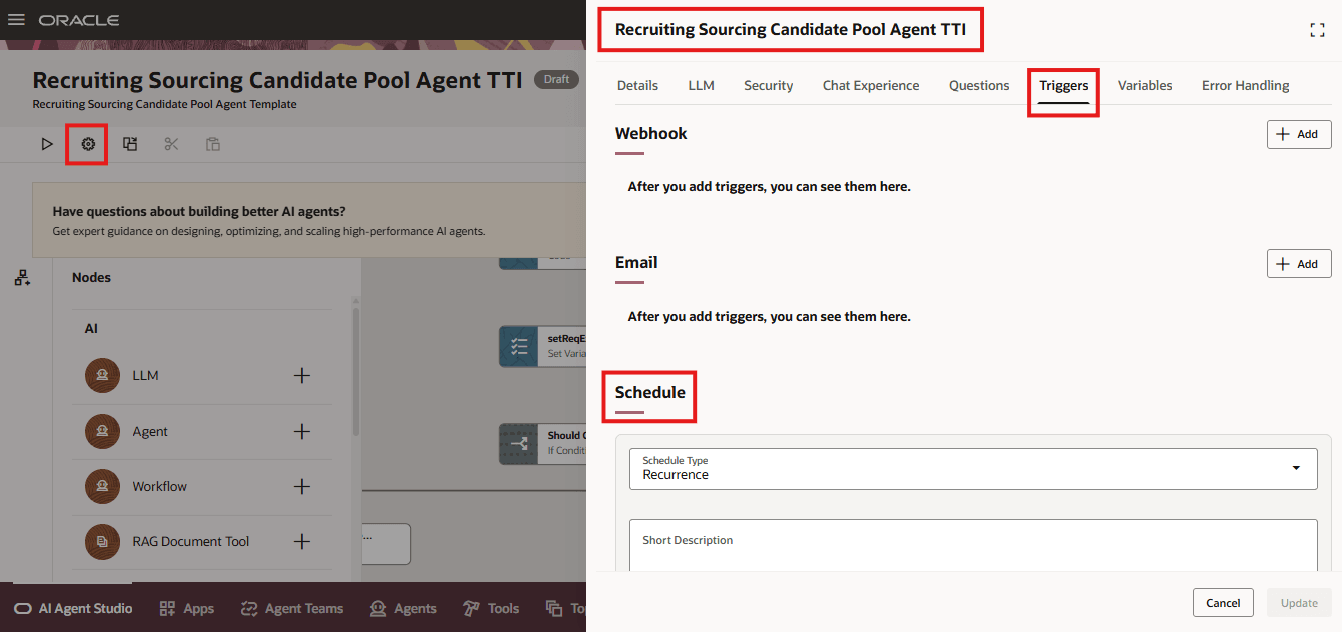
Agent Trigger Schedule
Key resources
- Create AI Agents Using Preconfigured Agent Team Templates
- Explore AI Agents for Oracle Fusion Cloud Applications
- How do I use AI Agent Studio?
- How can I give users access to AI agents
- Access Requirements for AI Agent Studio
Access requirements
Users need these privileges:
- Manage Candidate Pool (IRC_MANAGE_CANDIDATE_POOL_PRIV)
- View Job Requisition (IRC_VIEW_JOB_REQUISITION_PRIV)
- Manage Candidate Pool (IRC_MANAGE_CANDIDATE_POOL_PRIV)
- View Job Requisition (IRC_VIEW_JOB_REQUISITION_PRIV)
- Search for Candidates (IRC_SEARCH_FOR_CANDIDATE_PRIV)
- Manage Candidate Pool (IRC_MANAGE_CANDIDATE_POOL_PRIV)
- View Recruitment Campaign (IRC_VIEW_RECRUITMENT_CAMPAIGN_PRIV)
- Recruiting Sourcing User Workflow Agent Access (ORA_HCM_IRC_SOURCING_USER_WF_AGENT_ACCESS)