Redwood: Performance Document Generative AI Enhancements
Leverage additional Gen AI functionality in Redwood performance documents for workers, managers and participants with these enhancements. These enhancements are also available to managers in All-in-One Evaluations:
- Use AI Assist to generate responses for text based evaluation questions
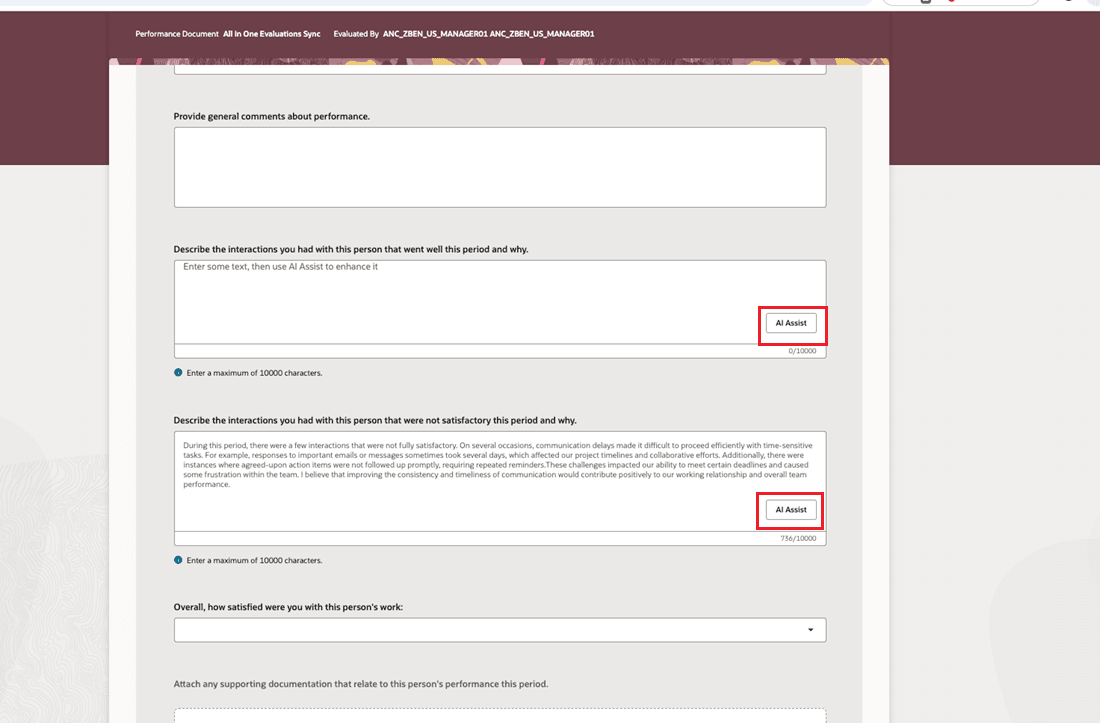
AI Assistance in Questionnaire
- Use AI Assist to generate evaluation comments in evaluation topic summaries for competencies, skills, performance and development goals
Business Benefit: This feature enables you to take advantage of Generative AI to enhance your initial responses and provide more comprehensive feedback.
Steps to enable and configure
You need to configure the profile options for Redwood performance documents as indicated in the following table.
| Profile Option Code | Description | Value |
|---|---|---|
| ORA_HCM_VBCS_PWA_ENABLED | Enable VBCS Progressive Web Application User Interface | Y |
| ORA_HRA_PERFORMANCE_DOCUMENTS_AND_GOALS_REDWOOD_ENABLED | Enable performance documents and employee performance and development goals to display in Redwood. | Yes |
Configure the following page properties to provide text responses to questionnaires:
| Page Property Label | Description |
|---|---|
| Show AI Assist Button for Manager Text Questions in a Performance Document |
This property controls the display of the AI Assist button that's used to provide responses to text based questions in a performance document manager questionnaire. Set it to true or false to show or hide the button respectively |
| Show AI Assist Button for Manager Text Questions in All-in-One Evaluations | This property controls the display of the AI Assist button that's used to provide responses to text based questions in a manager questionnaire in All-in-One Evaluations. Set it to true or false to show or hide the action button respectively. |
| Show AI Assist Button for Worker Text Questions in a Performance Document | This property controls the display of the AI Assist button that's used to provide responses to text based questions in a worker questionnaire in a performance document. Set it to true or false to show or hide the action button respectively. |
| Show AI Assist Button for Participant Text Questions in a Performance Document | This property controls the display of the AI Assist button that's used to provide responses to text based questions in a participant questionnaire in a performance document. Set it to true or false to show or hide the action button respectively. |
Configure the following page properties to control the display of AI Assist for manager evaluation:
| Page Property Label | Description |
|---|---|
| Show AI Assist for Manager Development Tips for Competencies | This property controls the display of the AI Assist functionality to provide manager development tips for competencies. |
| Show AI Assist for Manager Overall Summary Evaluation Comments | This property controls the display of the AI Assist functionality to provide manager overall summary evaluation comments. |
| Show AI Assist for Manager Performance Goal Evaluation Comments | This property controls the display of the AI Assist functionality to provide manager performance goal evaluation comments. |
| Show AI Assist for Manager Development Goal Evaluation Comments |
This property controls the display of the AI Assist functionality to provide manager development goal evaluation comments. |
Tips and considerations
- If you enable the Show AI Assist for Manager Evaluation page property it displays the page level AI Assist functionality and all the other AI Assist functionality regardless of whether the other AI Assist features are enabled.
- If you disable the Show AI Assist for Manager Evaluation page property it displays the other AI Assist functionality if those are individually enabled.
- The page level AI Assist button won't generate responses for questions. The end user must initiate that separately. Consider customizing the text to make this clear to your users. If a performance document only displays questions for a specific role, the page level AI Assist button shouldn't be enabled.
Key resources
- For a listing of all profile options for the recreated pages across HCM, see the following document in My Oracle Support:
- For more information on extending Redwood pages in HCM, refer to this guide on the Oracle Help Center: