Redwood: Multi-Select Records on Performance HR Admin Pages
HR users can now select multiple records simultaneously for processing in these pages:
- When selecting performance documents on the Performance Documents page
- When selecting employees on the Create Performance Document page
- When selecting participants on the Participant Feedback page
On these pages, you can select the check box highlighted in the illustration below to process all or a selected number of records. When you select, the number of selected records displays.
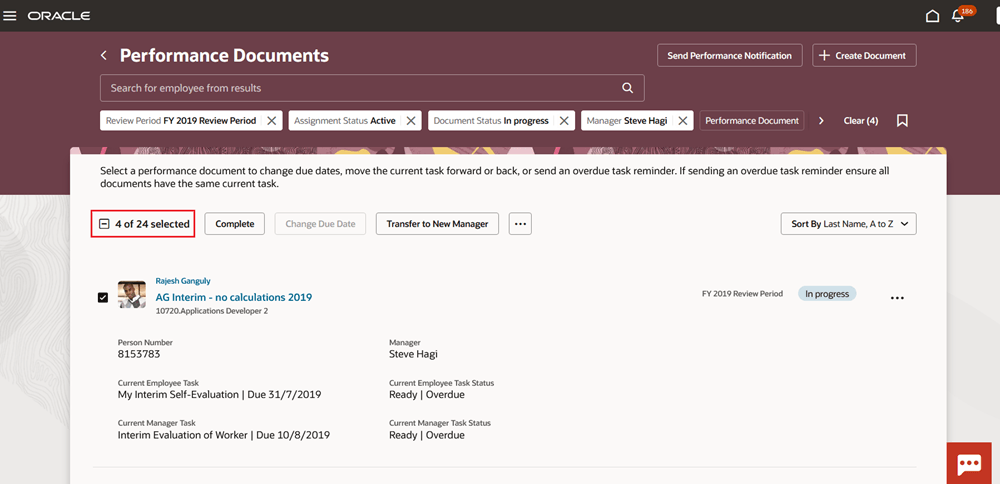
Select Multiple Records for Processing
Business Benefit: This feature reduces repetitive tasks and supports more effective bulk actions, ultimately saving time and reducing administrative effort.
Steps to enable and configure
You need to configure the profile options for Redwood performance documents as indicated in the following table.
| Profile Option Code | Description | Value |
|---|---|---|
| ORA_HCM_VBCS_PWA_ENABLED | Enable VBCS Progressive Web Application User Interface | Y |
| ORA_HRA_PERFORMANCE_ADMIN_REDWOOD_ENABLED | Enable Performance administration pages to display in Redwood. | Yes |
Configure the following page properties in VB Studio:
| Page Property Name | Description |
|---|---|
| Control Maximum Number of Records for Real Time Processing in HR Performance Documents Page | This property controls the maximum number of records that can be processed real time in the HR Performance Documents page. |
| Control Maximum Number of Records for Real Time Processing in HR Participant Feedback Page | This property controls the maximum number of records that can be processed real time in the HR Participant Feedback page. |
| Control Maximum Number of Records for Real Time Processing in HR Create Performance Documents Page | This property controls the maximum number of records that can be processed real time in the HR Create Performance Documents page. |
Tips and considerations
- You can change the number of records that can be processed real time but increasing it will affect the performance of the pages.
Key resources
- For a listing of all profile options for the recreated pages across HCM, see the following document in My Oracle Support:
- For more information on extending Redwood pages in HCM, refer to this guide on the Oracle Help Center: