Redwood: New VB Studio Page Properties to Control Filter Defaults on Manager Evaluate Performance Page
As an HR administrator, you can now use VB page properties to set the default value for the document status, current task owner, and assignment status filters on the Evaluate Performance page for managers.
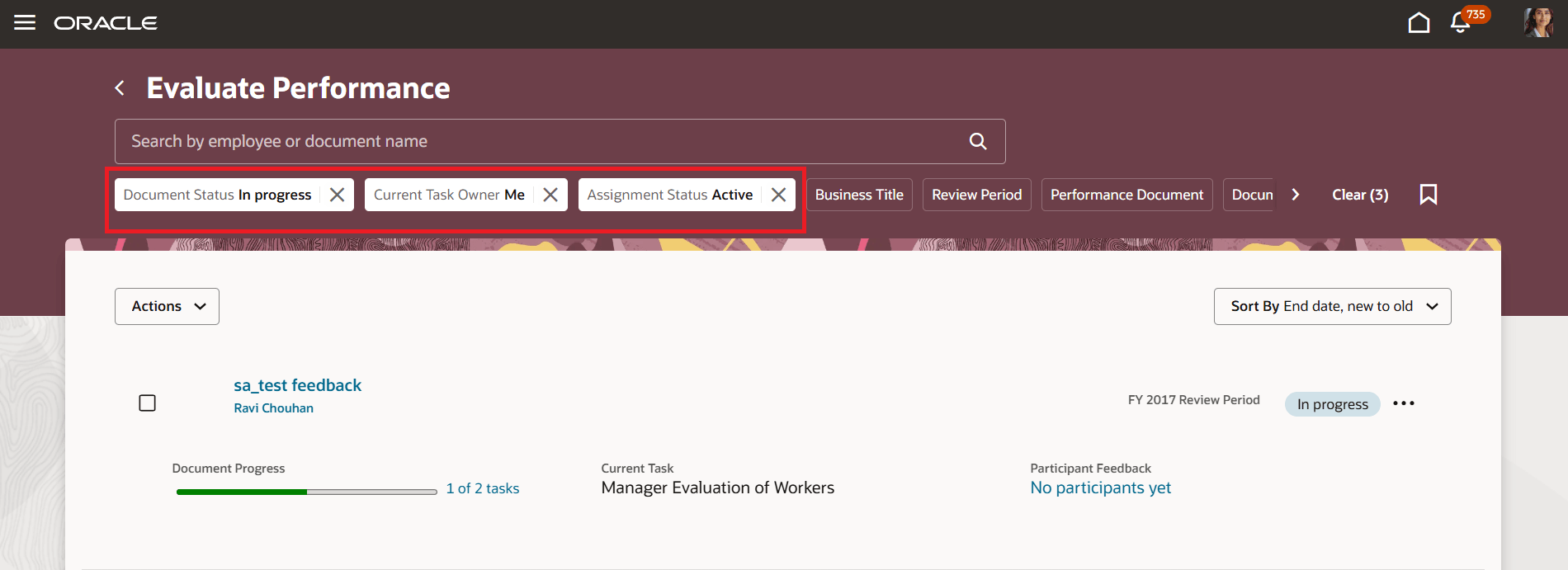
Set the Default Value for the Filters on the Evaluate Performance Page
Business Benefit: This feature provides managers the flexibility to immediately focus on the right set of performance documents while still allowing them to change the filter as needed.
Steps to enable and configure
You need to configure the profile options for Redwood performance documents as indicated in the following table.
| Profile Option Code | Description | Value |
|---|---|---|
| ORA_HCM_VBCS_PWA_ENABLED | Enable VBCS Progressive Web Application User Interface | Y |
| ORA_HRA_PERFORMANCE_LANDING_PART_FDBK_REDWOOD_ENABLED | Enable employee Performance and manager Evaluate Performance pages to display in Redwood. | Yes |
Configure the following page properties:
| Page Property Name | Description |
|---|---|
| Set Current Task Owner Filter Default Value On The Evaluate Performance Page | This property sets the default value for the Current Task Owner filter on the Evaluate Performance page. |
| Set Document Status Filter Default Value On The Evaluate Performance Page | This property sets the default value for the Document Status filter on the Evaluate Performance page. |
| Set Assignment Status Filter Default Value On The Evaluate Performance Page | This property sets the default value for the Assignment Status filter on the Evaluate Performance page. |
Key resources
- For a listing of all profile options for the recreated pages across HCM, see the following document in My Oracle Support:
- For more information on extending Redwood pages in HCM, refer to this guide on the Oracle Help Center: