Activate Journey Tasks Based on Specified Days Before Transaction Effective Date
You can now configure journey tasks so that the task assignment date is calculated from the transaction effective date or action date, instead of only from the journey assignment date.
This enhancement helps you schedule tasks before or after important worker lifecycle dates, such as hire, transfer, proposed start, or termination dates. Additionally, administrators have more control over when journey tasks become active, particularly when the task schedule must align with the business event date rather than the date on which the journey was assigned.
Two new fields, Select criteria for task due and Criteria for starting task, are available on the Overview and Advanced tabs of the task setup page. This table describes the fields and the option behavior for each field:
| Field Name | Description | Field Options | |
|---|---|---|---|
| Select criteria for task due | Defines how the task due date is calculated. | Duration | Let’s you enter the number of days to calculate the due date relative to the applicable reference date. |
| On specific date | Let’s you choose whether the task is due before action date or after action date. This supports scenarios where the task due date must be based on the action effective date rather than only on the journey assignment date. | ||
| Criteria for starting task | Defines when the task becomes active or available to the assignee. | Delay Duration | Let’s you enter the number of days to delay or advance task initiation relative to the applicable reference date. |
| On specific date | Let’s you choose whether the task starts before action date or after action date. This supports preboarding, termination, and other journeys where tasks may need to start a certain number of days before or after the action date. | ||
This is a task configuration example of signing the confidentiality agreement task 3 days before the job start date.
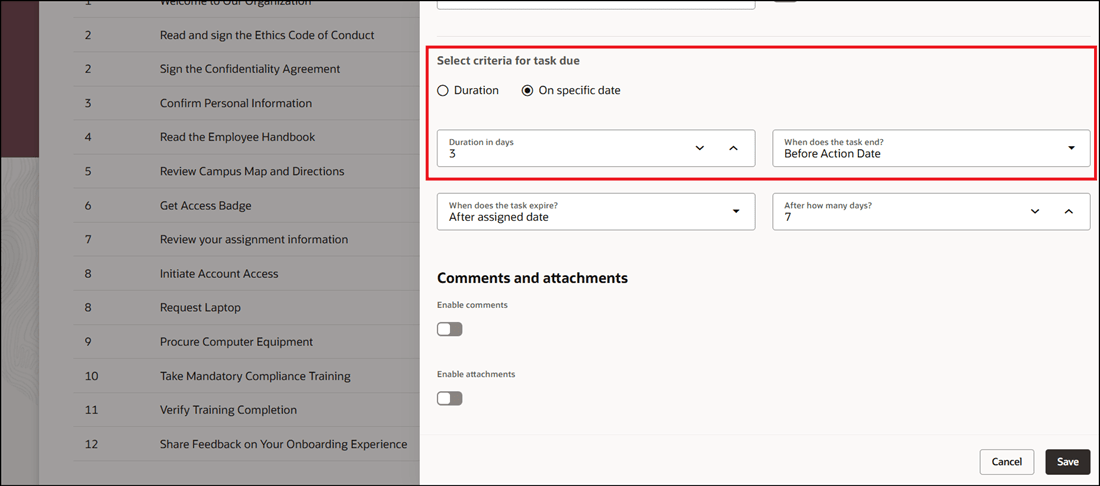
Configure Criteria for Task Due
Another example is sharing your onboarding experience feedback one week after the job start date.
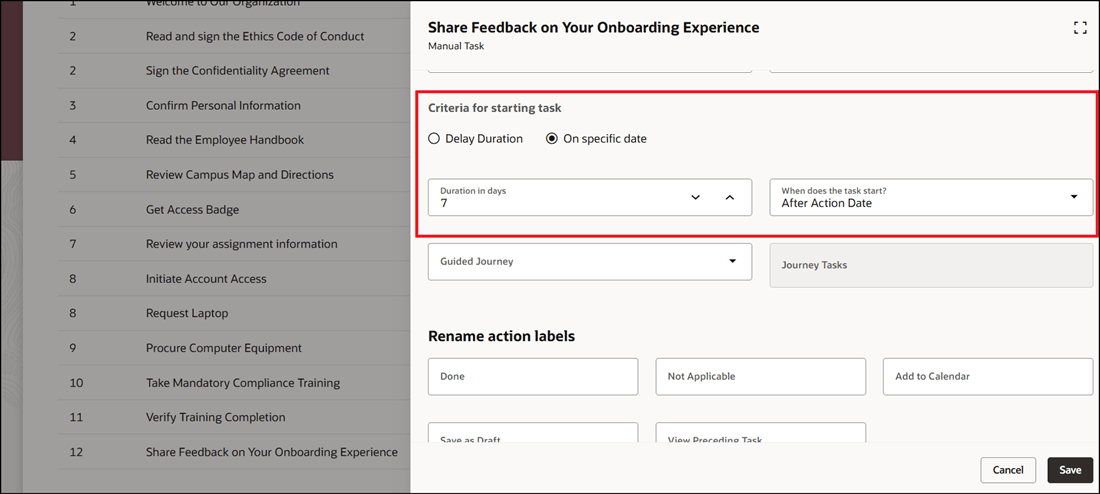
Configure Criteria for Starting Task
These are some key benefits of the feature:
- Improve preboarding readiness: Tasks such as IT provisioning, welcome emails, document collection, and access setup can be scheduled before the worker’s start date.
- Support backward scheduling: Tasks can be assigned a configured number of days before an transaction effective date.
- Reduce manual coordination: Administrators no longer need to manually adjust task timing when business processes depend on start, hire, transfer, or termination dates.
- Improve offboarding timing: Offboarding tasks can be aligned to the termination effective date, helping teams prepare before the worker exits.
- Preserve existing behavior: The default remains the journey assignment date, so existing configurations can continue to behave as they do today unless administrators choose the new fields.
Here are a few use case examples of how this feature can be configured:
-
Preboarding IT readiness: Assign an Activate IT Devices task 15 days before a pending worker’s start date.
-
Preboarding communications: Assign or trigger an onboarding email 3 days before the worker’s start date.
-
Offboarding preparation: Assign offboarding tasks a fixed number of days before the termination effective date.
-
Hire-related tasks: Assign tasks based on the hire effective date even if the journey itself is assigned earlier or later.
-
Transfer-related tasks: Assign tasks before or after the effective date of a transfer action.
This table shows example action date calculations and how the task assignment date is calculated.
| Action | Action Date | Action Effective Date | Days of Initiation | Journey Assignment Date | Delay Duration Basis | Delay Duration | Task Assignment Date | How Task Assignment Date is Derived |
|---|---|---|---|---|---|---|---|---|
| Hire | 02-Dec-2025 | 10-Dec-2025 | 3 | 13-Dec-2025 | Action Effective Date | 4 | 14-Dec-2025 | Action Effective Date + 4 days |
| Hire | 02-Dec-2025 | 10-Dec-2025 | -5 | 05-Dec-2025 | Action Effective Date | -2 | 08-Dec-2025 | Action Effective Date - 2 days |
| Hire | 02-Dec-2025 | 05-Dec-2025 | Not applicable | 05-Dec-2025 | Action Effective Date | -7 | 05-Dec-2025 |
Journey Assignment Date If the start date or due date is earlier than the system date, the journey will be assigned based on the system date, which will then be treated as the journey assignment date. |
| Termination | 02-Dec-2025 | 02-Dec-2025 | Not applicable | 02-Dec-2025 | Journey Assignment Date | 1 | 03-Dec-2025 | Journey Assignment Date + 1 day |
| Termination | 02-Dec-2025 | 31-Dec-2025 | -20 | 11-Dec-2025 | Action Effective Date | -5 | 26-Dec-2025 | Action Effective Date - 5 days |
| Termination | 02-Dec-2025 | 31-Dec-2025 | -10 | 21-Dec-2025 | Action Effective Date | 3 | 03-Jan-2026 | Action Effective Date + 3 days |
| Termination | 02-Dec-2025 | 31-Dec-2025 | -10 | 21-Dec-2025 | Action Effective Date | -15 | 16-Dec-2025 | Action Effective Date - 15 days |
This feature improves journey scheduling flexibility and helps administrators align task assignment with the actual business event date. It reduces manual coordination for preboarding, onboarding, transfer, and offboarding processes where tasks must be completed before or after the effective date of the action.
Steps to enable and configure
For more information, see this topic: Configure Journey Task Based on Duration Before or After Transaction Effective Date
Tips and considerations
-
A task can’t be assigned before the journey itself is assigned. In such cases, the journey assignment date is used as the task assignment date.
Key resources
For more information, refer to the Implementing and Using Journeys guide.
Access requirements
You must be granted the Manage Journey (ORA_PER_MANAGE_JOURNEY_TEMPLATE) aggregate privilege to work on journey templates.