Control the Display of the Edit Icon in the Name Section of the Personal Details Page
On the Redwood Personal Details page, the Edit icon in the Name section is visible by default. You can use the new Show Edit Icon in the Name Section page property in VB Studio to control whether the Edit icon is hidden or visible.
The following image shows a sample VB Studio business rule for conditionally hiding the Edit icon when a user with the Employee role is viewing his own info.
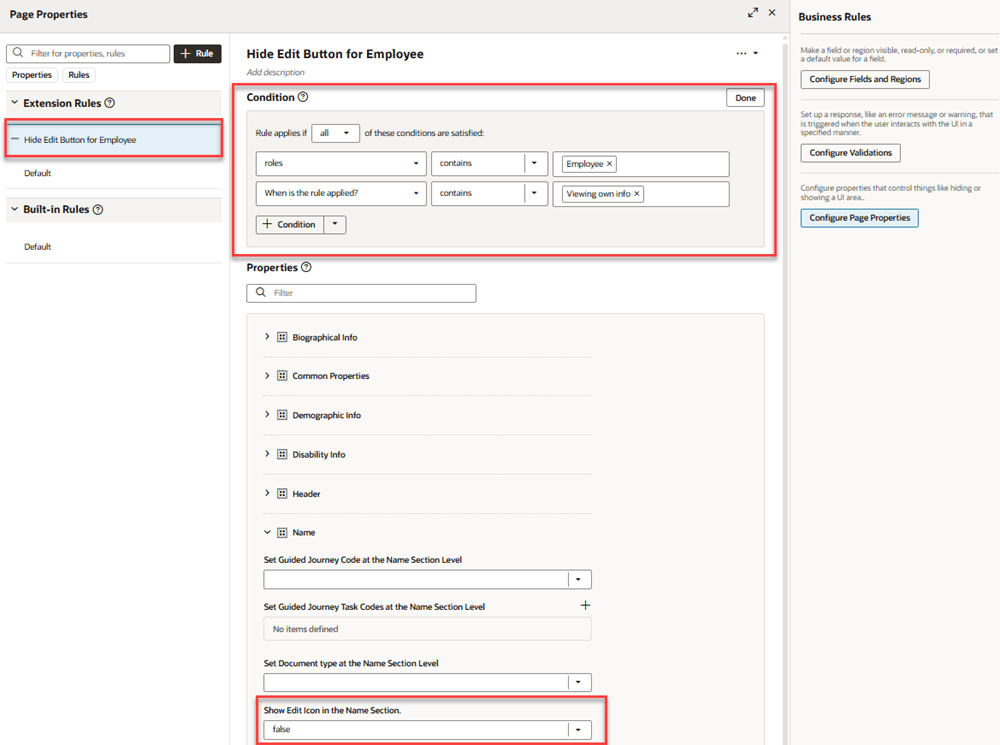
VB Studio business rule to hide Edit icon in Name section of Personal Details page
The enhancement allows you to show or hide the Edit icon based on your specific business requirements.
Steps to enable and configure
For more information about how to control the display of the Edit icon, see How do I control the display of a UI element in Visual Builder Studio?
Tips and considerations
- Users who don't have the Manage Person Names privilege won't see the Edit icon even if it's enabled using the page property.
Key resources
For more information, refer to these resources on the Oracle Help Center:
- Configuration of Processes Using Page Properties in the Extending Redwood Applications for HCM and SCM Using Visual Builder Studio guide.