Display Page Properties Conditionally in Connections
You can control the Connections experience with the Configure Page Properties feature.
You can now apply these settings with conditional rules based on:
- Logged-in user info
- Role
- When is the rule applied? (viewing own info or viewing others' info)
- Info about the profile being viewed
- Business Unit
- Department
- Country
- Legal Employer
- Location
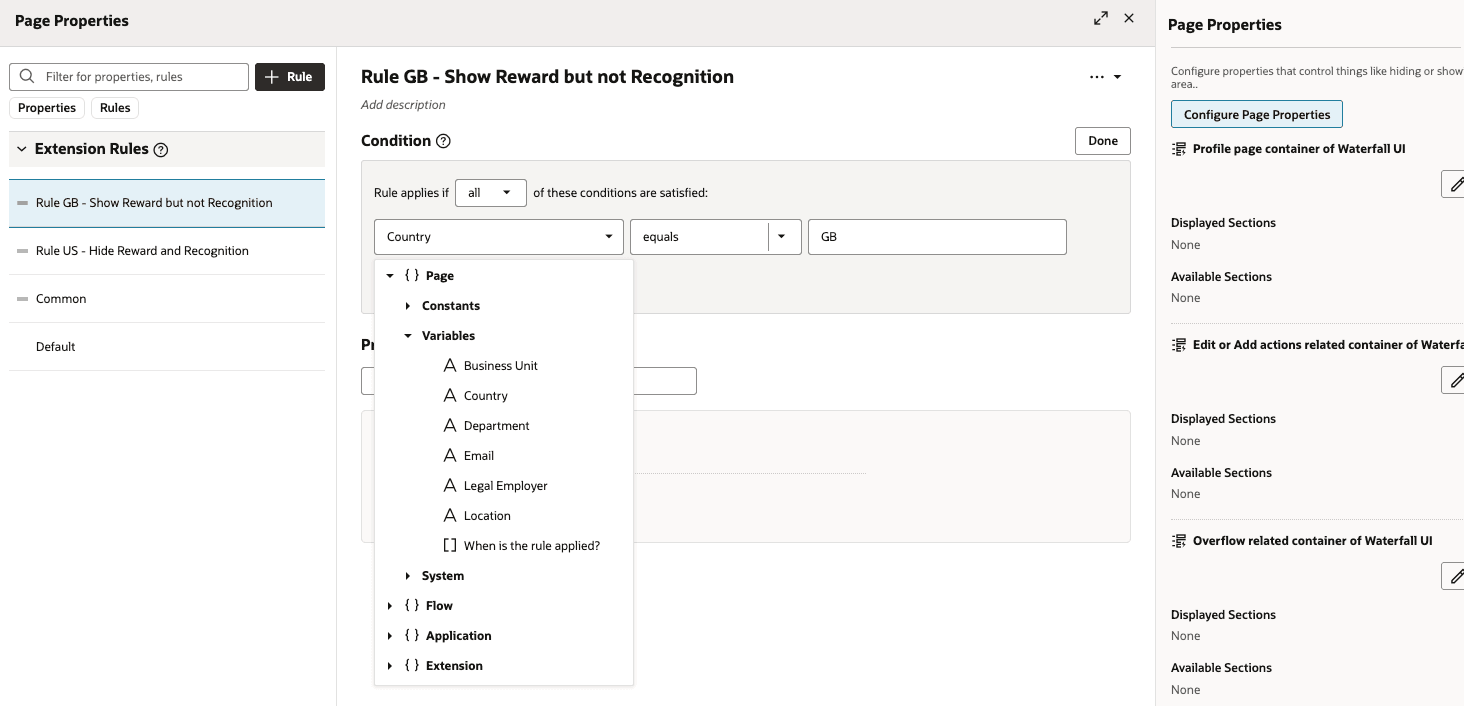
Configure Page Properties
For example, you can display the Feedback card only in countries where it’s applicable.
New page properties are delivered to prevent your employees from editing the profile such as phone number and social network.
| New in 26C | View | Code | Label | Description | Type | Default Value |
|---|---|---|---|---|---|---|
| No | Common |
showAboutMePrompt |
Show About Me Prompt | Controls display of the “Tell us more about yourself” prompt on Person Profile; set
false to hide. |
boolean | TRUE |
| No | Common |
showSkillsCard |
Show Skills Card | Controls display of the Skills panel; set
false to hide. |
boolean | TRUE |
| No | Common |
showOrganizationCard |
Show Organization Card | Controls display of the Organization card on Person Profile; set
false to hide. |
boolean | TRUE |
| No | Common |
showAboutMeCard |
Show About Me Card | Controls display of the About Me card on Person Profile; set
false to hide. |
boolean | TRUE |
| No | Common |
showExperienceCard |
Show Experience Card | Controls display of the Experience card on Person Profile; set
false to hide. |
boolean | TRUE |
| No | Common |
showFeedbackCard |
Show Feedback Card | Controls display of the Feedback card on Person Profile; set
false to hide. |
boolean | TRUE |
| No | Common |
showAchievementCard |
Show Achievement Card | Controls display of the Achievement card on Person Profile; set
true to display. |
boolean | FALSE |
| No | Common |
showReportsAndManagersCard |
Show Reports and Managers Card | Controls display of the Reports and Managers card on Person Profile; set
false to hide. |
boolean | TRUE |
| No | Common |
showHierarchyBreadcrumbs |
Show Hierarchy Breadcrumbs | Controls display of hierarchy breadcrumbs on the Organization card; set
false to hide. |
boolean | TRUE |
| No | Common |
pronounNameAttribute |
Show Pronoun | Controls pronoun display on Person Profile using NameInformation15–30 segment mapping. | string | (blank) |
| No | Common |
SHOW_AI_ASSIST |
Show AI Assist | Controls display of AI Assist in profile context. | boolean | FALSE |
| No | Waterfall |
showWaterFallLayout |
Show WaterFall View | Controls display of Waterfall view; set
true to enable layout. |
boolean | TRUE |
| No | Waterfall |
useBossCallsForSavingBasicInfoSectionData |
Enable Boss Calls For Saving Basic Info Section Data | Waterfall-related control; functional behavior per product-team guidance. | boolean | FALSE |
| No | Waterfall |
showEditProfilePhoto |
Show Edit Profile Photo | Controls ability to edit profile photo; set
false to hide edit option. |
boolean | TRUE |
| No | Waterfall |
showRecognitionsCard |
Show Recognitions | Controls display of Recognitions card on Person Profile; set
false to hide. |
boolean | TRUE |
| No | Waterfall |
showAwardsCard |
Show Awards | Controls display of Awards card on Person Profile; set
false to hide. |
boolean | TRUE |
| Yes | Waterfall |
showEditProfile |
Show Edit Profile | Controls display of Edit Profile pencil on Person Profile; set
false to hide. |
boolean | TRUE |
| Yes | Waterfall |
showAddAnotherPhoneNumber |
Show Add Another Phone Number | Controls display of Add Another Phone Number action in Phone Number section; set
false to hide. |
boolean | TRUE |
| Yes | Waterfall |
showAddAnotherSocialNetwork |
Show Add Another Social Network | Controls display of Add Another Social Network action in Links section; set
false to hide. |
boolean | TRUE |
Business Benefit
This feature gives organizations tighter control of the profile experience by reducing clutter, guiding user behavior, and showing only relevant actions for each audience and context.
Steps to enable and configure
You don't need to do anything to enable this feature.
Key resources
For more information, refer to this topic on the Oracle Help Center:
- Overview of Activity Centers, in the Using Global Human Resources guide
You can also refer to this What's New announcement in release 26C
Here are the topics we recommend on getting started with Express Mode.
-
Refer to the following documentation in this order:
-
Express Mode in VBS for detailed instructions on using specific Express Mode features.
-
Extending Redwood Applications for HCM and SCM Using VB Studio for details on what’s supported by HCM.
-
-
You can refer to the VB Studio documentation "Configure an Oracle Cloud Application" to check the steps to access VB Studio from a Redwood page.
-
Extending HCM Redwood Applications Using Visual Builder Studio
-
Refer to the Customer Connect forum Visual Builder Studio for HCM