New Redwood Work Relationship Info Page
A new Redwood page, Work Relationship Info, is now available for reviewing key work relationship information for a selected worker. The page includes a worker header, start date and primary information, work relationship information and related work relationship attributes.
Users can review the information in a read-only page and use the available actions, such as Edit Work Relationship and Cancel Work Relationship, when those actions are available to them.
Example Uses
- If a user requires to only view a worker's work relationship info, thin access and quick action can be given..
- Review a worker's legal employer, enterprise start date, country, and primary work relationship indicator.
- Confirm work relationship details such as projected termination date, I-9 status, E-Verify status, and medical insurance availability.
- Move directly to edit or cancel work relationship actions from the page when the user has access The action buttons Edit and Cancel are shown on the page depending on the user's access.
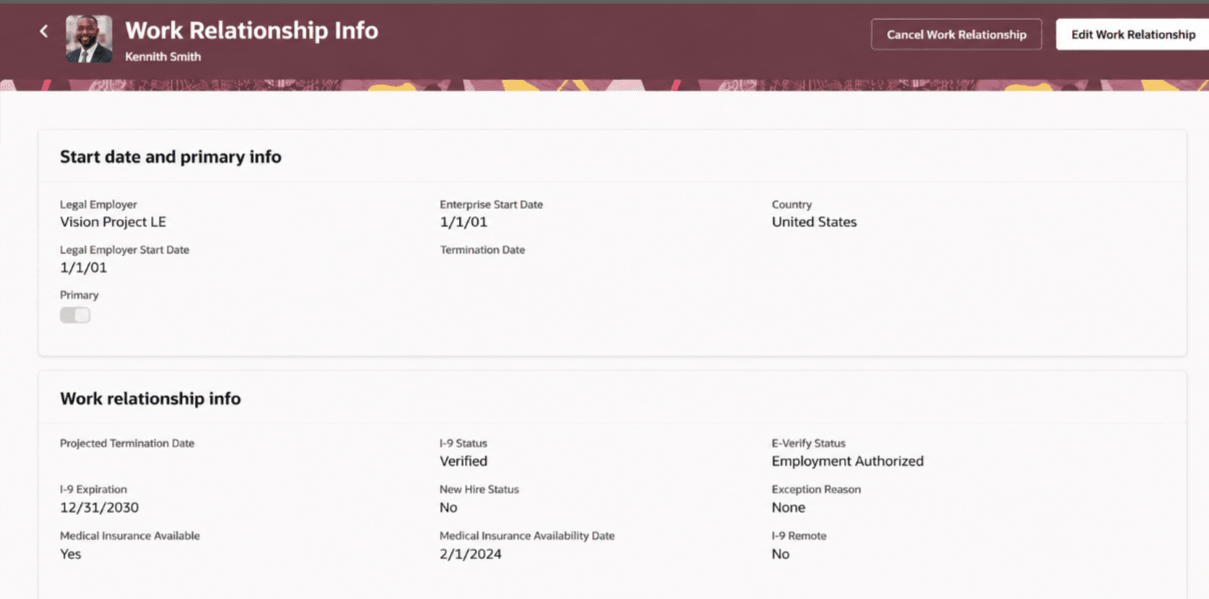
New Redwood Work Relationship info page
This feature gives HR users a focused Redwood page for reviewing important work relationship information. It reduces navigation and presents related employment details in a clear and consolidated layout.
Steps to enable and configure
You don't need to do anything to enable this feature.
Tips and considerations
- Guided journeys are supported at page and section levels.
Key resources
For more information, refer to this resource on the Oracle Help Center.
- Work Relationships in the Using Global Human Resources guide
Access requirements
Your user needs the View Work Relationship privilege to review work relationship info.