Personalized Learning Guidance Using Grow Coach
Grow Coach analyzes multiple sections of the Grow page—including manager recommendations, current role gaps, skills in development, careers of interest, and current learning—to deliver personalized and prioritized upskilling advice. It supports flexible user queries to recommend courses that address specific skill gaps, career goals, or available learning time, helping employees resolve competing training needs efficiently. It also warns about overdue required learning to highlight professional risks and prioritization needs.
This feature is powered by the Grow Coach agent team in Oracle AI Agent Studio.
You’ll see the Grow Coach as an Ask Oracle banner on the Grow page. Go to Me > Grow to view it. You can engage with the agent by asking questions relevant to your learning needs and priorities, such as:
- What should I learn next?
- Give me a quick win course (based on my career gaps)
- I have 30 minutes to learn something. What should I learn?
- List the skills my manager wants me to develop. Don't show me courses.
- Make a prioritized learning calendar/list for me.
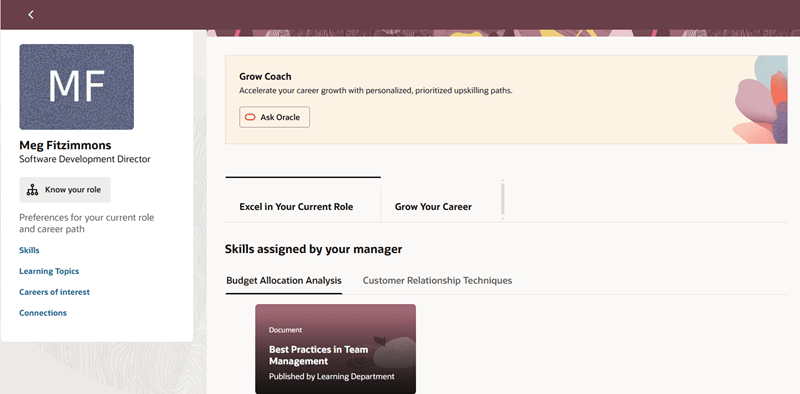
Grow Coach Agent on the Banner
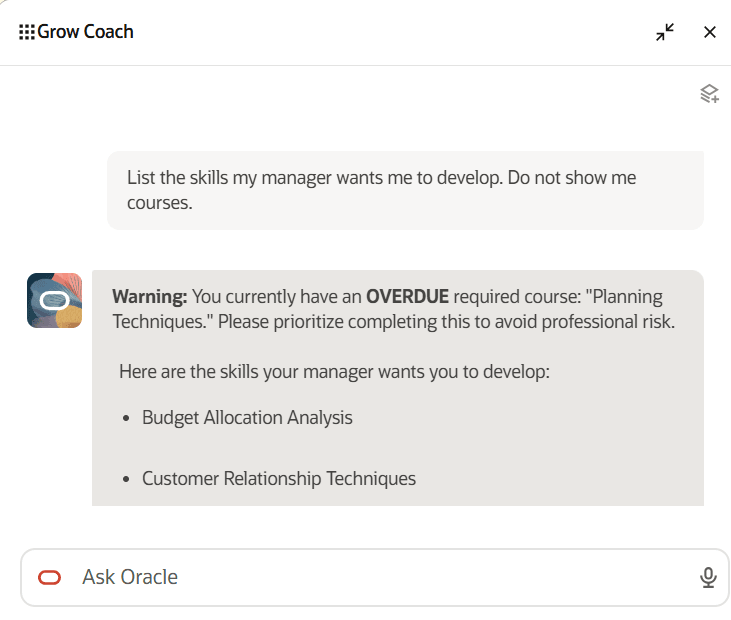
Response from Grow Coach
Business Benefit: This feature improves employee career growth by delivering personalized and prioritized upskilling paths tailored to skill gaps and goals.
Steps to enable and configure
Grow Coach is a delivered agent in Oracle AI Agent Studio. You can view this on the Agent Teams tab.
The agent code is ORA_HCM_HRT_GROW_COACH. No customization or configuration is required for this agent team.
The prerequisites for using AI Agent Studio are:
- Your environment must have the appropriate services for Oracle Applications Platform deployed. For more information, see FAQ2521 on My Oracle Cloud Support.
- Set the Enable Security Console External Application Integration (ORA_ASE_SAS_INTEGRATION_ENABLED) profile option to Yes and enable permission groups for the appropriate roles. See Access Requirements for AI Agent Studio.
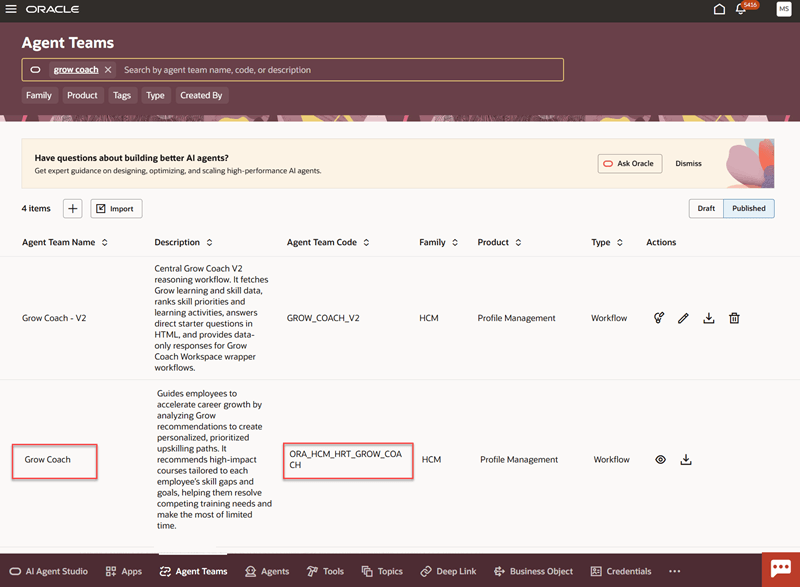
Grow Coach on the Agent Teams tab
To enable the Grow Coach banner on the Grow page, you need to first create a guided journey and associate the Grow Coach agent with it. You also need to add the journey code to the Grow page using Oracle Visual Builder Studio. For details, see these topics:
For privileges, see the Access Requirements section.
Tips and considerations
- Grow Coach provides the best experience when Grow is enabled and recommendations are available on the Grow page. The more relevant recommendations available, the more effectively Grow Coach can assist you.
- Grow Coach shows warnings about overdue required learning to emphasize completing mandatory assignments before optional upskilling.
- The agent maintains conversational context, letting users ask follow-up questions and get tailored guidance throughout their learning.
- Some recommended courses may lack detailed descriptions; users should review course content before enrolling.
- Prioritize resolving overdue required learning first, as Grow Coach highlights professional risk from unfinished mandatory training.
Key resources
- Explore AI Agents for Oracle Fusion Cloud Applications
- How do I use AI Agent Studio?
- Create AI Agents Using Preconfigured Agent Team Templates
Access requirements
The agents you can view depend on the roles and privileges assigned to you. To access the Grow Coach agent, your role must be explicitly granted access to it by an AI Studio Administrator. See How can I give users access to AI agents and Access Requirements for AI Agent Studio.
The following Spectra Authorization Service (SAS) duty role is required to access Grow Coach in AI Agent Studio and in Grow:
- Grow Coach Access Duty Role
This is added by default to the delivered employee and contingent worker roles. If you’re creating a custom role, ensure that this duty role is added to it.