Learning Assignment Assistant with Mass Actions support
Learning specialists can use Learning Assignment Assistant to update assignment and activity statuses for courses, offerings, events, self-paced learning, and learning paths.
The assistant can interpret natural language requests that include actions, learner criteria, statuses, reason codes, and comments. It identifies the applicable assignments and activities and supports actions such as status updates, completions, undo completions, and updates across multiple learning items.Before it applies changes, the assistant generates a presummary that shows the requested actions, affected learners and assignments, and the number of assignments it'll update. Learning specialists can review and approve the proposed changes before the assistant does the updates.
Example instructions
- Learners can be identified by person number, work email, first and last name or using "all learners"
- Items and activities can be identified by Item numers
- Assignments can be targeted using the assignment number. Learner identifier is not required when assignment number is provided.
| Use Case | Sample Instruction |
|---|---|
| Withdraw all learners from a course using the course's item number. | Withdraw all learners from item number OLC331562 with reason learning is no longer relevant to learner |
| Mark all activities complete for an offering for specific learners identifying the learners by their full name using the offering's item number. | Update John Smith, Janice Henry, Janice Smith to a status of completed for item number OLC332014 with reason Specialist marked complete |
| Mark specific activities complete for an offering using the offering item number and specific activity numbers for the activity. Identify the learners by email, person number (e.g. P10029) and full name. | Update Jane Smith, john@email.com, P10029, Kerry Smith as completed for item number OLC1299, activity number OLC1099, activity number OLC12399 with reason specialist marked complete |
| Undo completion for several assignments for a self-paced learning using the assignment number as the identifier. | Undo complete for assignment OLC1122, OLC2333, OLC1111 with reason undo completed by the specialist |
| Mark assignments completed for a learner, course, learning path, event and self-paced learning and provide a comment using the assignment number to identify what to update as completed. | Mark assignment number OLC111, OLC222, OLC333, OLC444 as completed with reason completed offline and status verified and comment "learner completed elsewhere" |
|
Mark all event activities complete except the evaluation complete using the event item number and identifying the learners using their full name and do not update the evaluation to completed. (evaluation/feedback activity is never included unless the activity number is provided for the evaluation/feedback or it's explicitly mentioned) |
Update all activities except the evaluation complete for item number OLC1299 complete for Jane Smith, Mike Smith, Bob Smith with reason specialist marked complete Update all activities complete for item number OLC1299 complete for Jane Smith, Mike Smith, Bob Smith with reason specialist marked complete |
| Mark all event activities complete including the evaluation by including the event item number and the learner's full names. | Update all activities including the evaluation complete for item number OLC1299 complete for Jane Smith, Mike Smith, Bob Smith with reason specialist marked complete |
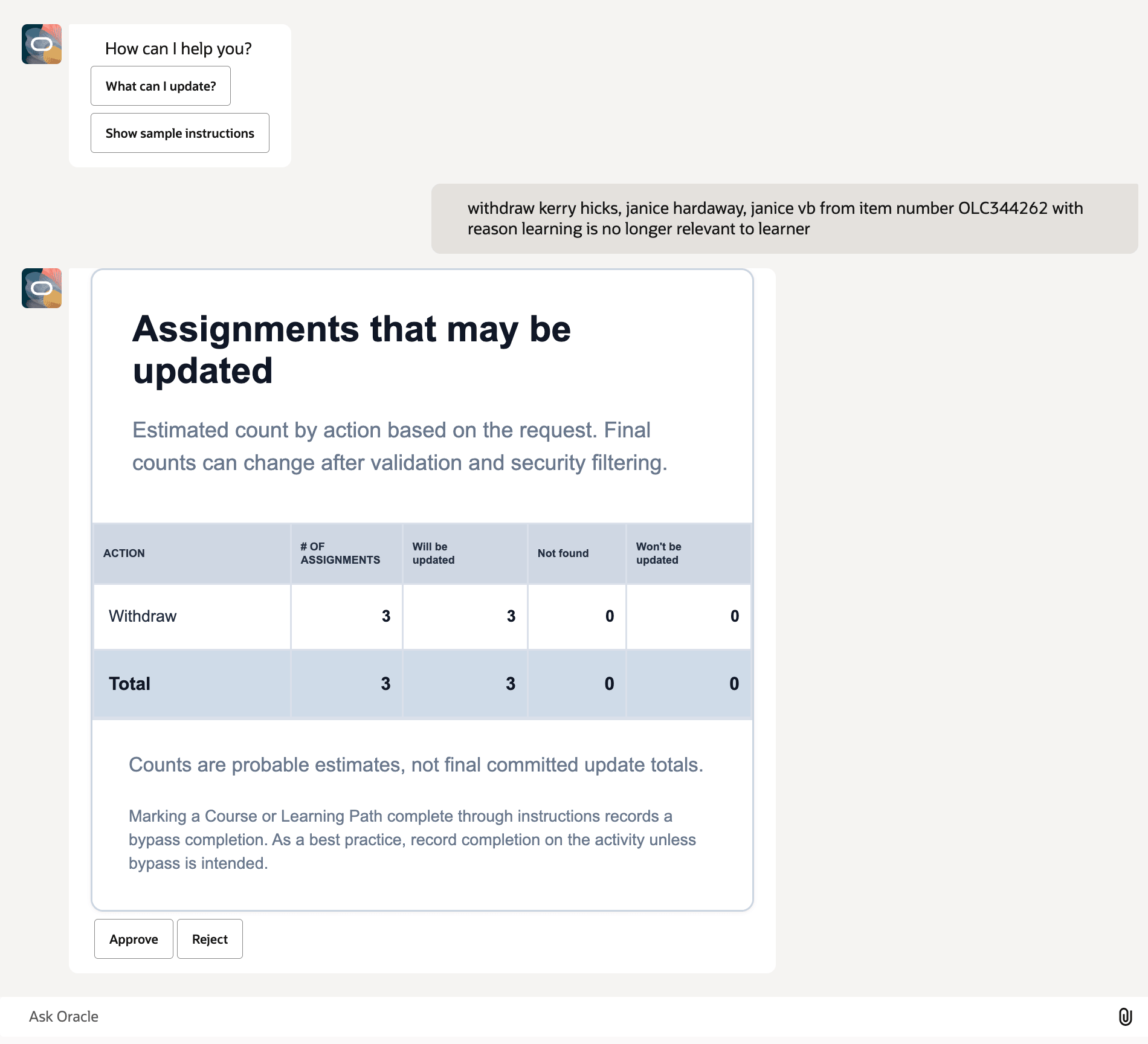
Interacting with the Learning Assignment Assistant
Reduce the effort required to manage learning assignments by supporting assignment maintenance through natural language requests. Help learning specialists complete assignment updates more efficiently while retaining review and approval controls.
Steps to enable and configure
If you already enabled Update Assignments button for learning events, you don't need to do anything for events. You do need to enable it for all other relevant pages.
To show the Update Assignments button, set the Define the agent to use to update learning assignment completions and statuses for learners page property to the appropriate Learning Assignment Assistant agent code. Supported pages include:
- Events
- Self-Paced Learning
- Courses
- Learning Paths
- Global Assignments
If a page property has no value for a page, the Update Assignments button doesn't appear on that page.
Tips and considerations
- When using the assistant from the Global Assignments page, include the action, reason code, assignment number or item number, and learner identifier. The learner identifier can be the learner’s full name, work email, or person number.
- When using the assistant from learning's assignment page, include the action, reason code, and learner identifier. The activity number is optional and can be included to further identify the assignment to update.
- Offerings don't have an Assignments tab. To update assignments for an offering, launch the assistant from the Global Assignments page while in the offering context.
- Valid reason codes are required when applicable. If a required reason code is missing or invalid, the assistant provides a list of valid actions and corresponding reason codes.
- Completing a course or learning path through the assistant results in a status of Bypassed. To mark a course or learning path as Completed, update the associated learning activities to Completed.
- Event presummary information has moved. In previous releases, presummary information was available through an event's Related Materials. In this version of the agent, presummary information is available on the dedicated Presummary tab and is no longer included in the Related Materials section.
- Future versions of the agent will support creating assignments and assignment profiles, as well as updating assignment attributes, such as start dates and due dates.
Key resources
26B Learning Assignment Assistant
Learning Assignment Assistant Agent Mass Action Support
Access requirements
Learning specialists require access to the Global Assignments page, the Assignments tab, or both on supported learning pages, including events, self-paced learning, courses, and learning paths. They also need the Manage Learning Assignments and Profiles (ORA_WLF_LEARNING_ASSIGNMENT_MANAGEMENT_DUTY) duty role to run the agent and do assignment management actions.