View Role Match Summary
This AI-powered feature provides employees with a role match summary of how their current skills and qualifications fit a career role. The Profile Match Analyst agent compares an employee’s talent profile with the job or position profile defined for a career role and provides this analysis.
The role match summary provides the level of suitability for the role and identifies specific skill and certification gaps, estimates the effort needed to close them, and recommends targeted actions to improve the match. The summary also encourages employees to update their skills and qualifications.
When you view a career role in Opportunity Marketplace (except the ones you added as a favorite role), you can see the role match summary for that role.
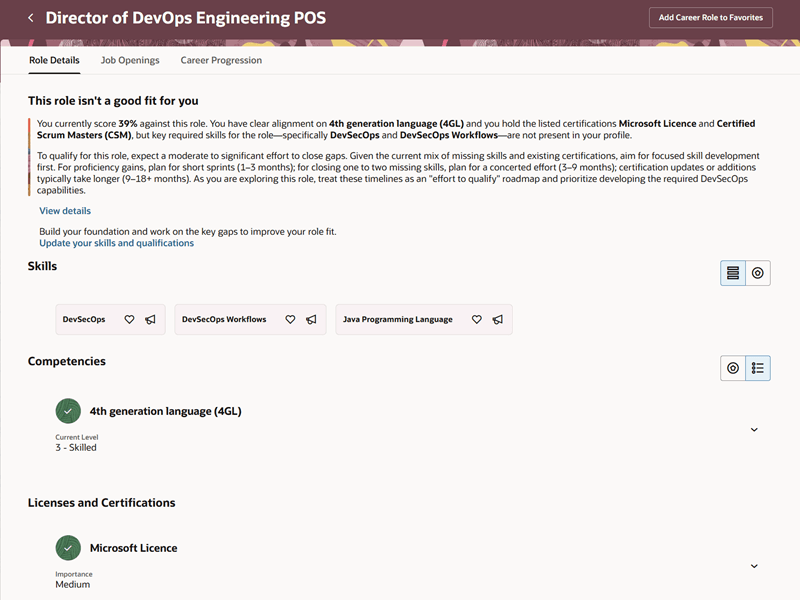
Role Match Summary on the Role Details Tab
For favorite career roles, the role match summary is displayed on the My Career tab. Refer to the 26C What's New feature, My Career Recommendations, for more details.
Matching levels like good fit, moderate fit, and no fit help quickly interpret your suitability for a role. Good fit means strong suitability with the role, moderate fit indicates some gaps, and no fit suggests significant development is needed to scale up to the role.
Select the View details link to understand the suitability score, skills that match the role, and skill gaps and certifications, if any. You're also encouraged to update your skills and qualifications, which takes you to your talent profile page.
Business Benefit: This feature simplifies career planning by highlighting strengths and areas for growth with clear, actionable insights.
Steps to enable and configure
While this feature is enabled by default, you can hide the role match summary section using the Visual Studio page property, Show Career Match. Set it to True to show the section. For details on using page properties, see How do I control the display of a UI element in Visual Builder Studio?
For roles and privileges, see the Access Requirements section.
Tips and considerations
- The role match summary is displayed for both job profiles and position profiles.
- The accuracy of the summary depends on the completeness of skills, certifications, and experience data in an employee’s talent profile. So, employees are encouraged to update it through the link given below the summary.
- If numeric ratings for competencies are missing, the suitability score may be less precise.
- The role match summary appears only on career role detail pages and excludes the Know Your Role page.
- If the AI agent fails to respond due to network or performance issues, the role match summary section won't display.
- The View details link won’t display if no explainability is received from the AI agent. This could be due to reasons such as skills and qualifications not being defined for the role.
Access requirements
If users have access to career role pages, they can access this feature. For details, see Enable Career Roles in Opportunity Marketplace in Oracle Help Center.
The agents you can view depend on the roles and privileges assigned to you. To access the Profile Match Analyst agent, your role must be explicitly granted access to it by an AI Studio Administrator. See How can I give users access to AI agents and Access Requirements for AI Agent Studio.
The following Spectra Authorization Service (SAS) duty role is required to access the Profile Match Analyst agent in AI Agent Studio:
- Profile Match Analyst Duty (ORA_DR_HRT_PROFILE_MATCH_DUTY)
This is added by default to the delivered employee and contingent worker roles. If you’re creating a custom role, ensure that this duty role is added to it.