Redwood Experience: Bulk Candidate Creation by Uploading Resumes
You can create multiple candidates at the same time by uploading resume attachments. Select the Create Candidate action and upload multiple resumes. Info from the resumes is entered into the fields and available for your review on the candidate details page once the candidate is created.
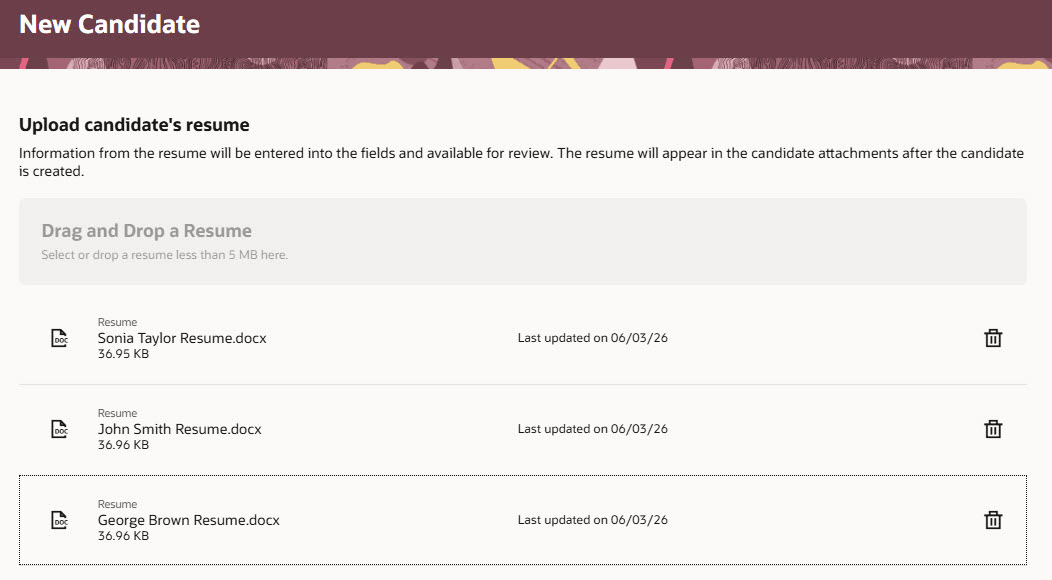
Uploading Multiples Resume Attachments
Note that:
- Bulk candidate creation uses an AI agent.
- Bulk candidate creation runs asynchronously, allowing you to continue working while candidate records are being processed. When the process is complete, you'll receive a Worklist notification summarizing the results, including any successful, partially successful, or failed candidate creations. For partially successful records, the notification includes links to the affected candidate records so you can review and complete any missing information or attachments. For failed records, no link is provided because the candidate record wasn't created.
- You can upload a maximum of 10 resume attachments. To upload more, you need to zip the resumes. The zip file can’t exceed 25 MB.
- You can upload only 1 zip file at a time.
- You can’t upload a zip file with other resume attachments.
Business benefit: Quickly create multiple candidates using resume parsing.
Steps to enable and configure
To enable bulk candidate creation using resumes, set the site profile value to Y for the ORA_IRC_BULK_CREATE_CANDIDATE_USING_RESUME profile option. For details, see Set profile options for Redwood pages.
To use Redwood experience, you need to enable the Recruiting Redwood pages profile options. For details, see Set profile options for Redwood pages. For details on enabling and customizing Redwood for HCM, see How do I adopt Redwood for HCM? and Extending Redwood Applications for HCM and SCM Using Visual Builder Studio
For privileges, see the Access Requirements section.
Access requirements
Users need this privilege to use the Create Candidate action: Create or Update Candidate (IRC_CREATE_OR_UPDATE_CANDIDATE)
Recruiter role needs to be assigned the ORA_HCM_IRC_RECRUITER_WF_AGENT_ACCESS privilege.
Hiring manager role needs to be assigned the ORA_HCM_IRC_HIRING_MGR_WF_AGENT_ACCESS privilege.