Redwood Experience: My Feedback Tab in Interviews Area
Use the new My Feedback tab in the Interviews area to view your assigned feedback requests and quickly access the Provide Feedback action to complete them.
Me > Interviews > My Feedback tab
The My Feedback tab lists feedback requests for which you’re a respondent. Only requests from the past three months are shown, and only for active job requisitions and active job applications. The Provide Feedback action is available for each item.
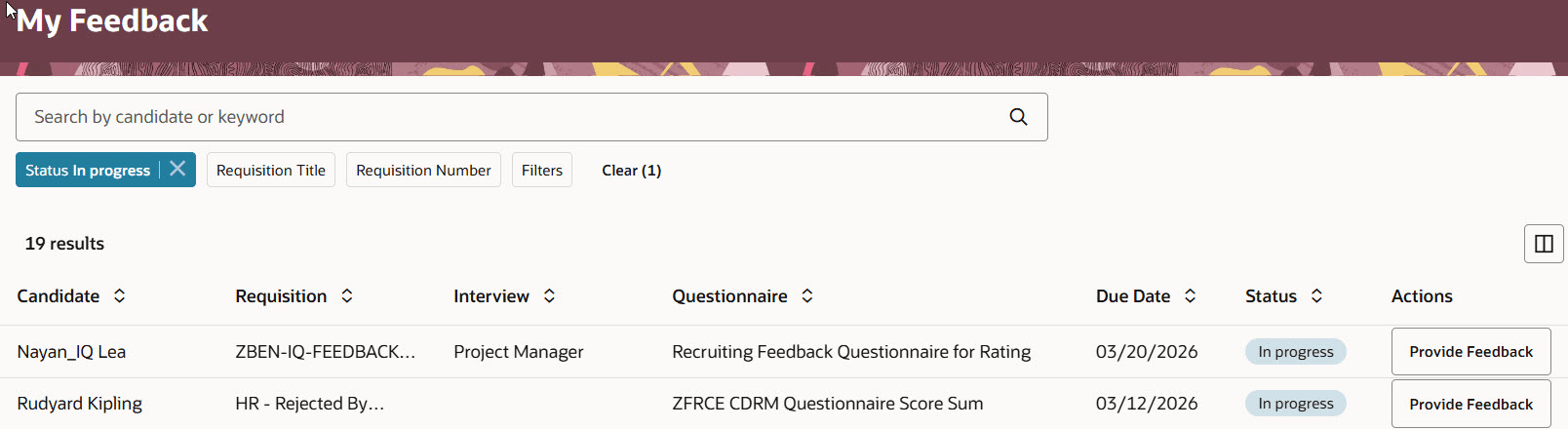
My Feedback Page in the Interviews Area
Business benefit: This feature gives interviewers a dedicated place to view and act on their assigned feedback requests, making it easier to stay organized and complete feedback on time.
Steps to enable and configure
To use the Interviews feature, you need to opt in to Recruiting Booster. For details, see Opt in to Recruiting Booster.
To use Redwood experience, you need to enable the Recruiting Redwood pages profile options. For details, see Set profile options for Redwood pages.
To define which columns are visible or hidden in the My Feedback tab, in Visual Builder Studio go to Hiring > Feedback List and create business rules.
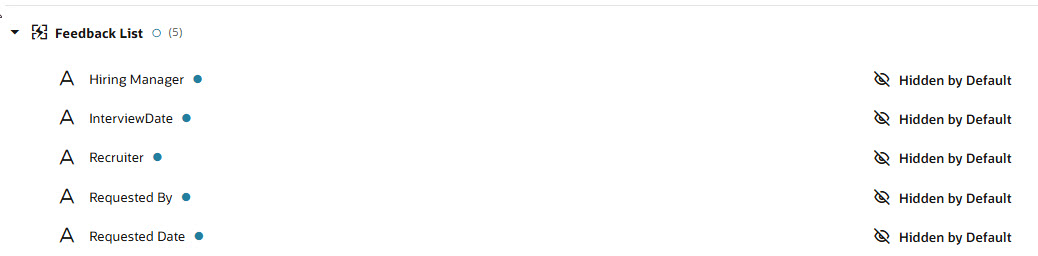
Configuring My Feedback List in Visual Builder Studio
Use Collection rules for the Feedback tab list column configuration, and use Form rules for the feedback details shown when opening a feedback item, such as the Feedback overview panel and its content. Although the current business rules interface may display some options in both places, Oracle recommends using the appropriate rule type so your configuration stays aligned with the intended setup model and remains better supported as Visual Builder Studio evolves.
For details on enabling and customizing Redwood for HCM, see How do I adopt Redwood for HCM? and Extending Redwood Applications for HCM and SCM Using Visual Builder Studio