Redwood: Hide Performance Improvement Plan Performance Documents Until Shared with the Employee
As an HR administrator, you can configure the Share task in the performance process flow so employees can’t view performance documents used as performance improvement plans before the manager shares them.
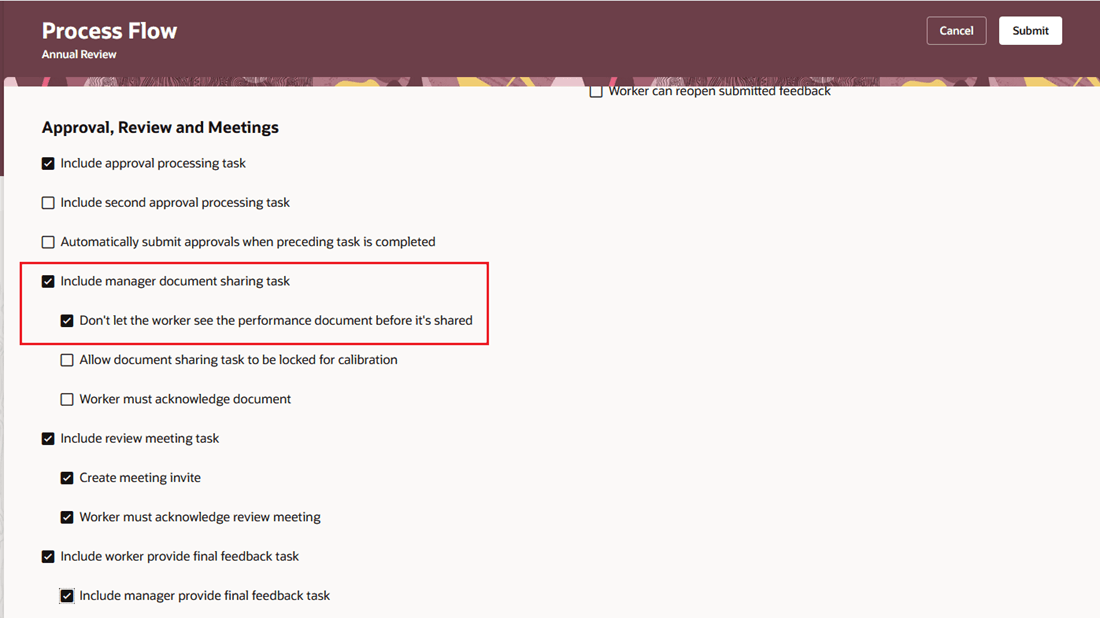
Configure option to hide performance document
This configuration when used in a performance template that performance documents are created from restricts the worker's access. A new Don't let the worker see the performance document before it's shared option is available under the manager document sharing task so you can control when the worker can access the document.
Employees see only the performance documents that are configured for them to view. If a performance document isn’t configured for worker viewing, it remains hidden until the manager starts the share document task by selecting Share and Retain or Share and Release. Employees don’t receive any notifications until the Share task starts.
Business benefit: This feature supports the intended review process and prevents employees from seeing the document too early.
Steps to enable and configure
You need to configure the profile options as indicated in the following table:
| Profile Option Code | Description | Value |
|---|---|---|
|
ORA_HRA_SETUP_REDWOOD_ |
Enable Redwood setup pages for Performance Management. |
Yes |
For more information about setting profile option values, see How do I enable a profile option?
- Navigate to My Client Groups > Performance > Setup Maintenance > Performance Process Flows.
- Edit an existing process flow or create a new one.
- Under Approval, Review and Meetings, locate Include manager document sharing task.
- Select Don't let the worker see the performance document before it's shared.
- Continue configuring the process flow.
- Save the process flow.
Tips and considerations
- The Don't let the worker see the performance document before it's shared option isn’t selected by default so existing functionality remains unchanged unless you enable it.
- If any employee tasks are configured, based on sequence number, before Include manager document sharing task, the process flow can’t be saved.
- On Me > Career and Performance, employees can still see the next performance document in progress if there are tasks for them to complete.
- On the Performance Document tab, employees can’t see performance documents that aren’t configured for them to view until sharing has started.
Key resources
- For a listing of all profile options for the recreated pages across HCM, see the following document in My Oracle Support: HCM Redwood Pages with Profile Options – MOS Document 2922407.1
- For more information on extending Redwood pages in HCM, see: Extending Redwood Applications for HCM and SCM Using Visual Builder Studio