Redwood: Hide Participant Types in Manage Participant Feedback Page
As an HR administrator, you can control which participant types appear in the Select Person From list on the Participant Feedback page.
Using page properties, you can hide participant types and present a more focused set of options to users.
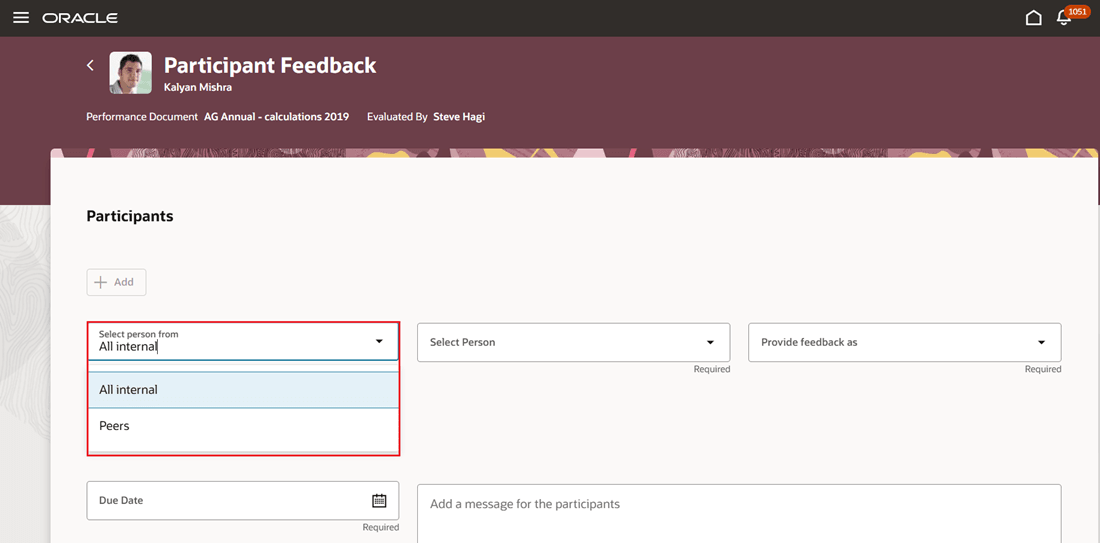
Suggestions and team hidden in select person from list
Business benefit: This feature enables you to streamline the participant selection process by removing participant types that don’t meet organizational requirements.
Steps to enable and configure
You need to configure the profile options as indicated in the following table.
| Profile Option Code | Description | Values |
|---|---|---|
| ORA_HCM_VBCS_PWA_ENABLED | Enable VBCS Progressive Web Application User Interface | Y |
| ORA_HRA_PERFORMANCE_ DOCUMENTS_AND_GOALS_ REDWOOD_ENABLED |
Enable performance documents and employee performance and development goals to display in Redwood. | Yes |
For more information about setting profile option values, see How do I enable a profile option?
| Page Property Label | Description |
|---|---|
| Hide Suggestions in Select Person From List on the Participant Feedback Page |
This property controls the display of the Suggestions value in the Select Person From list on the Participant Feedback page. Set to true or false to show or hide the value respectively. |
| Hide All Internal in Select Person From List on the Participant Feedback Page |
This property controls the display of the All Internal value in the Select Person From list on the Participant Feedback page. Set to true or false to show or hide the value respectively. |
| Hide Peers in Select Person From List on the Participant Feedback Page |
This property controls the display of the Peers value in the Select Person From list on the Participant Feedback page. Set to true or false to show or hide the value respectively. |
| Hide Team in Select Person From List on the Participant Feedback Page |
This property controls the display of the Team value in the Select Person From list on the Participant Feedback page. Set to true or false to show or hide the value respectively. |
- Open VB Studio Express Mode from the Participant Feedback page. Locate the page properties for participant type visibility.
- Set the applicable page properties to control which participant types appear in the Select Person From list.
- Publish changes.
Key resources
- For a listing of all profile options for the recreated pages across HCM, see the following document in My Oracle Support: HCM Redwood Pages with Profile Options – MOS Document 2922407.1
- For more information on extending Redwood pages in HCM, see: Extending Redwood Applications for HCM and SCM Using Visual Builder Studio