AI Agent: Intelligent Talent Profile Search
Delivers Intelligent Talent Profile Search , which is a chat-based talent-finding agent for HR administrators, which uses a vectorized database to perform semantic matching. Users can use chat interface and ask questions about people, and the agent returns people that match the criteria. The people names can be clicked to navigate to each person’s talent profile.
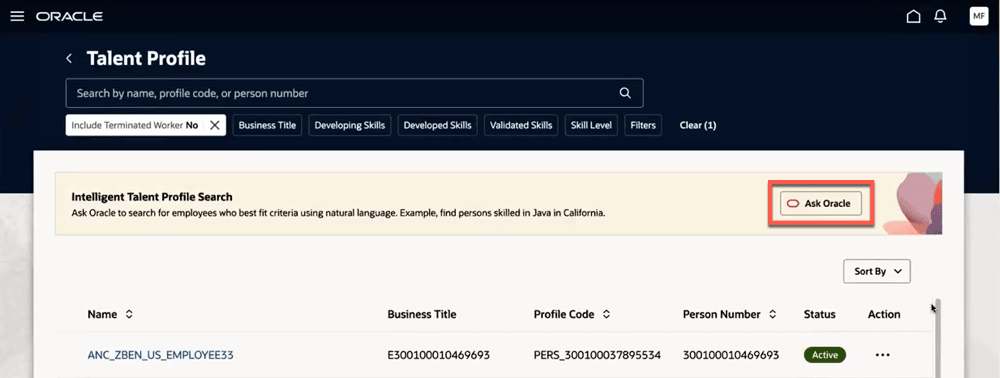
Intelligent Talent Profile Search for Talent Profile
Assists HR administrators in finding employees who match the specified criteria by combining talent profiles and work assignment details with flexible queries. For example, you can query for “Who has both Java and Python and works in the San Francisco Office?".
Steps to enable and configure
Enable Intelligent Talent Profile Search for person profile. For details, see How can I enable Intelligent Talent Profile Search for Talent Profile or Team Skills Center?
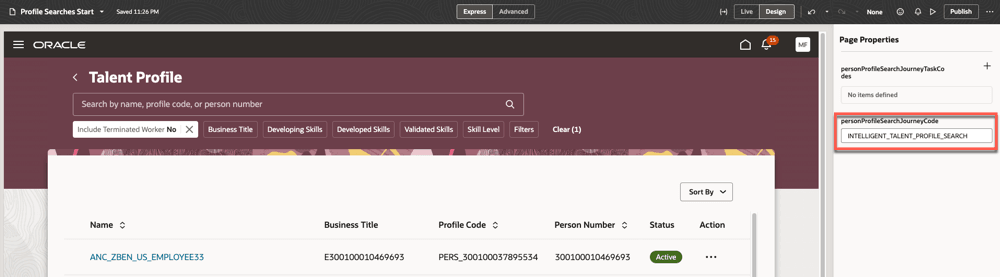
Enabling Intelligent Talent Profile Search
Key resources
For more details on extensibility, see Extending Redwood Applications for HCM and SCM Using Visual Builder Studio.
Access requirements
This feature uses Intelligent Talent Profile Search agent. The following Spectra Authorization Service (SAS) duty role is required to access the agent:
- Intelligent Talent Profile Search Duty Role
This is added by default to the delivered Human Resource Specialist role. If you're creating a custom role, ensure that the duty role is added to it.
The agents you can view depend on the roles and privileges assigned to you. To access the Intelligent Talent Profile Search agent, your role must be explicitly granted access to it. See How can I give users access to AI agents and Access Requirements for AI Agent Studio.