Flexible Duration Shift Swaps
Use flexible duration shift swaps to request swaps with eligible coworkers whose shifts are shorter, longer, or the same duration as the shift you offer. This gives workers more options to resolve schedule conflicts while existing scheduling, qualification, availability, absence, and compliance rules continue to apply.
When you initiate a swap, you can offer your full shift or a partial segment anchored to the start or end of your shift. Recipient shifts are always exchanged as full shifts.
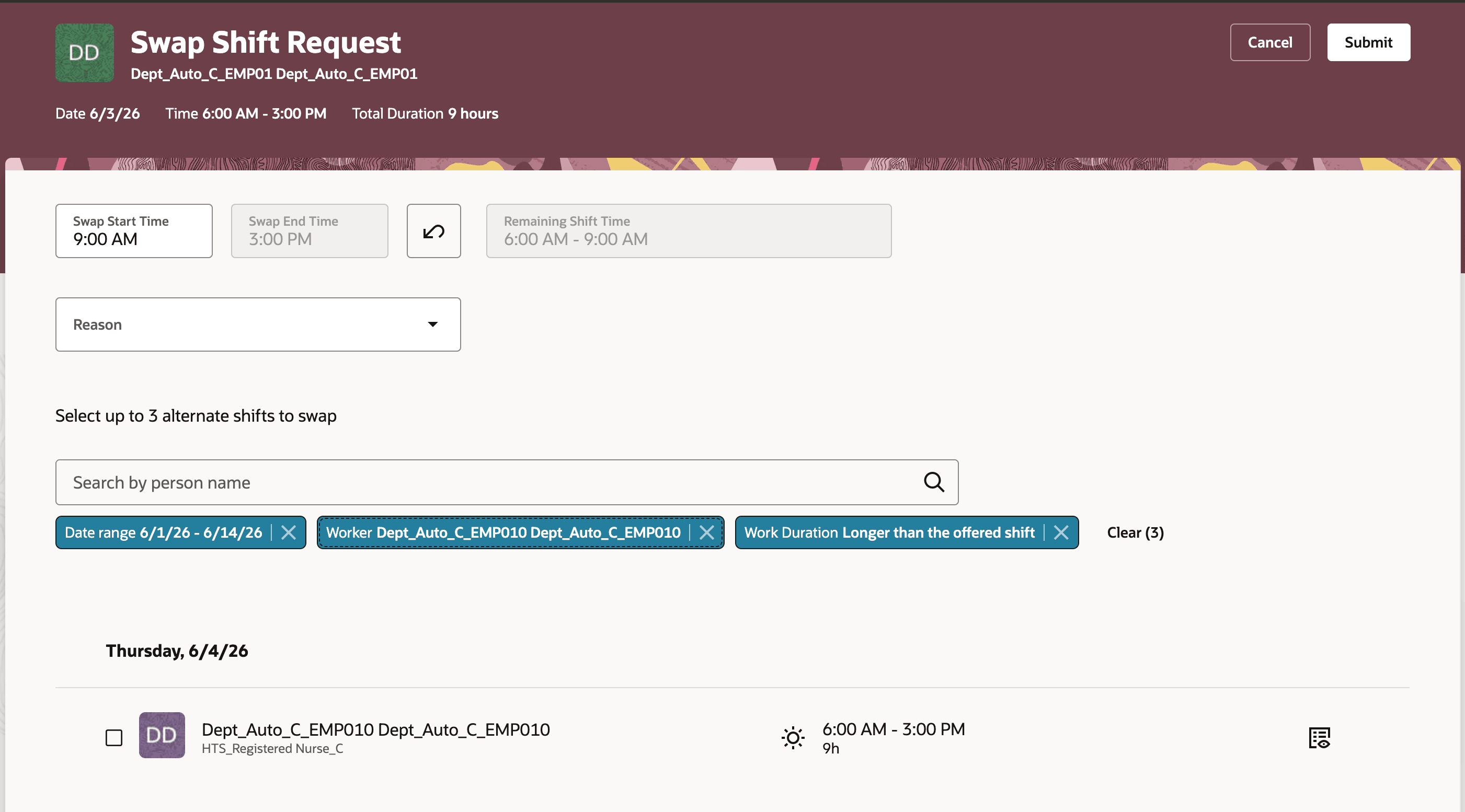
Initiating partial shift swap
As a worker initiating a swap, you can:
- Open your assigned shift from the calendar and select Swap Shift.
- Offer your entire shift or a partial segment anchored to the start or end of your shift.
- Select a date range to find eligible coworkers.
- Use the Duration filter to narrow results to shifts that are the same length as, shorter than, or longer than what you offered.
- Send the swap request to one or more recipients.
- Track sent requests on the Requests tab of your shift.
As a worker receiving a swap request, you can:
- Open the Requests tab on your shift to see incoming requests.
- Review the offered shift or segment, date, time, duration, and any incentive or premium indicators.
- Accept or decline the request directly from the notification.
Receiving partial shift swap requests
Accepting partial shift swap requests
As a schedule manager, you can:
- Review pending and active swaps in the Gantt view.
- See duration differences between initiator and recipient shifts for context.
- Approve or decline swap requests when your approval flow requires schedule manager action.
- Review and assign breaks when a partial-segment swap is accepted.
Example Scenarios
- A worker assigned a 4-hour regular shift can swap with an eligible coworker assigned an 8-hour regular shift when both shifts satisfy scheduling and compliance rules.
- A worker assigned a 12-hour shift can offer the first 8 hours of that shift in exchange for an eligible coworker’s full 4-hour shift.
A worker assigned an on-call shift can swap with another eligible worker’s on-call shift of a different duration when both assignments use the same shift type and meet all validation rules.
Improve schedule flexibility by giving workers more options to resolve coverage conflicts when shifts aren’t the same length. Organizations can reduce manager intervention, escalations, call-outs, and last-minute schedule changes while maintaining coverage and compliance controls.
Steps to enable and configure
- Go to the My Client Groups > Workforce Scheduling > Schedule and Shift Options.
- Enable the Flexible Duration Shift Swap setting. This setting is disabled by default.
Tips and considerations
- When flexible duration shift swaps are disabled, workers can continue to swap only shifts of the same duration.
- Recipient shifts are always exchanged as full shifts. Only the initiator can offer a partial segment, and the segment must be anchored to the start or end of the initiator’s shift.
- Both shifts must be in the same published schedule period.
- Both shifts must have the same department, location, and shift type.
- Workers must satisfy qualification, competency, skill, certification, language, absence, overlap, rest, overtime, and other scheduling validations.
- Paid and unpaid breaks transfer automatically when a full shift is acquired.
- Breaks aren’t automatically assigned to partial shift segments, so managers should review and assign breaks when needed.
- Workers who report to different managers can be eligible to swap shifts when all other validation rules pass.
- If either shift disallows overtime and the swap would push a worker over their FTE limit, the swap is blocked.
- If both shifts allow overtime, the swap is permitted even when it results in overtime.
- Cross-shift-type swaps and cross-schedule-period swaps aren’t supported.
- Swap notifications show a side-by-side comparison of the two shifts, with duration differences highlighted and a separate row for remaining shift time on partial swaps.
Key resources
For more information about workforce scheduling and shift swaps, see these resources:
Access requirements
No new privileges are required for this feature. Workers must have existing shift swap privileges to initiate or receive swap requests.