Life Event Simulation Analyst
Run a what-if simulation for a life event on a selected date without making persistent changes to a person’s benefits.
Use this feature to:
-
Compare current and new enrollment opportunities and highlight changes across plan types.
- Identify added and dropped plans and options, rate differences, and dependent or beneficiary changes.
- Review an AI Summary for each plan type and an overall summary of enrollment changes across all plan types.
- Assess proposed plan design changes, rate changes, eligibility profile changes, new events, restructuring, and merger or acquisition scenarios before making benefits changes.
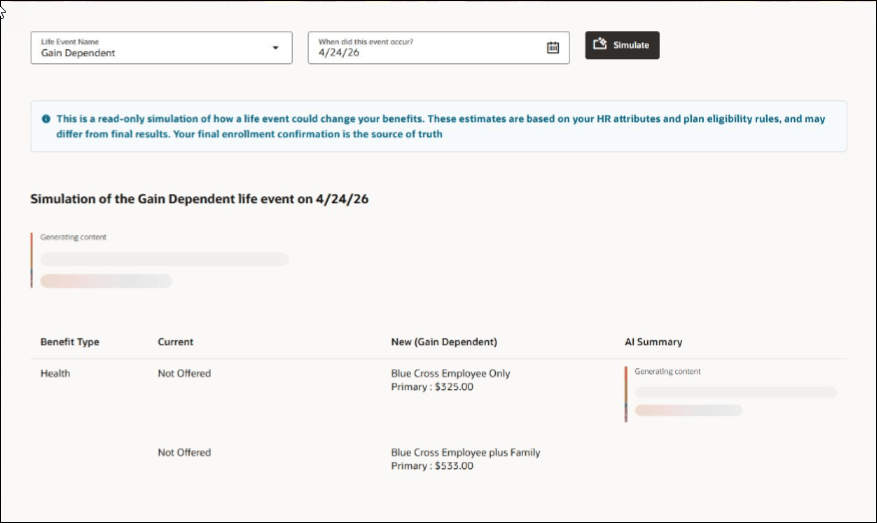
Simulate Life Event
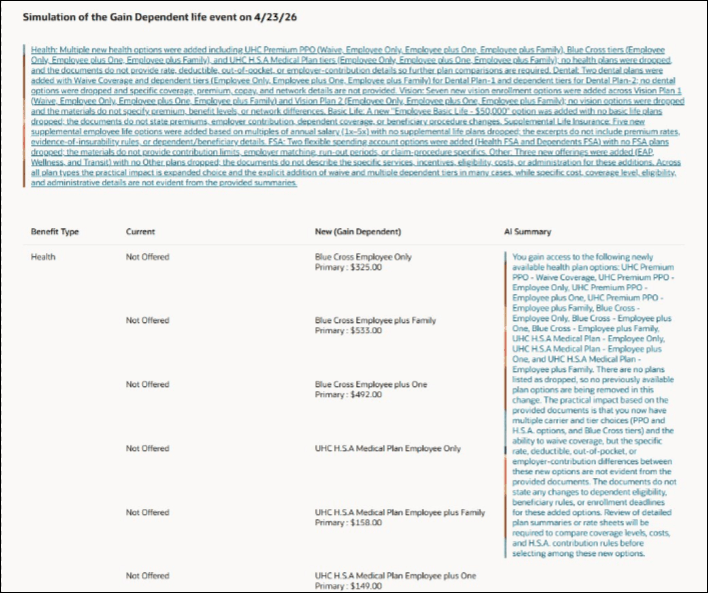
Simulate Life Event: Results
Try It Out
1. Go to My Client Groups > Show More > Benefits > Simulate a Life Event.
2. Select a person for life event simulation.
3. Select a life event and date of occurrence.
4. Click Simulate.
Business benefit: This feature helps administrators and implementers evaluate the potential impact of benefits configuration and organizational changes before applying them to a person's benefits. The AI-generated analysis support more informed validation and decision-making without making persistent changes to benefits data.
Steps to enable and configure
- Go to Setup and Maintenance > Manage Administrator Profile Values.
- Set the ORA_ASE_SAS_INTEGRATION_ENABLED profile option to Yes at the Site level.
- Open Configure Benefits Feature Preferences.
- For Life Event Simulation Analyst (LIFE_EVENT_SIMULATION_ANALYST), select Actions, Edit Details.
- Set Preference Status to Opted In.
- Save your changes.
Access requirements
Users need the Benefit Life Event Simulation Analyst Agent Duty (ORA_DR_BEN_BENEFIT_LIFE_EVENT_SIMULATION_ANALYST_AGENT_DUTY). This duty is mapped to the Benefits Specialist, Benefits Manager, and Benefits Administrator roles.