Benefits Administration Command Center
Detect, understand, and resolve benefits administration issues from a unified agentic workspace that brings together insights, analytics, and corrective actions.
Use these capabilities across Benefits Administration Command Center:
-
Ask Oracle: Ask natural-language questions about the current panel, benefits policies, and individuals. For individual queries, enter the person’s name or person number.
-
Executive Summary: Review an AI-generated summary of the current panel that highlights key trends, issues, and high-priority items requiring attention.
- Priority Actions: Review important follow-up items and take available actions, such as sending communications or submitting processes.
Review insights and analytics for:
- Open Enrollment: Track participation, election activity, submission trends, and enrollment progress.
- Self-Service Activity: Monitor employee activity, transaction volume, adoption, and participation trends.
- Plan Utilization: Review enrollment patterns, participation gaps, and completion rate projections.
- Life Events: Monitor event status, pending evaluations, exceptions, and processing bottlenecks.
- Court Orders: Track QMCSO, QDRO, and NMSN compliance activity and review operational insights to help determine the next steps.
- Action Items: Review the count of people with pending enrollment actions and documents awaiting approval. Close optional action items and send targeted pending-actions notifications when the resource alert is enabled.
Depending on the panel and your access, you can take these actions from Benefits Administration Command Center:
- Approve, reject, request more information for, or notify employees about self-reported life events.
- Assign self-reported life events to another administrator.
- Update manual and manual override life events and submit the process to purge backed-out and voided life events.
- Close optional pending action items.
- Schedule Open Enrollment reminder communications based on participation insights.
Use Benefits Administration Command Center to initiate these communications:
- Send Open Enrollment reminders to employees who haven’t started or completed their elections.
- Send targeted pending-actions notifications when the Benefits Pending Actions resource alert is enabled.
- Notify an employee when additional information is needed for a life event.
- Send a summary of self-reported life events to another administrator or executive stakeholder.
- Send a court order compliance summary to an administrator or executive stakeholder.
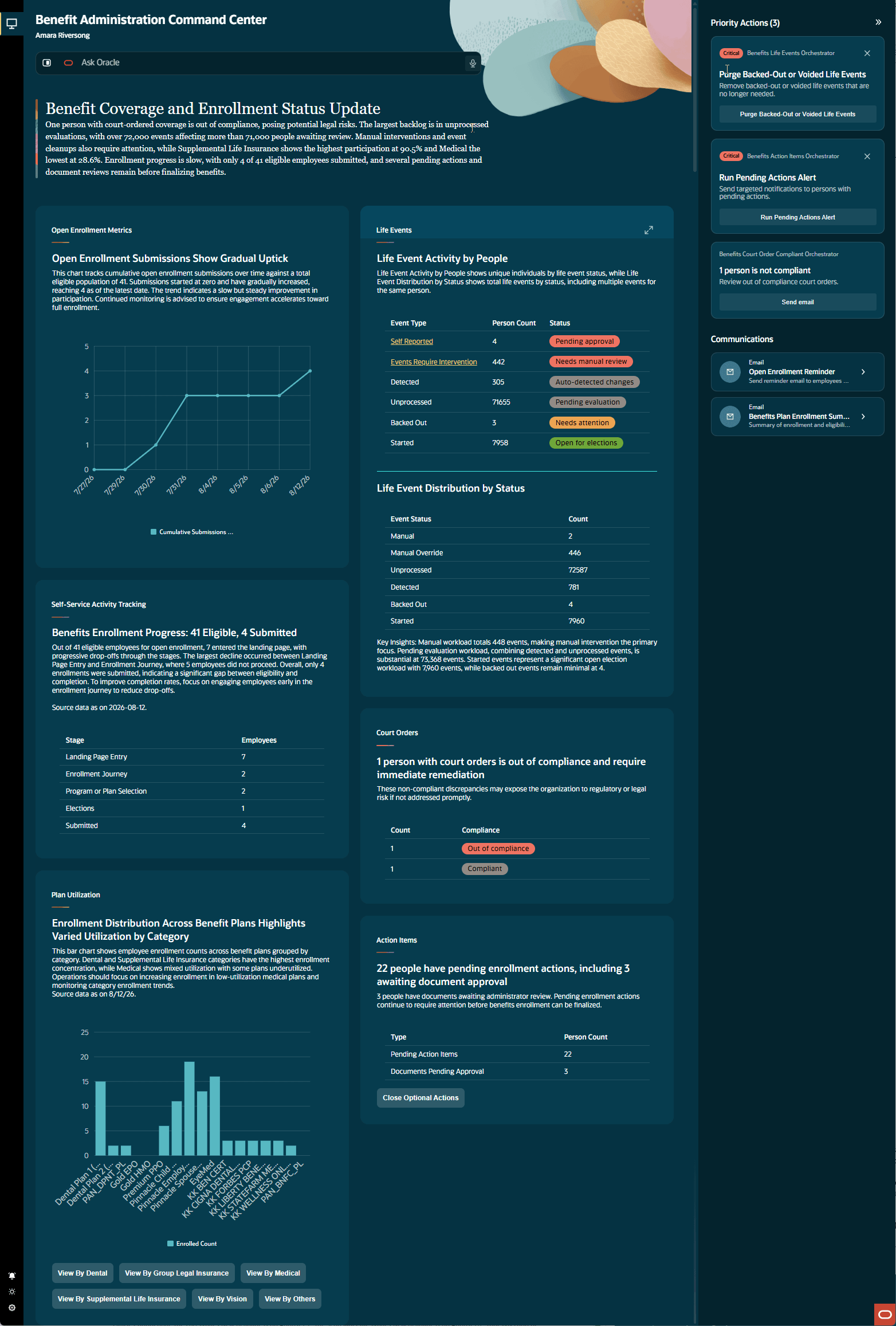
Benefits Administration Command Center
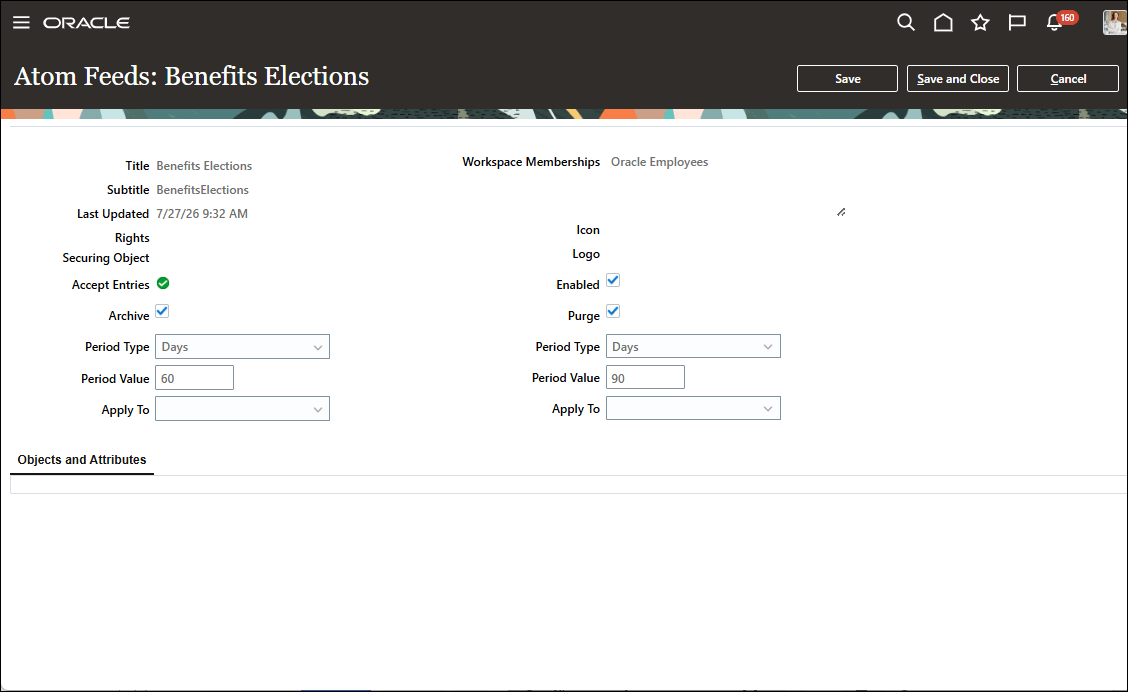
Atom Feed: Benefit Elections
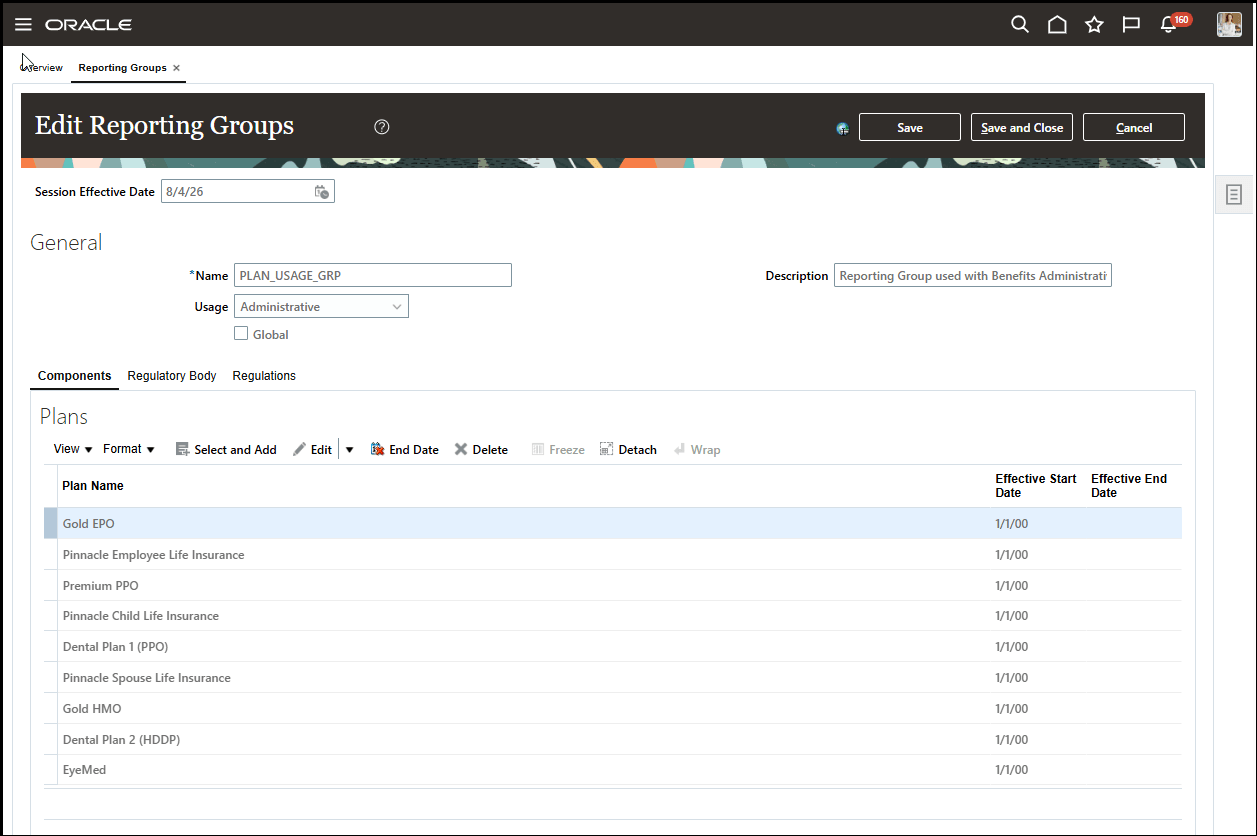
Reporting Group with Mapped Relevant Plans
Try It Out:
Go to My Client Groups > Benefits > Benefits Administration Command Center.
To personalize Benefits Administration Command Center:
-
Go to Tools > AI Agent Studio.
-
Select Applications, and search for Benefits Administration Command Center.
-
Select Duplicate to create a copy of the delivered Benefits Administration Command Center and complete the relevant fields.
-
Personalize your copy of Benefits Administration Command Center. You can remove panels, add or replace workflows, configure panel visibility by role, and create a quick action.
-
Publish your changes.
-
Disable the delivered quick actions.
- Enable the new quick action.
Business benefit: Benefits Administration Command Center helps benefits administrators identify and address issues more efficiently by bringing insights, analytics, investigation, and corrective actions into one workspace. It helps administrators focus on high-priority items, including pending enrollment actions and documents awaiting approval, and reduces the need to navigate between separate benefits administration pages.
Here's the demo of these capabilities:
Steps to enable and configure
Here's how you set up Command Center:
- You need to configure security to use this feature. See the Access Requirements section.
- Enable these Redwood and search profile options:
-
ORA_HCM_VBCS_PWA_ENABLED
-
ORA_BEN_ADMINISTRATIVE_ENROLLMENT_REDWOOD_ENABLED
-
HRC_ELASTIC_SEARCH_ENABLED
-
ORA_BEN_PERSON_SEARCH_INDEX_ENABLED
-
PER_PERSON_INDEX_FUZZY_SEARCH_ENABLED (optional)
-
- Enable the Benefits Elections Atom feed in Manage HCM Atom Feeds.
- Run the ESS job to create index definitions and perform the initial ingestion for the Benefits person search index. Enable the Benefit Pending Actions resource alert (BEN_PENDING_ACTIONS_NOTIFICATION) to send targeted pending-actions notifications from the Action Items panel.
- Create the PLAN_USAGE_GRP reporting group and map the applicable plans to it.
- Run the Benefits Activity Metrics process to populate the metrics used by Benefits Administration Command Center.
- Assign the required functional privilege and duty role to authorized users.
Enable the Benefits Elections Atom feed
- Go to Setup and Maintenance > Manage HCM Atom Feeds.
- Select the Benefits Elections atom feed.
- Select Enabled.
- Save your changes.
Create the Benefits person search index
- Go to Tools > Scheduled Processes.
- Select Schedule New Process.
- Search for the ESS job that creates the index definition and performs the initial ingestion.
- Enter fa-hcm-personbenefits in the Index Name to Reingest field.
- Submit the job.
Create and use the reporting group
- Go to Benefits Administration > Plan Configuration > Task List > Reporting Groups.
- Create a reporting group named PLAN_USAGE_GRP.
- Select Administrative as the usage.
- Open each applicable plan and add PLAN_USAGE_GRP on the Miscellaneous region’s Reporting Groups tab.
- Save your changes.
Run the Benefits Activity Metrics process
- Go to Tools > Scheduled Processes.
- Select Schedule New Process.
- Search for and submit the Benefits Activity Metrics process.
- During an active Open Enrollment period, click Advanced, select the Scheduled tab, and schedule the process to run at the start and end of each day.
Tips and considerations
- Open Enrollment Metrics, Self-Service Activity Tracking, and Plan Utilization depend on the Benefits Activity Metrics process.
- Incomplete Atom feed, indexing, or batch-process configuration can result in unavailable or incomplete Benefits Administration Command Center data.
- Plans not mapped to a category in PLAN_USAGE_GRP appear in the OTHERS category for Plan Utilization.
- Life Events, Court Orders and Action Items use Elastic Search data and require Elastic indexing.
- Ask Oracle provides information; use the available actions in the applicable panel to take action.
- Person-specific Ask Oracle questions about Life Events, Court Orders and Action Items accept one person name or person number. If the search returns multiple matches, refine the question with the exact display name or person number.
- Open Enrollment Metrics and Self-Service Activity Tracking report activity for open life events only.
Key resources
- How do I use AI Agent Studio?
- Oracle AI for Fusion Applications
- Working with Atom Feeds
- Create and Edit Quick Actions
- Implementing Benefits
Access requirements
Access is controlled by the BEN_ACCESS_BENEFITS_COMMAND_CENTER_PRIV functional privilege and the ORA_BEN_BENEFITS_COMMAND_CENTER_ACCESS_DUTY duty role. The duty role is inherited by the Benefits Administrator, Benefits Manager, and Benefits Specialist roles. Custom roles must inherit command center duty role to gain access to the agentic app.
For action items, users need the applicable view or manage pending-actions workflow access. To run the pending-actions alert, grant access to read and run the alert; to close optional action items, grant permission to submit the Manage Action Items process.
Workflow-generated insights require the oraCommonFusionAIAgents_Workflow_read workflow permission group and the EndUserAllowedWorkflows data security condition. Users need View Permission to review workflow summaries and insights, and Manage Permission to manage updates.
To access workflow-generated insights, grant the oraCommonFusionAIAgents_Application_read permission and the oraCommonFusionAIAgents_Application_EndUserAllowedApps data-security condition.