Propagate Historical Assignment Changes to Future Records
You can now propagate eligible changes made to a date-effective assignment to future-dated assignment records.
When you make an eligible change to an assignment record, the application identifies later date-effective assignment records and applies the changed product attributes to those future records. This helps keep future assignment records aligned with the current change without requiring you to open each future record and make the same update manually.
In supported Redwood flows, the page alerts you when the current change will update future assignment records. You can open the Future Records drawer to review the changed attribute, its existing value, the current change, and the value already stored on the future record. After you submit the transaction, the Change Assignment notification identifies the affected future records, and the Future Assignment Propagation Dashboard provides visibility into the propagation results.
Example Uses
- Retroactive organization correction: Correct a department or location on an earlier assignment date when a future job change is already scheduled. The eligible updated values are propagated to the future assignment record, avoiding a second manual update.
- Back-dated work pattern change: Update working hours or other eligible assignment details when a transfer or promotion is scheduled for a later date. The affected future records are identified during the transaction and updated accordingly.
Past assignment changes are reflected in future-dated records in the following cases:
- A new date-effective assignment record is added from the Redwood Employment flows.
- A new date-effective assignment record is added from HCM Data Loader (HDL), HCM Spreadsheet Data Loader (HSDL), and REST.
This feature supports product attributes on assignments and not on flexfields.
This feature applies to the following date-effective Redwood flows
- Change Assignment
- Change Location
- Change Working Hou
- Promote
- Transfer
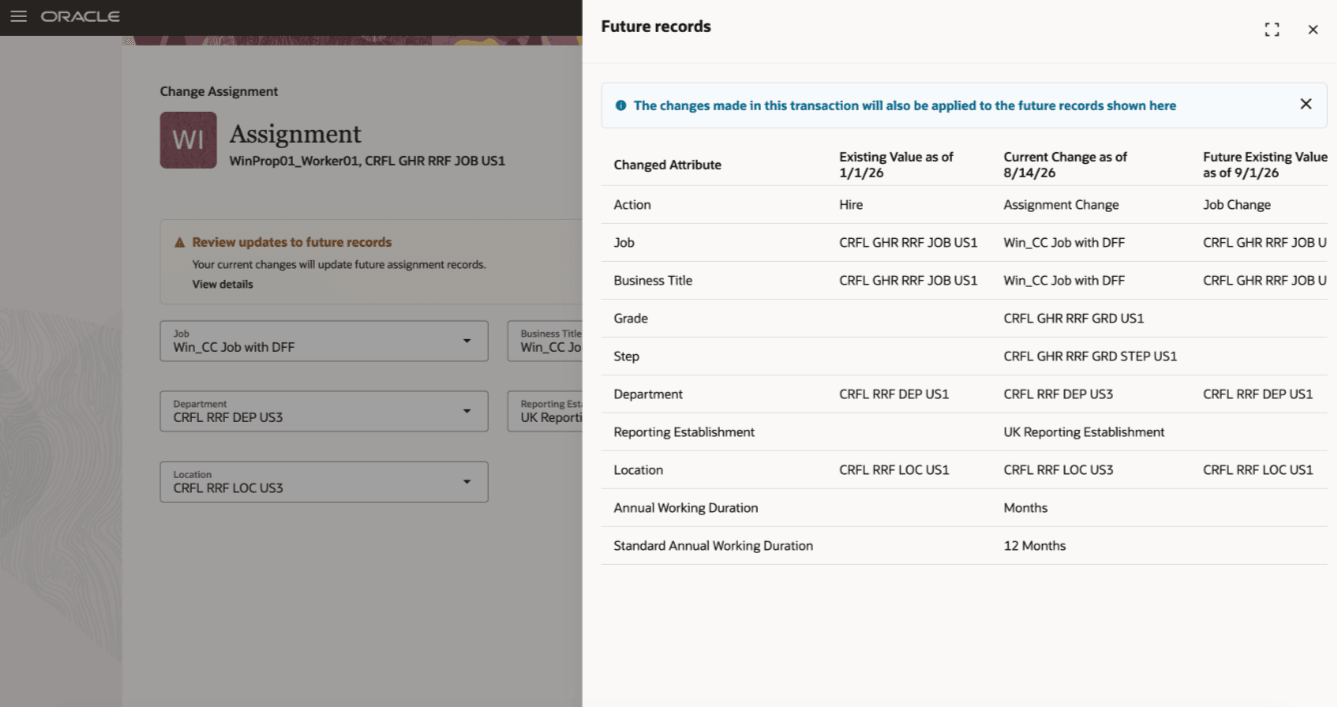
Existing, Current and Future records' are shown in the panel drawer
Only applicable fields are displayed in the panel drawer.
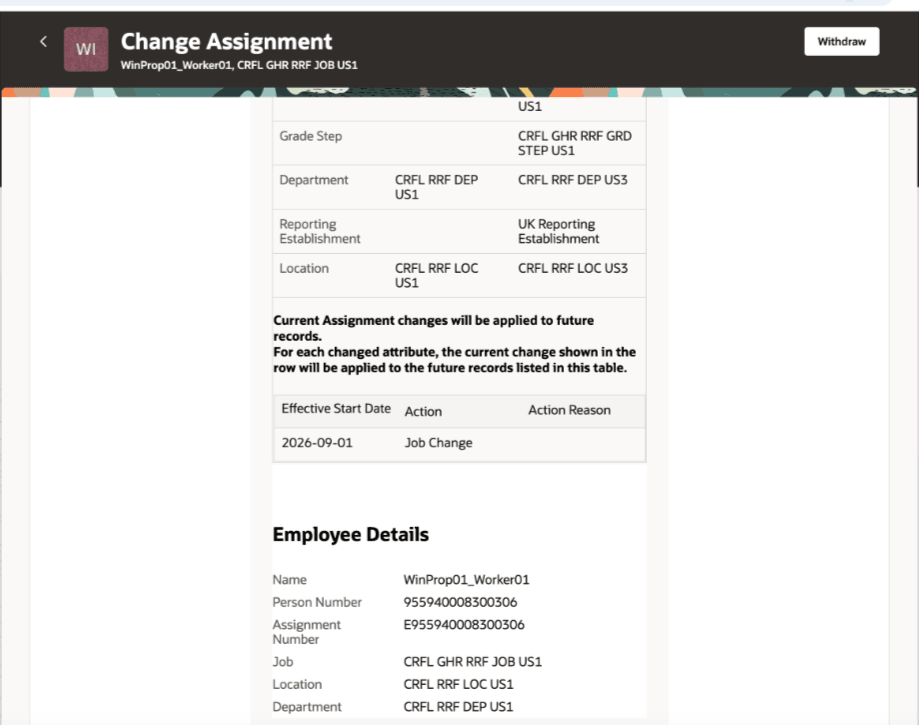
Change Assignment notification
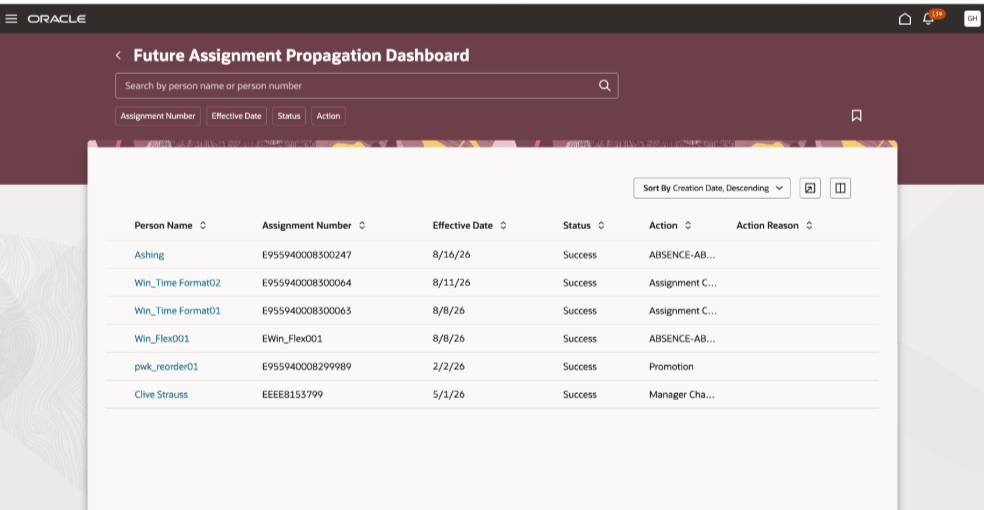
Future Assignment Propagation Dashboard
The Future Assignment Propagation Dashboard is a new quick action under the My Client Groups tab.
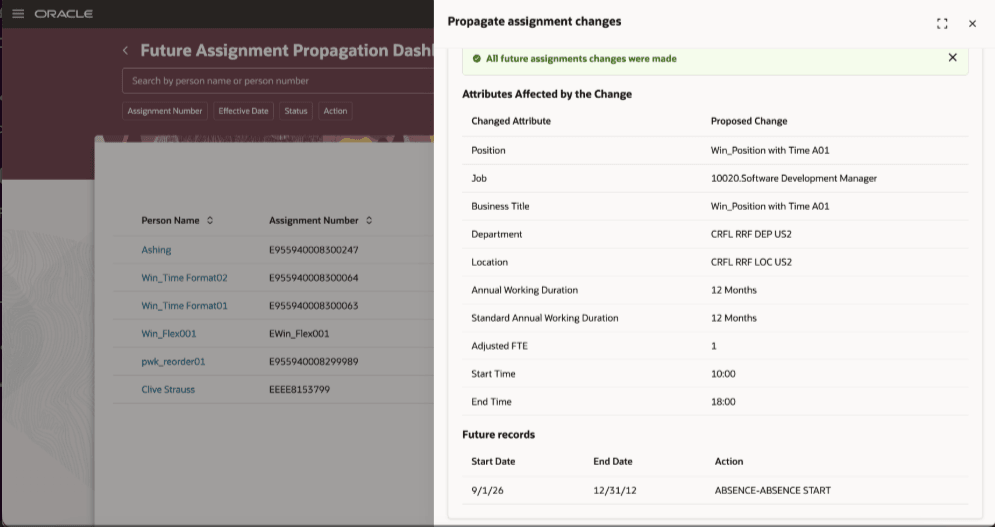
Future records propagation
Exclude Assignment Attributes from Future Propagation
A new lookup, ORA_PER_EMPL_EXCL_FUT_PROP is introduced to add product attributes to the lookup. Use this lookup to prevent selected assignment attributes from being propagated to existing future-dated assignment records. Add the required leading attribute name as a lookup code. The listed attribute, and any related attributes in the same group, are excluded from future propagation.
This table lists the attributes that will be excluded when the lookup code Is enabled. Use the lookup code exactly as shown. The associated attributes are excluded together when the lookup code is included in the lookup.
| Lookup Code (Leading Attribute) | Attributes Excluded from Future Propagation |
|---|---|
| ASSIGNMENT_NUMBER | Assignment Number |
| ASSIGNMENT_NAME | Business Title |
| ASSIGNMENT_STATUS_TYPE_ID | Assignment Status |
| ORGANIZATION_ID | Department |
| JOB_ID | Job |
| LOCATION_ID | Location |
| POSITION_ID | Position |
| GRADE_ID | Grade Step |
| GRADE_LADDER_PGM_ID | Grade Ladder |
| UNION_ID | Union, Bargaining Unit, Collective Agreement |
| LABOUR_UNION_MEMBER_FLAG | Union Member |
| MANAGER_FLAG | Working as a Manager |
| DATE_PROBATION_END | Probation End Date, Probation Period, Probation Unit |
| NORMAL_HOURS | Working Hours, Working Hours Frequency |
| WORK_AT_HOME | Working at Home |
| TIME_NORMAL_FINISH | End Time |
| TIME_NORMAL_START | Start Time |
| NOTICE_PERIOD | Notice Period, Notice Period Units |
| EMPLOYEE_CATEGORY | Worker Category |
| EMPLOYMENT_CATEGORY | Assignment Category |
| ESTABLISHMENT_ID | Reporting Establishment |
| HOURLY_SALARIED_CODE | Hourly or Salaried |
| PROJECTED_ASSIGNMENT_END | Projected End Date |
| EXPENSE_CHECK_ADDRESS | Expense Send to Address |
| INTERNAL_BUILDING | Building |
| INTERNAL_FLOOR | Floor |
| INTERNAL_MAILSTOP | Mail Stop |
| INTERNAL_OFFICE_NUMBER | Office Number |
| BUSINESS_UNIT_ID | Business Unit |
| TAX_ADDRESS_ID | Work Tax Address |
| RETIREMENT_AGE | Retirement Age, Retirement Date |
| POSITION_OVERRIDE_FLAG | Synchronize from Position |
| FULL_PART_TIME | Full Time or Part Time |
| PERMANENT_TEMPORARY_FLAG | Regular or Temporary |
| GSP_ELIGIBILITY_FLAG | Include in Grade Step Progression |
| SENIORITY_BASIS | Basis for Seniority Calculation |
| OVERTIME_PERIOD | Overtime Period |
| STANDARD_HOURS | Assignment Standard Working Hours; Assignment Standard Working Hours Frequency |
| ANNUAL_WORKING_DURATION | Annual Working Duration; Annual Working Duration Units; Standard Annual Working Duration; Annual Working Ratio |
| ADJUSTED_FTE | Adjusted FTE |
| FTE | FTE; Calculate FTE and headcount automatically |
| HEAD_COUNT | Headcount |
Behavior of Propagated Future Changes for Position-Synchronized Assignment Attributes
When a change to an assignment attribute is propagated to future-dated assignment rows, the application carries the changed value forward without validating it against the position value effective on each future date. This behavior also applies when the attribute is configured for position synchronization.
As a result, the propagated value on a future-dated assignment row may temporarily differ from the value on the associated position for that date. The assignment is corrected during the next scheduled run of the Synchronize Person Assignments from Position ESS process.
This feature improves data consistency across date-effective assignment records by automatically carrying eligible historical changes forward to future-dated records. It reduces the need to update each future record manually, lowers administrative effort, and minimizes the risk of future assignment records retaining outdated or inconsistent values.
Steps to enable and configure
You need to set up the following profile option to reflect the past changes in future-dated Redwood assignments
|
Profile Option |
Default Value |
|---|---|
| ORA_PER_EMPL_COPY_ASG_CHG_TO_FUT_REC | N |
To check the profile option, navigate to the Setup and Maintenance work area:
- Search for and click the Manage Administrator Profile Values task.
- Search for and select each of the profile option listed above.
- Select the Level as Site.
- In the Profile Value field, check the value in the above table and set it appropriately. Set the profile value to Y to reflect the past changes in future-dated assignments.
- Click Save and Close.
Tips and considerations
- Attributes including ActionOccurenceID, Action Code, Reason Code, and termination attributes are not displayed in future propagation.
- Copying of future-dated changes won't happen in assignment records that are inactive in the future or any termination records.
- If a transaction includes a change to the Primary flag, none of the changes made in that transaction are propagated to future-dated assignment records.
- Future propagation is supported only when the transaction updates an active and suspended assignment record. Changes made to an inactive assignment record aren’t propagated to future-dated records.
- Changes can be propagated to a maximum of 10 future-dated records for which Effective Latest Change = Y. This flag identifies the latest assignment change for each effective date.
- Changes can be propagated to a maximum of 25 future-dated records in total, including multiple assignment changes made on the same day. This limit includes all records, regardless of the Effective Latest Change value.
- Future assignment propagation section will not be displayed in the post approval notification.
- This feature isn't supported for these flows:
- Correct Employment Details
- Request My Assignment Change
- Promote and Change Position
- Change Manager