Person Data Assistant Workflow Agent Enhancements
The Person Data Assistant AI Agent was introduced in 26C. With 26D, we've added more capabilities to the Person Data Assistant workflow agent.
In this release, the agent supports creating, updating, deleting, and retrieving a user’s own data and data for others for these additional objects. The supported operations vary by object:
- Demographic Info
- Religion
- Biographical Info
- Citizenship
- Passport
- Visa and Permit
- Driver's License
Flexfields aren't supported for create, update, or delete, but you can ask the agent to retrieve the values.
The agent can now handle requests involving multiple people or multiple supported data objects in a single conversation.
In this release, worker search has moved from the Personal Information Assistant (Supervisor agent) into the overall workflow. As a result, requests that identify a worker by name or email are less dependent on Supervisor-agent routing, helping address a limitation of the 26C release.
The Person Data Assistant workflow agent continues to use the Personal Information Assistant (Supervisor agent) to support the following:
- Create and update capabilities that were introduced in 26B for phone and email objects.
- Retrieving data and providing deep links for objects not yet supported for update: addresses, and family and emergency contacts.
For this release, the Person Data Assistant includes the following new workflow-based child agents:
- Person Demographic Data Assistant - Allows users to manage person demographic data.
- Person Religion Data Assistant - Allows users to manage person religion data.
- Person Biographical Data Assistant - Allows users to manage person biographical data.
- Person Citizenship Data Assistant - Allows users to manage person citizenship data.
- Person Passport Data Assistant - Allows users to manage person passport data.
- Person Visa and Permit Data Assistant - Allows users to manage person visa and permit data.
- Person Driver's License Data Assistant - Allows users to manage a person's driver's license data.
Examples
In the following example, let's say you created an AI Agent called Person Data Assistant 26D from the preconfigured template.
The user starts by asking the agent to update the marital status and last name for a person named Taliessen Alderwyn, effective May 1, 2026. The agent responds with a list of names matching the request. In this case, only one record is returned. The agent displays the person number, work email, assignment number, and business title. The agent asks the user to confirm that this is the right person. The user confirms, and then the agent makes the update to the marital status and the last name.
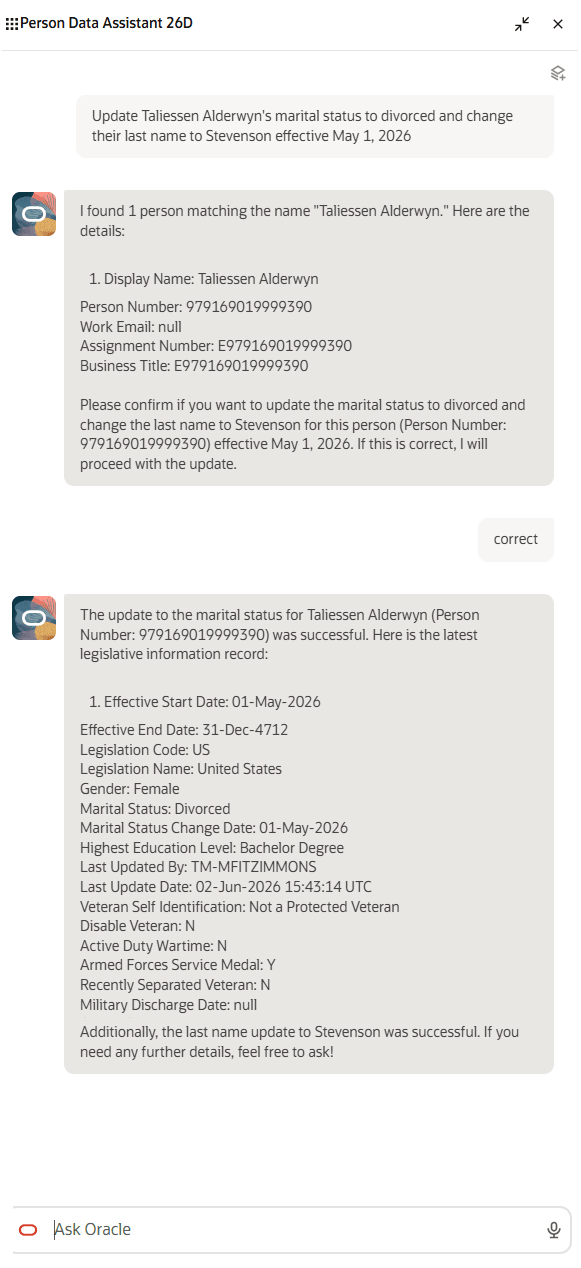
Person Data Assistant AI Agent updates marital status and last name
In this second example, the user asks the agent to add French visas for two people. The user gives the person number for each person and designates that the type of visa is provisional. The agent makes the update and displays the visa information for both people.
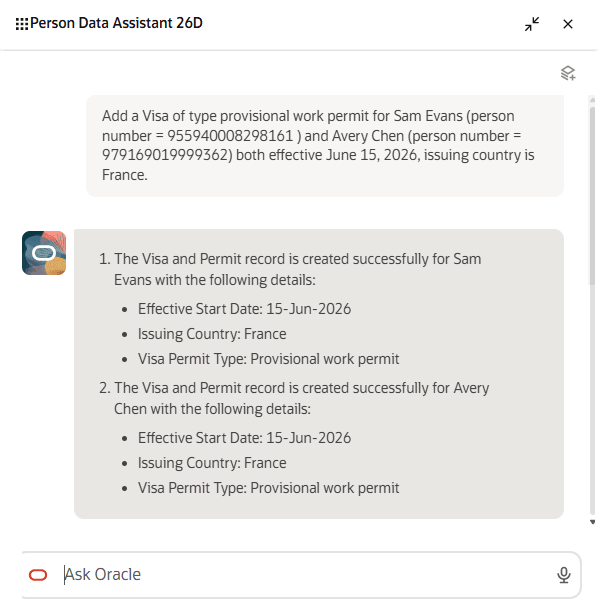
Person Data Assistant AI Agent adds visa for two people
The agent provides enhancements to person data management through a workflow-based approach.
Steps to enable and configure
-
Your environment must have certain necessary configurations. Ask your help desk to contact Oracle Support, who can verify what your environment has and address any gaps. For more information, see FAQ2521 on My Oracle Cloud Support.
-
Set the Enable Security Console External Application Integration (ORA_ASE_SAS_INTEGRATION_ENABLED) profile option to Yes and enable permission groups for the appropriate roles. See Access Requirements for AI Agent Studio.
-
The Person Data Assistant is a preconfigured template. You need to create your own agent using the preconfigured template.
-
To learn how to set up AI agents, see Choose How to Create Workflows and Agentic Applications.
-
Tips and considerations
The Person Data Assistant (Workflow agent) uses child workflow agents to manage supported data areas and invokes the Personal Information Assistant (Supervisor agent) for other capabilities.
- Child workflow agents (supporting create, update, and delete, where supported by the object) added in 26C:
- Person Name Data Assistant (Name)
- Person National Identifier Data Assistant (National Identifiers)
- Person Ethnicity Data Assistant (Ethnicity)
- Child workflow agents (supporting create, update, and delete, where supported by the object) added in 26D:
- Person Demographic Data Assistant (Demographic Info, excluding religion and ethnicity which are separate workflows)
- Person Religion Data Assistant (Religion)
- Person Biographical Data Assistant (Biographical Info)
- Person Citizenship Data Assistant (Citizenship)
- Person Passport Data Assistant (Passport)
- Person Visa and Permit Data Assistant (Visa and permit)
- Delete is not supported for visa and permit in this release
- Person Driver's License Data Assistant (Driver's License)
- Objects handled by child supervisor agent, Personal Information Assistant:
- Create, retrieve, update, and delete supported for:
- Phone
- Retrieve supported for:
- Address
- Family and Emergency Contacts
- Create, retrieve, update, and delete supported for:
Details about worker search
- The agent doesn’t return workers whose hire date is in the future.
- The agent doesn’t support advanced worker-search filtering, such as requests to find workers by location.
Controlling what information the agent can return, create, update, or delete
- What's honored: Role-based data security (RBAC). Users only see the data that their role permits.
- What's not honored:
- Localization rules and your own business rules in Visual Builder Studio aren't enforced by the agent.
- Differences built into the "Me" versus "My Client Groups" versions of the page, such as those which exclude add or edit buttons from page sections.
- Examples
- Date of Birth: You may have added a business rule to hide it for the employee role, but the agent may return it if RBAC allows access.
- Demographic Info: The "Me" version of the Personal Details page doesn't include an add button. But the security privileges allow the employee role to add demographic info records, so the agent will do so as well.
- Biographical Info: The "Me" version of the Personal Details page doesn't include an edit button. But the security privileges allow the employee role to update biographical info, so the agent will do so as well.
- Options to prevent unwanted fields from appearing
- Prompt guardrails: Update the prompt or topic to include: "Don't display [fields]. If asked, say it's restricted."
- Scope data: Create a custom agent that excludes the business object or use a trimmed-down version of the business object without restricted attributes.
Date logic
- For viewing or editing a user's own data, the agent uses session date as the effective date, even if another date is provided. The user can update only current and future records, not historical records.
- For viewing and editing another person's data, an effective date can be specified. If omitted, the agent uses the session date as the effective date. The user can update records that are current or future relative to the specified effective date.
Object details
-
Demographic Info
- The “Me” Personal Details page hides the Add action, but the agent allows the employee to add a new demographic record.
- When marital status is changed, the agent enforces that the effective date of the change is the same as the marital status change date. This is also how it's handled in the Personal Details page.
-
Religion
-
The agent doesn’t allow users to view, create, update, or delete religion information for these legislations: Argentina, Australia, Belgium, Bulgaria, Brazil, Canada, Chile, Colombia, Cyprus, Germany, Denmark, Estonia, Spain, Finland, France, Greece, Hong Kong, Hungary, Israel, Italy, Japan, South Korea, Kazakhstan, Lithuania, Luxembourg, Latvia, Mexico, Netherlands, Norway, New Zealand, Poland, Portugal, Russia, Sweden, Slovakia, Taiwan, Ukraine, and United States. This special logic was included to match the seeded business rule in VB Studio.
-
-
Biographical Info
- Just like in the Personal Details page, the agent can only update the biographical information. It can't create or delete biographical info.
- The “Me” Personal Details page hides the Edit action, but the agent allows the employee to update their own biographical fields.
-
Citizenship, Passport, Visa and Permit, and Driver's License
- For visa and permit records, Pending can be a record status as well as a way users describe transactions awaiting approval. To avoid ambiguity, specify whether you mean the visa/permit status or a transaction pending approval.
-
Ethnicity (change in 26D)
- 26C:The Personal Details page includes business rules which allow you to hide the ethnicity fields for certain countries. The agent allows viewing, creating, updating, and deleting for all countries.
- 26D: The agent doesn’t allow users to view, create, update, or delete ethnicity information for these legislations: Austria, Belgium, Bulgaria, Canada, Chile, Cyprus, Germany, Denmark, Estonia, Spain, Finland, France, Greece, Hong Kong, Hungary, Israel, India, Italy, Japan, South Korea, Kazakhstan, Liechtenstein, Lithuania, Luxembourg, Latvia, Mexico, Netherlands, Norway, Poland, Portugal, Russia, Sweden, Slovakia, Taiwan, and Ukraine. This special logic was included to match the seeded business rule in VB Studio.
Approvals
- When approvals are enabled, changes are routed for approval and take effect only after approval.
- When updates are pending approval:
- The agent won’t allow a new change. Person data pages (for example, Personal Details, Identification Info, Contact Info) support edit-by-initiator, but the agent doesn't; instead, it provides a deep link to modify the in-flight transaction in the UI.
- When retrieving data from the Demographic Info, Biographical Info, Email, Phone, Name, National Identifier, Ethnicity, Religion, Citizenship, Visa and Permit, Driver's License, and Passport objects, the agent will retrieve values that are pending approval and identifies them as pending. For other objects, pending values aren't returned.
- Comments and attachments aren't supported via the agent for approval-enabled updates. If needed, ask the agent for the page link and add them in the application.
- Approval notifications aren't viewable from the agent.
Key resources
Access requirements
The agents you can view depend on the roles and privileges assigned to you. To access this agent, your role must be explicitly granted access to it by an AI Studio Administrator.
See How can I give users access to AI agents, and Access Requirements for AI Agent Studio.
The seeded Human Resource Specialist role includes the duty role required to use the Person Data Assistant. To grant access to users with other roles such as Employee, Line Manager, or a custom Human Resource Specialist role, add this duty role to the applicable role:
- Person Data Assistant Access Duty (ORA_PER_PERSON_DATA_ASSISTANT_ACCESS_DUTY)
To add the duty role, edit the target role and go to the Role Hierarchy page. On the Roles and Permission Groups tab, add the Person Data Assistant Access Duty role to the role hierarchy, then save your changes.
For line managers or custom roles, the role must also include Use REST Service - Worker Searches V2. To add this privilege, edit the target role and go to the Role Hierarchy page. On the Roles and Privileges tab, add Use REST Service - Worker Searches V2 to the role hierarchy, then save your changes.