Personal Information Assistant AI Agent Can Now Edit Demographic, Biographical, Phone, and Email Information
The Personal Information Assistant now not only retrieves but can also create, update, and delete selected personal information directly in the chat experience. Allowed operations are subject to role-based access control (RBAC) and your configured approval rules.
- Objects supported: Demographic Info (excluding Religion and Ethnicity), Biographical Info, Email, and Phone.
- Attributes supported: All attributes except flexfields.
The agent continues to support viewing a user’s own data and data for others, searching by person number, display name, or email, and providing deep links to view or update pages when needed. For details about those features, review View Employee Personal Information with AI Assistance: Enhancements for 26A.
When creating or updating fields supported by an LOV, the agent ensures valid values and can respond with a list of choices if prompted to do so.
Example
In the following example, let's say you created an AI Agent called Personal Information Assistant 26B from the preconfigured template. In this example, approvals are enabled for updates to personal information.
The user starts by asking to update their own marital status. The agent responds with the list of choices and asks for the change date. The user responds "Divorced, as of 1/2/26". The agent submits the change and replies that it's been updated and is pending approval.
Next, the user asks to update the phone number for a different person, identified by first name and email. The user also gives the new area code and phone number in the request. The agent searches by email, finds the matching person, and updates the phone number. The agent responds that the change is pending approval.
And finally, the user asks the agent to update the birth date for a person named Shannon Trillo. The agent searches by name and finds a few results, so it returns a list and asks the user to choose. The user responds with "1" to indicate the first person on the list. There's already a pending update, so the agent can't edit the pending transaction. However, the user can edit the pending transaction in the UI. The agent provides a link to the Personal Details page where the user can make that change.
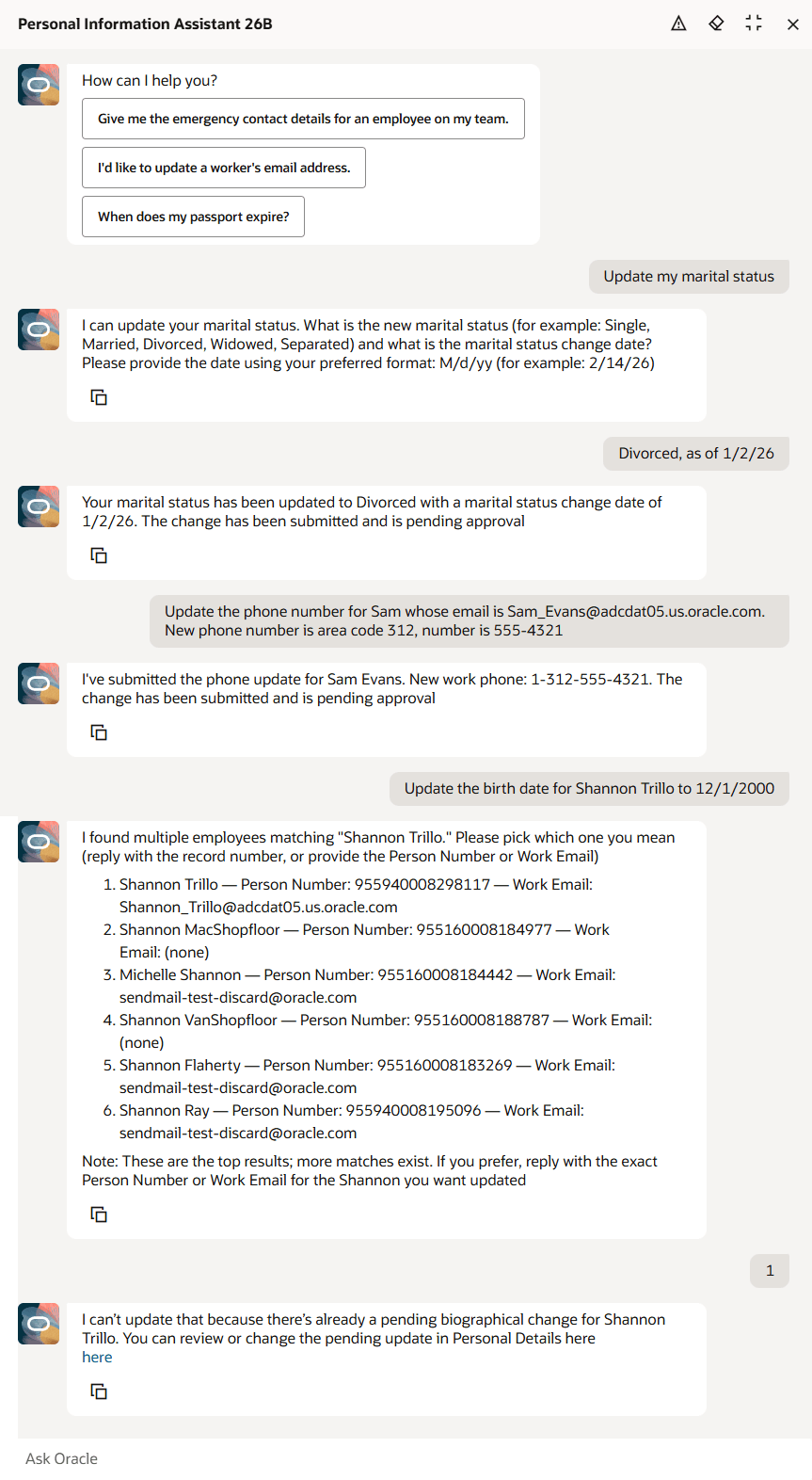
Personal Information Assistant AI Agent
Business benefit: Productivity and accuracy are improved as the agent handles simple changes in chat and routes updates to approval flows when required.
Steps to enable and configure
- Your environment must have certain necessary configurations. Ask your help desk to contact Oracle Support, who can verify what your environment has and address any gaps. For more information, see FAQ2521 on My Oracle Cloud Support.
- Set the Enable Security Console External Application Integration (ORA_ASE_SAS_INTEGRATION_ENABLED) profile option to Yes and enable permission groups for the appropriate roles. See Access Requirements for AI Agent Studio.
- The Personal Information Assistant is a preconfigured template. You need to create your own agent using the preconfigured template.
- To learn how to set up AI agents, see Create AI Agents Using Preconfigured Agent Team Templates.
Tips and considerations
Controlling what information the agent can return, create, update, or delete
- What's honored: Role-based data security (RBAC). Users only see the data that their role permits.
- What's not honored:
- Localization rules and your own business rules in Visual Builder Studio aren't enforced by the agent.
- Differences built into the "Me" versus "My Client Groups" versions of the page, such as those which exclude add or edit buttons from page sections.
- Examples
- Religion: Built-in templates hide it in some countries, but the agent can still return the value.
- Date of Birth: You may have added a business rule to hide it for the employee role, but the agent may return it if RBAC allows access.
- Demographic Info: The "Me" version of the Personal Details page doesn't include an add button. But the security privileges allow the employee role to add demographic info records, so the agent will do so as well.
- Biographical Info: The "Me" version of the Personal Details page doesn't include an edit button. But the security privileges allow the employee role to update biographical info, so the agent will do so as well.
- Options to prevent unwanted fields from appearing
- Prompt guardrails: Update the prompt or topic to include: "Don't display [fields]. If asked, say it's restricted."
- Scope data: Create a custom agent that excludes the business object or use a trimmed-down version of the business object without restricted attributes.
Date logic
- For viewing or editing a user's own data, the agent uses session date as the effective date, even if another date is provided. The user can update only current and future records, not historical records.
- For viewing and editing another person's data, an effective date can be specified. If omitted, the agent uses the session date as the effective date. The user can update records that are current or future relative to the specified effective date.
Object details
-
Demographic Info (excluding Religion and Ethnicity)
- Even though the Religion and Ethnicity attributes are displayed in the Demographic Info section of the Personal Details page, they're separate objects which aren't yet supported for updates in the agent.
- The “Me” Personal Details page hides the Add action, but the agent allows the employee to add a new demographic record.
- When marital status is changed, the agent enforces that the effective date of the change is the same as the marital status change date. This is also how it's handled in the Personal Details page.
-
Biographical Info
- Just like in the Personal Details page, the agent can only update the biographical information. It can't create or delete biographical info.
- The “Me” Personal Details page hides the Edit action, but the agent allows the employee to update their own biographical fields.
- The agent enforces that the first email created must be primary, and that the primary email can't be deleted unless it's the only one.
Phone
- The agent enforces that the first phone created must be primary, and that the primary phone can't be deleted unless it's the only one.
- The agent will use the profile option ORA_PER_PHONE_COUNTRY_DEFAULTED_FROM_SERVICE_PERIOD (if set to Y) to default the country when adding a new phone record. The user can specify a different country if needed.
Approvals
- When approvals are enabled, changes are routed for approval and take effect only after approval.
- When updates are pending approval:
- The agent won’t allow a new change. Person data pages (for example, Personal Details, Identification Info, Contact Info) support edit-by-initiator, but the agent doesn't; instead, it provides a deep link to modify the in-flight transaction in the UI.
- When retrieving data from the Demographic Info, Biographical Info, Email, and Phone the agent will retrieve values that are pending approval and identifies them as pending. For other objects (including Religion and Ethnicity), pending values aren't returned.
- Comments and attachments aren't supported via the agent for approval-enabled updates. If needed, ask the agent for the page link and add them in the application.
- Approval notifications aren't viewable from the agent.
Use of Agent template in 26A versus 26B
- Create, update, and delete weren't supported in 26A for any object. In 26B, there's support for a limited set of objects.
- Topics were added for each object that supports updates.
- The topics give instructions to the agent about permitted operations, and how to use the tools and functions.
- New Tools
- Personal Information business object tool includes functions that handle the create, update, and delete of supported data.
- Personal Information Lookups and Profile Options business object tool includes functions that retrieve common lookup values, extended lookup values, and profile option values used by the agent.
Key resources
Access requirements
The agents you can view depend on the roles and privileges assigned to you. To access this agent, your role must be explicitly granted access to it by an AI Studio Administrator. See How can I give users access to AI agents, and Access Requirements for AI Agent Studio.