Retain Transaction Changes On Changing the Effective Date in Redwood Employment Processes
When you change the effective date of an in-progress transaction in a supported Redwood employment flow, the application retains your changes, rebuilds the transaction for the new effective date, reapplies the changes, and validates them. The retained changes include values that you enter directly and values that are updated through dependent logic, defaulting, or derivation.. For example, when you change the department and the application automatically changes the location, both the department and location changes are retained when you change the effective date.
This enhancement is available in these Redwood employment flows:
- Add Assignment
- Change Assignment
- Change Location
- Change Worker Type
- Change Working Hours
- Convert Pending Worker
- Create Work Relationship
- Local & Global Transfer
- Promote
- Transfer
When you change the effective date, the application:
- Captures the current transaction changes.
- Determines the date-effective records applicable to the new date.
- Verifies that the new effective date is within the supported date range.
- Rebuilds the transaction context for the new date.
- Reapplies the changed values.
- Re-evaluates dependent, defaulted, and derived values.
- Validates the retained values.
- Displays applicable warning or error messages.
When the new effective date is outside the valid date range, the application resets the transaction values based on the recalculated date-effective context. All retained values are validated for the new effective date. An invalid value can be raised with a warning or error, or reverted to a valid contextual value, depending on the applicable validation rule. An error will prevent you from submitting the transaction
.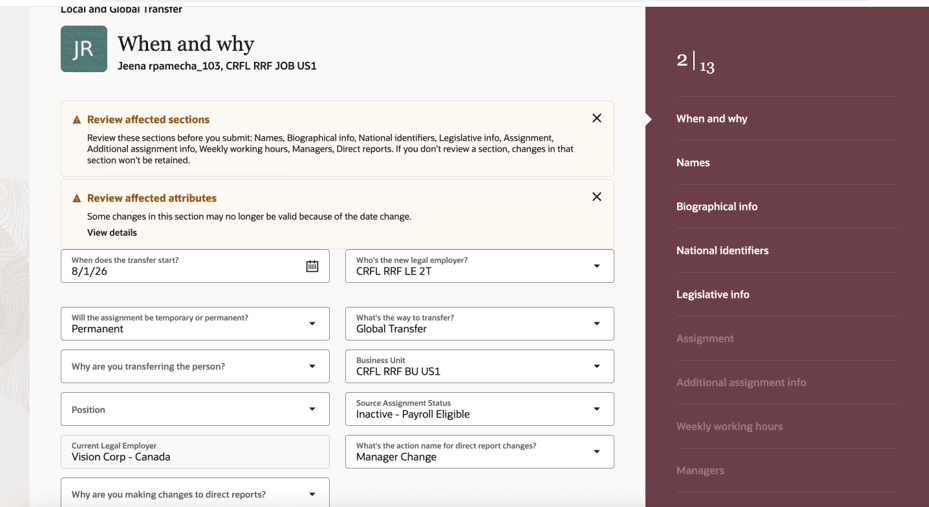
Date-Effective Validation of Transaction Values
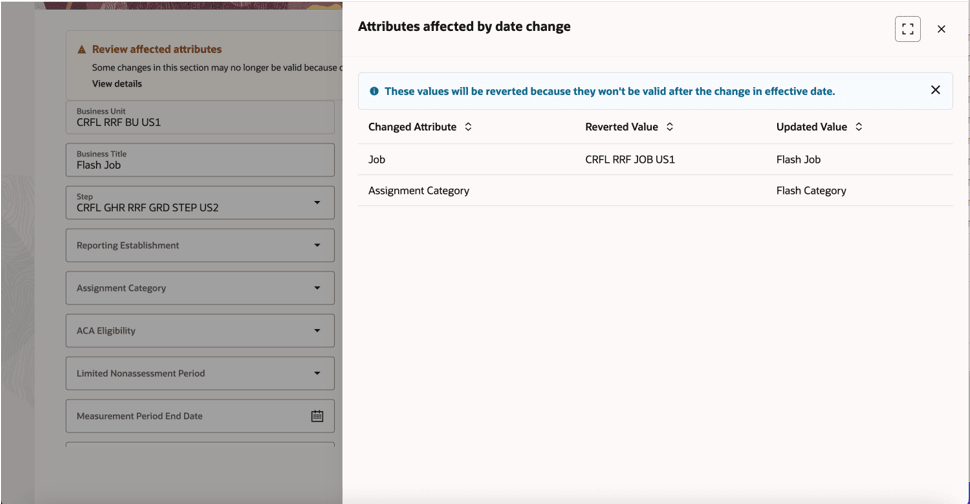
Invalid Attributes Reverted After a Date Change
Updated Value is the value entered by the user before date change. Reverted Value is the valid contextual value restored by the application when the user-entered value is no longer valid for the new effective date.
The same retention and validation behavior applies when an approver changes the effective date during the approval process.
Note: You need to enable the ORA_PER_EMP_RETAIN_CHANGES profile option.
This feature protects users from losing in-progress transaction changes when they adjust the effective date in Redwood Employment flows. Instead of forcing the user to re-enter data, the application preserves the transaction changes, rebuilds the correct date-effective context, reapplies those changes, and validates them against the new date.
Steps to enable and configure
By default, the profile option is set to N which means your changes won’t be retained. To retain your changes, you need to set this profile option to Y.
| Field | Value |
|---|---|
| Profile Option Code | ORA_PER_EMP_RETAIN_CHANGES |
To enable the profile option (set it to Y), navigate to the Setup and Maintenance work area:
- Search for and click the Manage Administrator Profile Values task.
- Search for the ORA_PER_EMP_RETAIN_CHANGES profile option code and select the profile option in the search results.
- In the Profile Values area, enter Y in the Profile Value field.
- Click Save and Close.
Tips and considerations
- After changing the effective date in the When and Why section, you must revisit all sections before submitting the transaction for their changes to be retained. If you change the date and submit the transaction after visiting only the Assignment section, only the changes made in the Assignment and Line Manager change in Manager sections are retained. Changes made in other sections are lost unless those sections are revisited after the date change.
Key resources
For more info, refer to the following resource on the Oracle Help Center;
-
Mass Updates in the Using Global Human Resources guide