Upgraded My Learning Assistant
My Learning Assistant now helps you complete common learning tasks from a single conversational experience. Depending on what you need, you can:
Get answers about your learning
-
Ask questions about active, overdue, due soon, required, self-enrolled, and completed learning.
Discover relevant learning
-
Get recommendations from the learning catalog when you ask for learning or when no matching assignment is found.
-
Review recommendation cards with the title, format, expected effort, price (when available), summary, AI reason, and a Catalog Details link.
Enroll in learning
-
Start enrollment from recommended learning when enrollment conditions allow.
-
Select from available offerings when an offering selection is required.
-
Confirm successful enrollment with an enrollment details link.
-
Learn why automatic enrollment isn't available and use the catalog details link when appropriate.
Access additional learning tasks
-
Open Record External Learning and Request Noncatalog Learning directly from the conversation.
-
Get redirected to supported learning topics when your request is outside the assistant's supported capabilities.
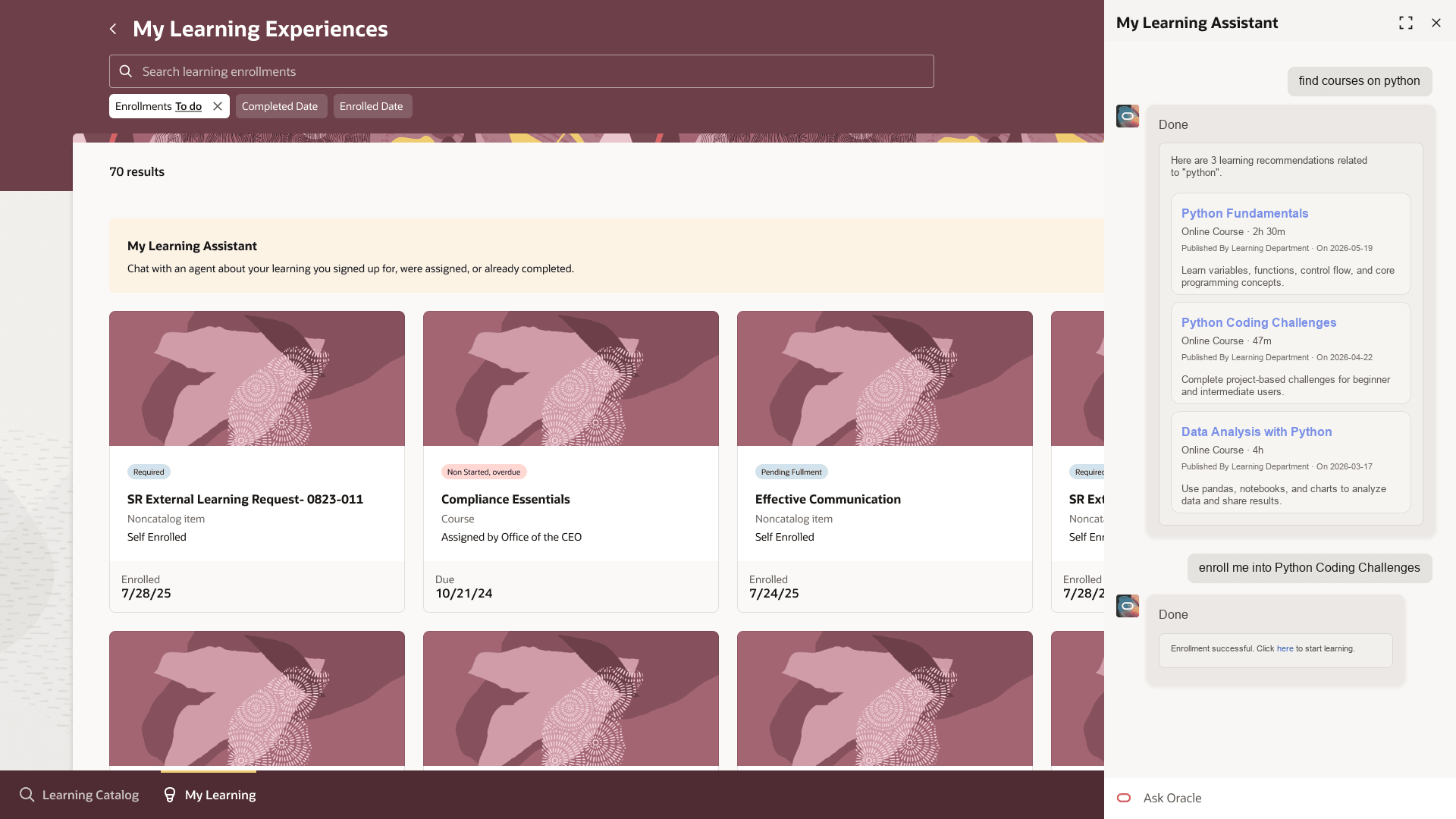
My Learning Assistant Chat Interface with New Card Layout
Business benefit: Help learners find information, discover relevant learning, and enroll more efficiently from a single conversational experience. Grounding responses in workflow and API data improves the accuracy and reliability of AI-assisted learning support.
Steps to enable and configure
If you've already deployed My Learning Assistant using the release 25D template, replace it with this updated delivered version. You may also need to update any guided journey used to deploy the assistant through the Ask Oracle banner message in Redwood.
- Create a guided journey with the AI agent as a task.
- Add the AI agent to Redwood pages using the guided journey from step 1. We suggest adding the agent on the Me > Learning and Development > Learning Catalog page
Tips and considerations
- Broad learning queries return approximately the first 10 assignments, ordered by the due date closest to today.
- By default, query results include active assignments from the last year and exclude future-dated assignments unless you ask for a different status.
- If you ask a question outside the assistant's supported capabilities, it redirects you to supported learning topics.
- Responses are based on workflow and API data. When matching information isn't available, the assistant doesn't generate placeholder or fabricated results.
Key resources
- Learning Assignment Administration
- Related what's new: Ask Oracle: Your Learning Assistant
Access requirements
To interact with My Tutor, learners need the ORA_WLF_LEARNING_COMMON duty role.