Designate Employee Events as Private
Event owners can create private employee events that are visible only to selected employees based on promotion or invitation.
To make an event private, select Private for the Event Visibility field when creating an event.
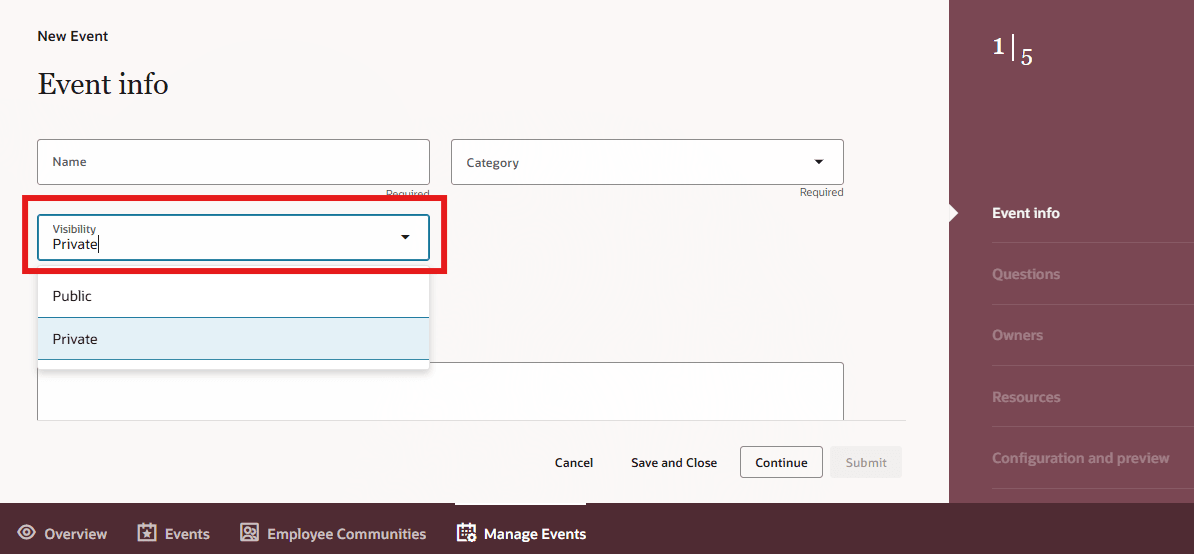
Visibility field private selected in event info
Business benefit: This enhancement improves attendance management by restricting participation to selected employees, ensuring security. It also increases engagement on the communication hub by simplifying event discovery for invited employees, and provides efficient loading and visibility filtering.
Steps to enable and configure
You don't need to do anything to enable this feature.
Access requirements
To see the Manage Events tab, users need the Manage Employee Event (IRC_MANAGE_EMPLOYEE_EVENT_PRIV) privilege.