Separate Event Audience and Promotions
Creating a private event now contains an Audience step in the workflow. This allows you to manage event audiences separately from the messages you send to promote them. Because event audience and promotion are now handled separately according to the type of employee event you create, the difference between public and private events is clearer and keeps event visibility separate from email promotion. This helps teams reach the right employees and clearly track invitations, promotions and registrations.
When creating a private event you define the event audience as part of the creation flow.
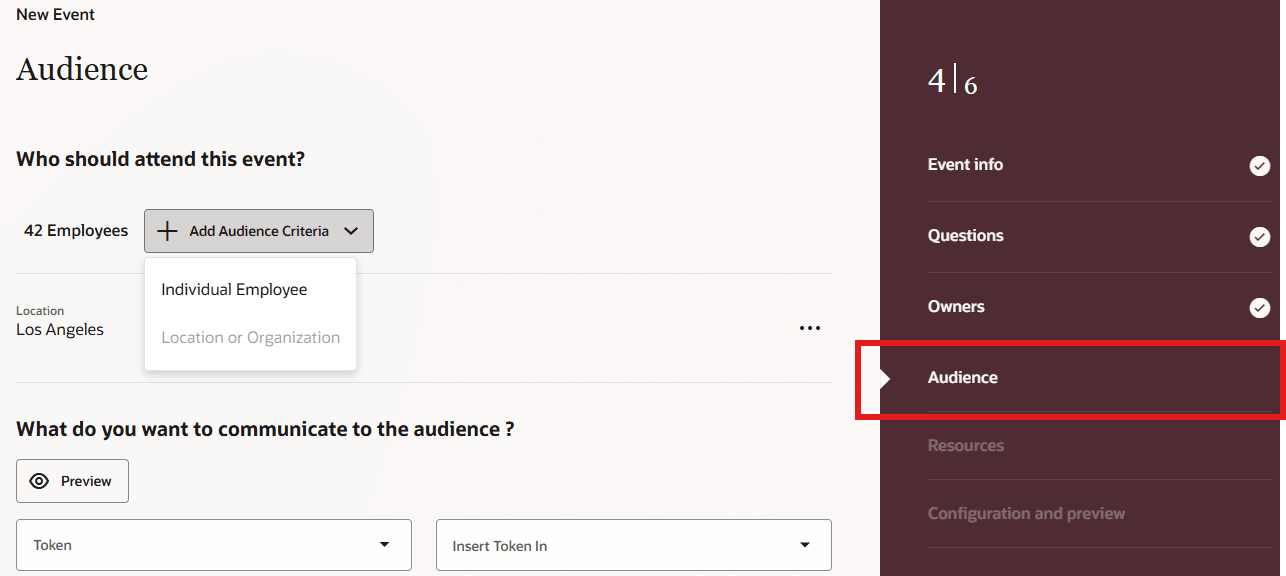
Audience step in private event creation workflow
Business benefit: By separating who an event is intended for from how it’s promoted, organizations can reach the right employees, improve event visibility, and manage communications more consistently across public and private events.
Steps to enable and configure
You don't need to do anything to enable this feature.
Tips and considerations
- Public event creation doesn't include the Audience step shown for private events.
- Sending a promotion message is separate from defining the event audience.
- An event can remain discoverable in the Events tab regardless of whether a promotion email is sent.
Access requirements
Users need the Send Messages Using Communicate (IRC_SEND_MESSAGES_USING_COMMUNICATE_PRIV) privilege.