Access Your Employee Communities on the Employee Communities, Communications, and Events Hub
The Overview tab on the Employee Communities, Communications, and Events Hub now includes employee community content so employees can review communities, posts, and events from in one place. The new Your communities section displays the communities an employee is a member of and they can open them directly, without navigating to the Employee Communities tab.
Communities where the employee is an owner are clearly identified, and owners and co-owners can see draft communities. If an employee isn't part of any community, they can navigate to Employee Communities tab from this section.
The Highlights carousel can show pinned community posts and team posts. Pinned community posts remain in the carousel for two weeks or until the employee views the post, whichever comes first. Community posts and team posts have the highest priority in the carousel. Employees can open team and Communicate posts in a separate panel similar to emails.
The upcoming events section now appears as a separate section above communities. It shows upcoming promoted and community events for communities the employee belongs to, ordered by earliest start date. Employees can navigate to the Events tab from the upcoming events section.
An indicator appears next to a community when it has activity the employee hasn’t viewed. This makes it easier for them to see where new conversations or updates are waiting and decide which community to visit next.
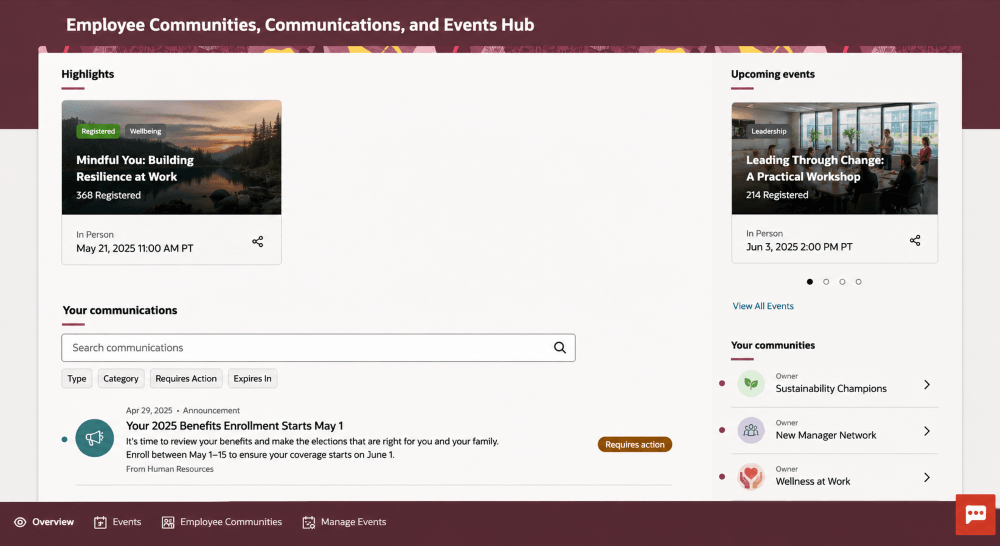
Employee Communities, Communications, and Events Hub showing highlights, upcoming events, communications, and the Your communities section
Business benefit: This update gives employees one convenient place to keep up with communications, events, and community activity. By highlighting communities with unseen activity and providing direct access from the Overview tab, employees can find relevant updates more quickly and stay connected with the communities they participate in.
Steps to enable and configure
You don't need to do anything to enable this feature.
Tips and considerations
- An indicator identifies those communities with activity employee that the hasn’t viewed yet. The indicator clears once the employee visits the community
- If someone deletes a draft community, it no longer appears on the Overview tabs of the owner or co-owner
- If an employee leaves a community or is removed from it, the community no longer appears on the employee’s Overview tab
- If someone deactivates a community, it remains on the owner’s Overview tab but is removed from the Overview tabs of co-owners and members
- A pinned community post no longer appears in Highlights after the employee views it, or if someone unpins or deletes the post
- Upcoming community events are removed from the upcoming events section when the event is canceled, the last registration date has passed, max capacity is reached, or the employee registers for the event
Access requirements
Community and event visibility is based on the employee's community relationship. Employees can see communities and community events for communities they belong to. Owners and co-owners can also see draft communities.