Customize and Improve the Candidate Application Experience
Organizations can tailor the candidate application flow more deeply across branded career sites. These enhancements add theme configuration options and improve the application flow experience across standard and Express Apply flows, talent community and candidate self-service flows, events flows, and related authentication and information pages.
Use this feature to:
- Configure application flow background styling with a background image, default image fallback, or solid color.
- Apply consistent background styling across flow pages, including authentication pages, PIN challenge, application forms, candidate self-service profile pages, talent community pages, events pages, and information pages.
- Improve spacing, font sizes, validation message styling, field height, hover states, and expanded profile-section spacing across application flow pages.
- Improve accessibility and navigation by preserving keyboard focus after pill add, edit, cancel, and delete actions, and by adding mobile and tablet navigation that lets candidates understand their current position and move between application blocks.
Business benefit: These enhancements give you greater flexibility to customize the candidate application experience, so it better reflects your organization's brand and integrates more naturally with your career site. The additional user experience improvements also create a smoother, more intuitive application process, helping improve the overall candidate experience.
Steps to enable and configure
While no steps are required to enable this feature, you can optionally configure background styling for the application flow.
- Use a background image URL when an image-based experience is preferred.
- Leave the image URL empty to use the default background image.
- Use a solid color when an image isn't required.
- Test the updated application flow across desktop, tablet, and mobile devices.
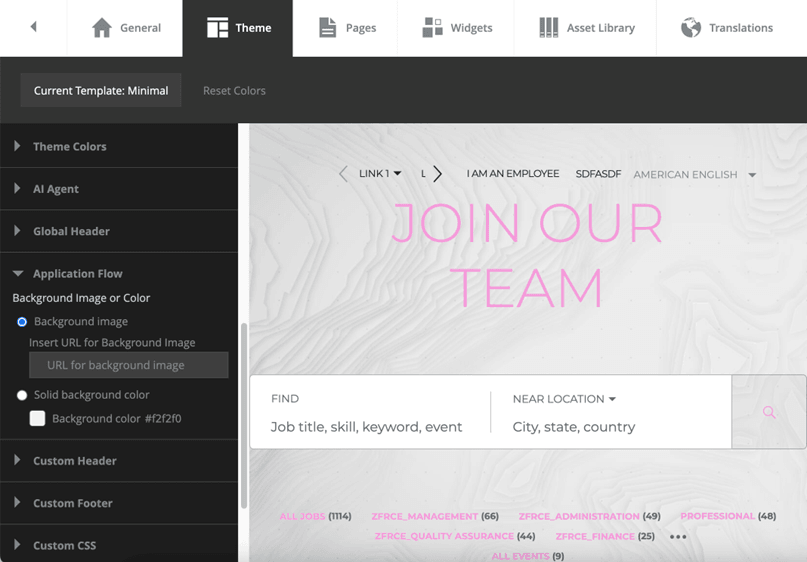
Background styling
Tips and considerations
- Review your existing application flow theme configuration after upgrading to determine whether the new customization options better support your organization's branding standards.
- Consider testing your updated application flow to ensure the candidate experience is consistent with the rest of your career site.
Access requirements
Users must have the appropriate privileges to configure Oracle Fusion Recruiting candidate experience settings and application flow configuration.