Control Delayed Candidate Notifications in Selection Processes
Recruiting administrators can configure delayed candidate notifications to be canceled when a job application's phase or state changes before the delay expires. This helps prevent candidates from receiving notifications, such as delayed rejection emails, that no longer apply.
Administrators can use this feature to:
- Prevent delayed candidate notifications from being sent after a job application's phase or state changes.
- Apply the control only when a delivery delay is configured.
- Use the control for candidate notifications (doesn’t apply to agent notifications)
Try it out
- Configure a delayed candidate notification in a Send Notification automated action.
- Move a job application to the phase and state that triggers the notification.
- Change the job application's phase or state before the delay expires. If the control is selected, the delayed notification isn't sent.
Business benefit: Keep candidate communications accurate and relevant by automatically canceling delayed notifications when a job application's phase or state changes before they're sent.
Steps to enable and configure
- Go to Setup and Maintenance > Recruiting and Candidate Experience > Candidate Job Applications > Candidate Selection Process Configuration.
- In the relevant selection process, configure a candidate notification with a delivery delay.
- Select Don't send if job application moves before the delay expires to stop a notification from being sent if the job application's phase or state changes during the delay period.
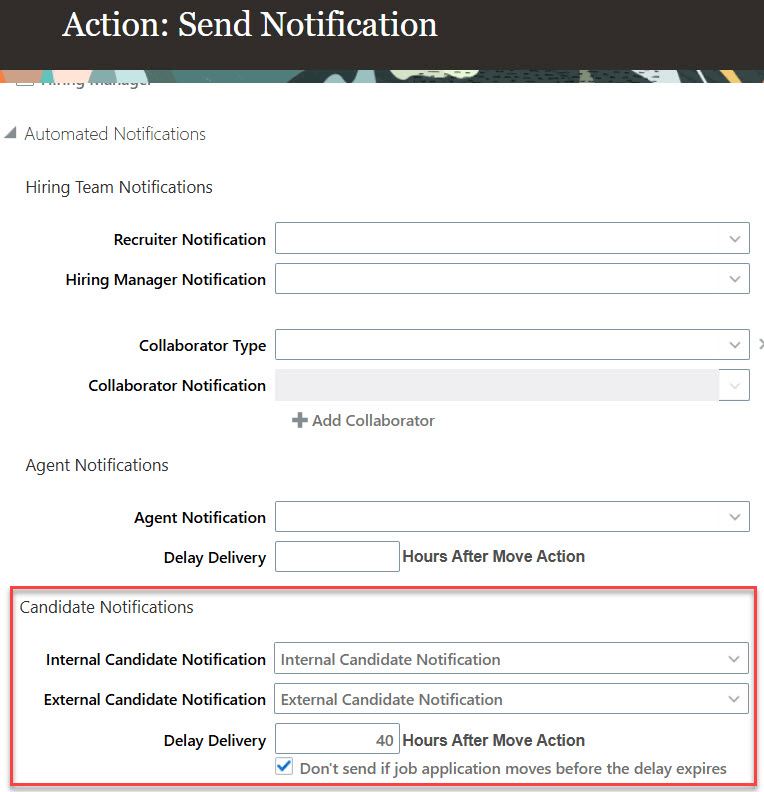
The Send Notification action shows the delayed candidate notification setting